
Numpy & Scipy - 1.3 Basic Manipulation of Matrices (1)

Numpy & Scipy - 1.3 Basic Manipulation of Matrices (1)
Numpy & Scipy Series (3 / 9)
- Numpy & Scipy - 1.1 Notation of Matrix and Vector, Matrix Input and Output
- Numpy & Scipy - 1.2 Convenient Functions of Matrix
- Numpy & Scipy - 1.3 Basic Manipulation of Matrices (1)
- Numpy & Scipy - 1.4 Basic Manipulation of Matrices (2)
- Numpy & Scipy - 1.5 Basic Manipulation of Matrices (3)
- Numpy & Scipy - 1.6 The Solution of Matrix Equation (General Matrices)
- Numpy & Scipy - 1.7 The Solution of Band Matrix
- Numpy & Scipy - 1.8 The Solution of Toeplitz Matrix and Circulant Matrix And How to Solve AX=B
- Numpy & Scipy - 1.9 Calculate Eigenvector and Eigenvalue of Matrix

copy (deep copy)
np.copy: Deep copy, allocates new memory space by referencing.
reshape (swallow copy)
np.reshape(matrix, number or shape): Changes the input matrix into the desired 1D vector or 2D matrix shape and performs a shallow copy.- Here,
shapeis a tuple type. e.g.,(2,3)means a 2x3 matrix. - If you input a single number, it becomes a 1D vector like
(3,).
[1, 2.5, 3, -1, -2, -1.5] [[1, 2.5] [3, -1] [-2, -1.5]]
tril / triu
np.tril(matrix, band_id): Deep copies the lower part includingband_id. Lower triangular matrix.band_idcan be omitted as a default parameter.
1
2
3
4
5
a = np.array([[1,2,3], [4,5,6], [7,8,9]], dtype=np.float64)

b = np.tril(a)

prt(b, "%0.2f", delimiter=" , ")
1
2
3
 1.00 ,  0.00 ,  0.00
 4.00 ,  5.00 ,  0.00
 7.00 ,  8.00 ,  9.00
np.triu(matrix, band_id): Deep copies the upper part includingband_id. Upper triangular matrix.
1
2
3
4
5
a = np.array([[1,2,3], [4,5,6], [7,8,9]], dtype=np.float64)

b = np.triu(a)

prt(b, "%0.2f", delimiter=" , ")
1
2
3
 1.00 ,  2.00 ,  3.00
 0.00 ,  5.00 ,  6.00
 0.00 ,  0.00 ,  9.00
diag
np.diag(matrix, k=band_id): Function to extract a specific band and create a 1D array (vector) via shallow copy.
1
2
3
4
5
6
7
8
a = np.array([[1,2,3], [4,5,6], [7,8,9]], dtype=np.float64)

b = np.diag(a, k=1)

prt(b, "%0.2f", delimiter=" , ")

b[0] = 0.0 # Error occurs because it is readonly
1
 2.00 ,  6.00
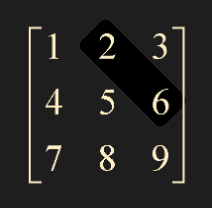
np.diag behavior changes with input
- If you input a 1D array into
matrixinnp.diag(matrix, k=band_id), it returns a deep copied square matrix.
1
2
3
4
5
6
7
c = np.array([1,2,3,4] , dtype=np.float64) # When a 1D array is input

d = np.diag(c, k=-1) # It is a deep copy.

c[0] = 0.0

prt(d, "%0.2f", delimiter=" , ")
1
2
3
4
5
 0.00 ,  0.00 ,  0.00 ,  0.00 ,  0.00
 1.00 ,  0.00 ,  0.00 ,  0.00 ,  0.00
 0.00 ,  2.00 ,  0.00 ,  0.00 ,  0.00
 0.00 ,  0.00 ,  3.00 ,  0.00 ,  0.00
 0.00 ,  0.00 ,  0.00 ,  4.00 ,  0.00
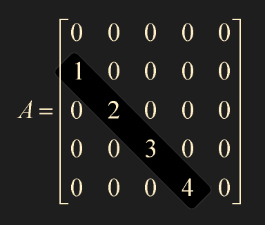
diagflat
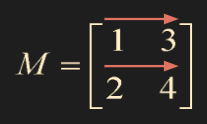
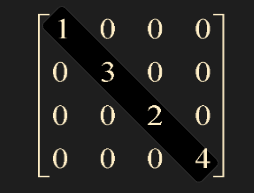
np.diagflat(M, k=band_id): Always creates a deep copied square matrix.- Note that it flattens the input M into a 1D array before creating the square matrix.
- 1d array -> similar to
np.diag, 2d array -> flattens to 1d then creates square matrix.
1
2
3
4
5
M = np.array([[1,3],[2,4]], dtype=np.float64)

e = np.diagflat(M, k = 0)

prt(e, "%0.2f", delimiter=" , ")
1
2
3
4
 1.00 ,  0.00 ,  0.00 ,  0.00
 0.00 ,  3.00 ,  0.00 ,  0.00
 0.00 ,  0.00 ,  2.00 ,  0.00
 0.00 ,  0.00 ,  0.00 ,  4.00
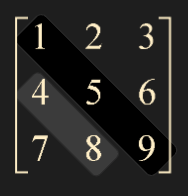
trace
np.trace: Returns the sum of diagonal entries or band entries.
1
2
3
4
5
6
7
8
9
10

T = np.array([[1,2,3],[4,5,6],[7,8,9]], dtype=np.float64)

val = np.trace(T)

print(val)

val = np.trace(T, offset=-1)  # uses offset, not k

print(val)
1
2
3
15

12
flatten method / ravel
flatten: Flattens matrix A into a 1D array, deep copies, and returns it.
1
2
3
4
5
T = np.array([[1,2,3],[4,5,6],[7,8,9]], dtype=np.float64)

flat = T.flatten()

prt(flat, "%0.2f", delimiter=" , ")
1
1.00 ,  2.00 ,  3.00 ,  4.00 ,  5.00 ,  6.00 ,  7.00 ,  8.00 ,  9.00
np.ravel: Flattens matrix A into a 1D array, shallow copies, and returns it.
1
2
3
4
5
6
7
T = np.array([[1,2,3],[4,5,6],[7,8,9]], dtype=np.float64)

rav = np.ravel(T)

T[0,0] = 0.0

prt(rav, "%0.2f", delimiter=" , ")
1
 0.00 ,  2.00 ,  3.00 ,  4.00 ,  5.00 ,  6.00 ,  7.00 ,  8.00 ,  9.00
This post is licensed under CC BY 4.0 by the author.