
Unity Cinemachine Jittering Issue

Unity Cinemachine Jittering Issue

1. About Cinemachine Method Update
Main symptom
- Due to Cinemachine camera damping, jittering occurs when a character or airship moves quickly.
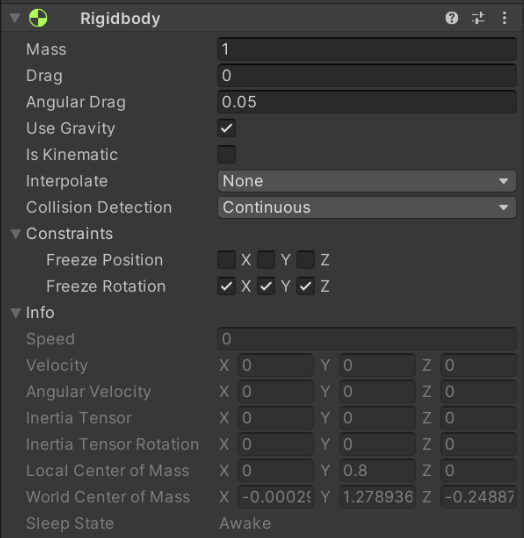
Character Rigidbody settings

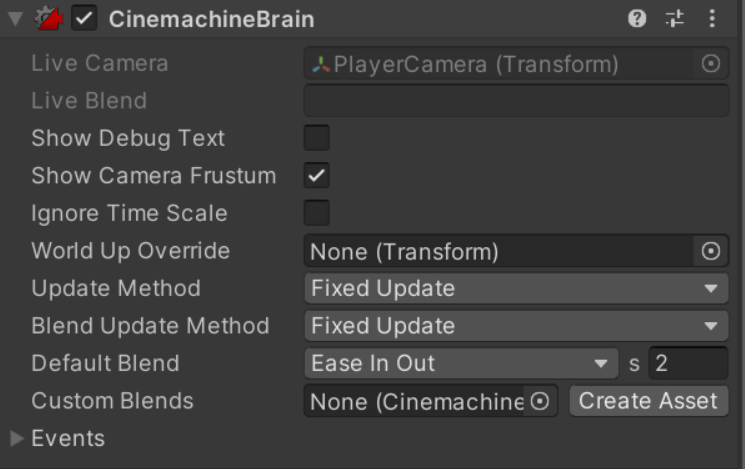
Cinemachine Brain (Main Camera)
Cause analysis
Rigidbody.Interpolatehandles CCD-related interpolation for physics-based moving characters.
When Cinemachine Camera follows/looks at that player, the Transform value updated through its Update Method
and the Transform value processed by damping interpolation can diverge.
Solution
- Disable
Rigidbody -> Interpolatefor physics-based player movement. - Handle movement code (
rigidbody.velocity,rigidbody.AddForce(), etc.) inFixedUpdate. - Set Cinemachine Camera
Update MethodandBlend Update MethodtoFixed Update. - Disable
Virtual Camera -> Inherit Position.
This post is licensed under CC BY 4.0 by the author.