Table of Contents
Build Pipeline & UHT (Unreal Header Tool) Header/CPP Separation Principle (IWYU), Forward Declaration, Include Order, Module Macros Reflection Basics: UCLASS/UPROPERTY/UFUNCTION/generated.h Rules UObject Creation, Lifecycle, GC - UPROPERTY/TObjectPtr/TWeakObjectPtr String Logging - FString, FName, FText, TEXT/TCHAR GameInstance and Subsystem Initialization Flow and Super::Init() Unreal C++ Basics: Pointers, References, Inline, Assertion
1. Build Pipeline & UHT
- Unreal handles Blueprint exposure, serialization, RPCs, etc., via C++ metadata. The build proceeds in two stages.
- UHT (Unreal Header Tool) scans headers with
UCLASS/UPROPERTY/UFUNCTION to create metadata and generates *.generated.h/.cpp files. - Then, standard C++ compilation proceeds.
UHT collects metadata of UObject-based classes and automatically generates C++ code based on it. In other words, using designated macros triggers the generation of additional code that the engine understands.
One core rule: The #include "X.generated.h" in the header must always be last. This ensures the UHT-generated declarations correctly expand based on preceding declarations.
1
2
3
4
5
6
7
8
9
| #pragma once
#include "CoreMinimal.h"
#include "MyObject.generated.h" // Must be last
UCLASS()
class HELLOUNREAL_API UMyObject : public UObject
{
GENERATED_BODY()
};
|
- Keep headers light and CPPs heavy. This stabilizes build times.
- Headers should include
CoreMinimal.h and only the minimum necessary. - Use Forward Declaration whenever possible to resolve references.
- Headers needed only for implementation should be included in the CPP.
- The first include in the CPP must always be its own header. This reveals missing dependencies immediately at compile time.
- Attach module export macros like
HELLOUNREAL_API to types/functions used in other modules. - When applying scripts from other projects, you need to modify them to the current project’s macro.
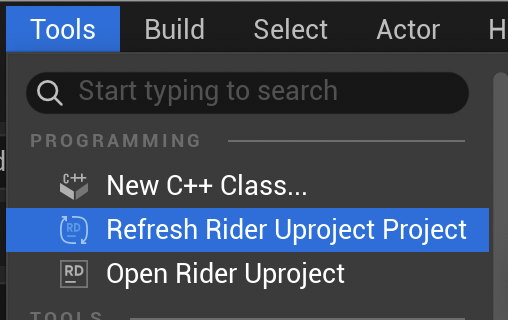
- After adding the script, be sure to run Refresh Rider/VS Uproject Project in Tools!
1
2
3
4
5
6
7
8
9
10
11
12
13
14
15
16
17
18
19
20
21
22
23
24
25
26
27
| // MyFeature.h
#pragma once
#include "CoreMinimal.h"
UCLASS()
class HELLOUNREAL_API AMyFeature : public AActor
{
GENERATED_BODY()
public:
AMyFeature();
virtual void BeginPlay() override;
private:
UPROPERTY()
TObjectPtr<UStaticMeshComponent> Mesh; // Forward declaration is sufficient for pointers/references
};
// MyFeature.cpp
#include "MyFeature.h" // Own header first
#include "Components/StaticMeshComponent.h" // Headers needed for implementation
AMyFeature::AMyFeature()
{
Mesh = CreateDefaultSubobject<UStaticMeshComponent>(TEXT("Mesh"));
SetRootComponent(Mesh);
}
|
- If a complete definition is needed (e.g., value member
UStaticMeshComponent Mesh;), forward declaration is insufficient, so actual include is required in the header.
3. Reflection Basics: UCLASS/UPROPERTY/UFUNCTION & generated.h Rules
Unreal Reflection is a system for querying type information at runtime. It is much richer than C++ RTTI, and core engine features like Blueprint binding, serialization, GC, and network replication rely on it.
To participate in reflection, you must attach macros (UCLASS, UPROPERTY, UFUNCTION, USTRUCT, UENUM). Without them, UHT ignores the symbol, and the engine won’t recognize it.
UCLASS
- Registers the class itself to the engine. Control behavior by putting Specifiers in parentheses.
1
2
3
4
5
6
| UCLASS(Blueprintable, BlueprintType, ClassGroup=(Custom), meta=(BlueprintSpawnableComponent))
class HELLOUNREAL_API UMyComponent : public UActorComponent
{
GENERATED_BODY()
// ...
};
|
Common UCLASS Specifiers
Blueprintable — Allows inheriting this class in Blueprint BlueprintType — Can be used as a Blueprint variable type Abstract — Cannot instantiate directly, only subclasses allowed NotBlueprintable — Blocks Blueprint inheritance Transient — Not serialized to disk (useful for runtime-only objects) Config=GameName — Can read settings from ini files meta=(BlueprintSpawnableComponent) — Exposed in Blueprint Editor’s Add Component list
UPROPERTY
- Registers member variables to the engine. It also serves as a GC root, so UObject pointer members must have UPROPERTY to avoid being GC’d.
1
2
3
4
5
6
7
8
| UPROPERTY(EditAnywhere, BlueprintReadWrite, Category="Stats", meta=(ClampMin="0.0", ClampMax="100.0"))
float Health = 100.f;
UPROPERTY(VisibleAnywhere, BlueprintReadOnly, Category="Components")
TObjectPtr<UStaticMeshComponent> MeshComp;
UPROPERTY(Transient)
int32 CachedValue; // Excluded from serialization
|
Common UPROPERTY Specifiers
Editor Exposure: EditAnywhere, EditDefaultsOnly, EditInstanceOnly, VisibleAnywhere, VisibleDefaultsOnly Blueprint Exposure: BlueprintReadWrite, BlueprintReadOnly Category: Category="GroupName" — Grouping in Detail Panel Serialization Exclusion: Transient — Ignored during Save/Load Replication: Replicated, ReplicatedUsing=OnRep_FuncName — Network sync Meta: meta=(AllowPrivateAccess="true") — Expose private members to Blueprint
UFUNCTION
- Registers member functions to the engine. Used for Blueprint calls, RPCs, delegate bindings, etc.
1
2
3
4
5
6
7
8
9
10
11
12
13
14
15
16
17
18
| // Callable from Blueprint
UFUNCTION(BlueprintCallable, Category="Combat")
void TakeDamage(float DamageAmount);
// Implementable in Blueprint (Call only in C++)
UFUNCTION(BlueprintImplementableEvent, Category="Combat")
void OnDeath();
// C++ Default Implementation + Override in Blueprint
UFUNCTION(BlueprintNativeEvent, Category="Combat")
void OnHit();
void OnHit_Implementation(); // Actual C++ implementation
// Server RPC
UFUNCTION(Server, Reliable, WithValidation)
void ServerFireWeapon();
void ServerFireWeapon_Implementation();
bool ServerFireWeapon_Validate();
|
Common UFUNCTION Specifiers
BlueprintCallable — Callable from Blueprint BlueprintPure — Pure function without side effects (Getter, etc.) BlueprintImplementableEvent — Declared in C++, implemented in Blueprint BlueprintNativeEvent — C++ default implementation + Blueprint override possible Server / Client / NetMulticast — Network RPC Reliable / Unreliable — RPC reliability Exec — Executable via console command
USTRUCT & UENUM
- Structs and enums can also be registered for reflection. USTRUCT does not inherit from UObject, so it’s not GC’d, but UObject pointer members with UPROPERTY are tracked by GC.
1
2
3
4
5
6
7
8
9
10
11
12
13
14
15
16
17
18
19
20
| USTRUCT(BlueprintType)
struct FCharacterStats
{
GENERATED_BODY()
UPROPERTY(EditAnywhere, BlueprintReadWrite)
float MaxHP = 100.f;
UPROPERTY(EditAnywhere, BlueprintReadWrite)
float Attack = 10.f;
};
UENUM(BlueprintType)
enum class ECharacterState : uint8
{
Idle UMETA(DisplayName="Idle"),
Moving UMETA(DisplayName="Moving"),
Attack UMETA(DisplayName="Attack"),
Dead UMETA(DisplayName="Dead")
};
|
USTRUCT requires GENERATED_BODY(). UENUM does not.UMETA(DisplayName="...") specifies the display name in the editor.
GENERATED_BODY() Rules Summary
GENERATED_BODY() is placed at the very beginning of the class/struct declaration block (before public/private).#include "X.generated.h" is placed as the last include in the header.GENERATED_BODY() replaces the legacy GENERATED_UCLASS_BODY(). Use only GENERATED_BODY() unless it’s legacy code.- Missing
GENERATED_BODY() causes UHT build errors with non-intuitive messages. Make it a habit to add it whenever creating a class.
4. UObject Creation, Lifecycle, GC - UPROPERTY/TObjectPtr/TWeakObjectPtr
- Unreal’s UObject-based objects do not use
new/delete directly. They are created via factory functions provided by the engine, and GC (Garbage Collector) manages their lifecycle.
Two Creation Functions
1
2
3
4
5
| // 1. NewObject<T>() — General UObject creation
UMyObject* Obj = NewObject<UMyObject>(this); // Specify Outer as this
// 2. CreateDefaultSubobject<T>() — Used ONLY in constructor, for component initialization
UStaticMeshComponent* Mesh = CreateDefaultSubobject<UStaticMeshComponent>(TEXT("Mesh"));
|
NewObject<T>(Outer)
- Callable anywhere
- Outer is the “owner” of this object. Usually
this or GetTransientPackage()
CreateDefaultSubobject<T>(Name)
- Callable only in constructor (executed during CDO creation)
- Used to attach components to root or setup subobjects
- Calling outside constructor causes a crash
- AActor derived classes must be created with
GetWorld()->SpawnActor<T>(), not NewObject. SpawnActor handles NewObject + World Registration + BeginPlay call.
1
2
3
| FActorSpawnParameters Params;
Params.Owner = this;
AMyEnemy* Enemy = GetWorld()->SpawnActor<AMyEnemy>(EnemyClass, &SpawnTransform, Params);
|
GC (Garbage Collection) and UPROPERTY
Unreal GC uses Mark-and-Sweep. It starts from the Root Set, Marks following UPROPERTY reference chains, and Sweeps (releases) unmarked UObjects.
Core concept: If you hold a UObject pointer as a raw pointer without UPROPERTY, GC won’t know about the reference. If GC collects that object, accessing it causes a Dangling Pointer crash.
1
2
3
4
5
6
| // Danger — GC doesn't know this reference
UMyObject* DangerousPtr; // No UPROPERTY!
// Safe — GC tracks this reference
UPROPERTY()
TObjectPtr<UMyObject> SafePtr;
|
TObjectPtr vs Raw Pointer
TObjectPtr<T> was introduced in UE5. It provides additional features like Lazy Loading and Access Tracking in editor builds, and compiles to the same performance as a raw pointer in shipping builds.
1
2
3
4
5
6
| // UE5 Recommended Style
UPROPERTY()
TObjectPtr<UStaticMeshComponent> MeshComp;
// Raw pointers are fine for function parameters and local variables
void DoSomething(UMyObject* Obj); // OK
|
TObjectPtr<T> is used for UPROPERTY member variables. Function parameters, local variables, and return types still use raw pointers (T*). This distinction is specified in Epic’s Coding Standards.
TWeakObjectPtr — Weak Reference
- Used when you want to check “is it alive” without ownership. It automatically becomes null if GC collects the object.
1
2
3
4
5
6
7
8
9
10
11
12
13
14
15
16
17
18
19
| TWeakObjectPtr<AActor> WeakTarget;
void SetTarget(AActor* Target)
{
WeakTarget = Target;
}
void Tick(float DeltaTime)
{
if (WeakTarget.IsValid())
{
// Still alive, safe to use
FVector Loc = WeakTarget->GetActorLocation();
}
else
{
// Already destroyed — find new target etc.
}
}
|
- Often used for target tracking in AI, UI bound actor references, caching, etc.
- Using TWeakObjectPtr instead of a raw pointer for non-UPROPERTY references prevents dangling pointers.
TSoftObjectPtr — Soft Reference
- Stores only the path without loading the asset directly. Can be asynchronously loaded when needed.
1
2
3
4
5
6
7
8
9
10
11
| UPROPERTY(EditAnywhere, Category="Assets")
TSoftObjectPtr<UStaticMesh> MeshAsset;
void LoadMesh()
{
if (!MeshAsset.IsNull())
{
UStaticMesh* Loaded = MeshAsset.LoadSynchronous(); // Sync load
// Async: StreamableManager.RequestAsyncLoad(...)
}
}
|
- Hard references (
TObjectPtr) always load the object into memory, but soft references load only when needed, which is beneficial for memory management. Especially used in large open worlds.
AddToRoot / RemoveFromRoot
- Manually register/unregister to GC Root Set. Used for singletons that need to stay alive but aren’t referenced by UPROPERTY anywhere.
1
2
3
4
5
| UMyManager* Mgr = NewObject<UMyManager>();
Mgr->AddToRoot(); // Protect from GC
// When no longer needed
Mgr->RemoveFromRoot(); // Eligible for collection in next GC cycle
|
AddToRoot() is a last resort. In most cases, solving with UPROPERTY reference chains is correct. Overusing AddToRoot causes memory leaks. Must call the paired RemoveFromRoot().
String/Logging: FString/FName/FText, TEXT/TCHAR, %s and *FString
- Unreal has three string types for different purposes. Distinguishing them correctly is crucial for performance and localization.
Three String Types
| Type | Characteristics | Usage |
|---|
FString | Heap allocation, mutable, TArray<TCHAR> based | General string manipulation, formatting, printing |
FName | Hash table based, case-insensitive, extremely fast comparison | Identifiers like asset names, bone names, socket names, tags |
FText | Localization support, immutable | UI text, all strings shown to user |
1
2
3
| FString Str = TEXT("Hello World"); // General String
FName Name = FName(TEXT("WeaponSocket")); // Identifier
FText Text = FText::FromString(TEXT("HP: 100")); // UI Display
|
TEXT() Macro and TCHAR
The TEXT("...") macro converts string literals to platform-appropriate wide characters (TCHAR). It becomes wchar_t on Windows, UTF-16 or UTF-32 on other platforms.
String literals in Unreal code must always be wrapped in TEXT(). Otherwise, they become ANSI literals, causing encoding mismatches across platforms.
1
2
3
4
5
| // Correct
FString Good = TEXT("Hello");
// Danger — ANSI literal, encoding issues may occur
FString Bad = "Hello";
|
Conversions
1
2
3
4
5
6
7
8
9
10
11
12
13
14
15
16
17
18
19
| // FString → FName
FName NameFromStr = FName(*MyString);
// FName → FString
FString StrFromName = MyName.ToString();
// FString → FText
FText TextFromStr = FText::FromString(MyString);
// FText → FString
FString StrFromText = MyText.ToString();
// FString → int32/float
int32 IntVal = FCString::Atoi(*MyString);
float FloatVal = FCString::Atof(*MyString);
// int32/float → FString
FString FromInt = FString::FromInt(42);
FString FromFloat = FString::SanitizeFloat(3.14f);
|
- Combines strings in the same format as C
printf.
1
| FString Msg = FString::Printf(TEXT("Player %s Health: %.1f"), *PlayerName, Health);
|
Caution: When passing FString to %s format, you must dereference it with *FString. *FString is an operator* overload that returns the internal TCHAR* buffer. Passing FString object directly without * causes a crash.
1
2
3
4
5
6
7
| FString Name = TEXT("Warrior");
// Correct
UE_LOG(LogTemp, Log, TEXT("Name: %s"), *Name);
// Crash! — Passing FString object directly to varargs
// UE_LOG(LogTemp, Log, TEXT("Name: %s"), Name);
|
UE_LOG — Logging
- Traditional logging macro specifying category and verbosity.
1
2
3
4
5
6
7
8
9
10
11
| // Using default log category
UE_LOG(LogTemp, Log, TEXT("General Log"));
UE_LOG(LogTemp, Warning, TEXT("Warning: %s"), *WarningMsg);
UE_LOG(LogTemp, Error, TEXT("Error Occurred! Code: %d"), ErrorCode);
// Custom log category declaration (Header)
DECLARE_LOG_CATEGORY_EXTERN(LogMyGame, Log, All);
// (CPP)
DEFINE_LOG_CATEGORY(LogMyGame);
// Usage
UE_LOG(LogMyGame, Verbose, TEXT("Detailed Debug Info"));
|
Verbosity Levels (Lower is more important)
Fatal — Crash after log (Program termination) Error — Red, Serious issue Warning — Yellow, Attention needed Display — General output (Also shown on screen) Log — Written to file only Verbose — Detailed debug, hidden by default VeryVerbose — Most detailed level
UE_LOGFMT — Structured Logging (UE 5.2+)
- Modern logging introduced in UE 5.2. Supports name-based formatting instead of
printf style, and *FString dereference is not needed.
1
2
3
4
| #include "Logging/StructuredLog.h"
UE_LOGFMT(LogMyGame, Log, "Player {Name} took {Damage} damage", Name, Damage);
UE_LOGFMT(LogMyGame, Warning, "Health low: {Health}", Health);
|
- More readable as variable names match
{} in the format string, and no need to dereference FString. Recommended for new projects.
On-Screen Debug
1
2
3
4
5
6
| // Print text directly to screen (For Debug)
if (GEngine)
{
GEngine->AddOnScreenDebugMessage(-1, 5.f, FColor::Green,
FString::Printf(TEXT("HP: %.0f"), CurrentHP));
}
|
GameInstance and Subsystem: Initialization Flow and Super Call
UGameInstance is a unique object that exists from the start to the end of the game process. It is not destroyed during level transitions, making it suitable for storing cross-level shared data (player inventory, save slot management, global settings, etc.).
Basic Override and Initialization Flow
1
2
3
4
5
6
7
8
9
10
11
12
13
14
15
16
17
18
19
| // MyGameInstance.h
#pragma once
#include "CoreMinimal.h"
#include "Engine/GameInstance.h"
#include "MyGameInstance.generated.h"
UCLASS()
class HELLOUNREAL_API UMyGameInstance : public UGameInstance
{
GENERATED_BODY()
public:
virtual void Init() override;
virtual void OnStart() override;
virtual void Shutdown() override;
UPROPERTY(BlueprintReadWrite, Category="Save")
int32 CurrentSaveSlot = 0;
};
|
1
2
3
4
5
6
7
8
9
10
11
12
13
14
15
16
17
18
19
20
21
| // MyGameInstance.cpp
#include "MyGameInstance.h"
void UMyGameInstance::Init()
{
Super::Init(); // Must call!
UE_LOG(LogTemp, Log, TEXT("GameInstance Init Complete"));
}
void UMyGameInstance::OnStart()
{
Super::OnStart(); // Must call!
// Logic to run on first level entry
}
void UMyGameInstance::Shutdown()
{
// Cleanup logic
UE_LOG(LogTemp, Log, TEXT("GameInstance Shutdown"));
Super::Shutdown(); // Must call!
}
|
Initialization Order
- Engine Start →
UGameInstance::Init() called - First Map Load Complete →
UGameInstance::OnStart() called - Game Exit →
UGameInstance::Shutdown() called
Why Super:: Call is Important
If Super::Init() is omitted, parent class initialization logic is not executed. At GameInstance level, Subsystem initialization, internal engine bindings, etc., are handled in Super.
General Rule: For Init/BeginPlay family, call Super FIRST. For Shutdown/EndPlay family, do your cleanup FIRST, then call Super LAST.
1
2
3
4
5
6
7
8
9
10
11
| void AMyActor::BeginPlay()
{
Super::BeginPlay(); // Parent first
// My init logic
}
void AMyActor::EndPlay(const EEndPlayReason::Type EndPlayReason)
{
// My cleanup logic first
Super::EndPlay(EndPlayReason); // Parent last
}
|
Subsystem Overview
- Introduced in UE 4.24, Subsystems are Singleton Pattern replacements automatically tied to the lifecycle of a specific Outer object. No need to manually create/destroy; the engine automatically calls Initialize/Deinitialize matching the Outer’s creation/destruction.
| Subsystem Type | Outer (Lifecycle) | Instance Count |
|---|
UEngineSubsystem | GEngine | 1 (Entire Process) |
UEditorSubsystem | GEditor | 1 (Editor Only) |
UGameInstanceSubsystem | UGameInstance | 1 (Per Game Instance) |
UWorldSubsystem | UWorld | 1 Per World |
ULocalPlayerSubsystem | ULocalPlayer | 1 Per Local Player |
1
2
3
4
5
6
7
8
9
10
11
12
13
14
15
16
17
18
19
| // MySubsystem.h
#pragma once
#include "Subsystems/GameInstanceSubsystem.h"
#include "MySubsystem.generated.h"
UCLASS()
class HELLOUNREAL_API UMySubsystem : public UGameInstanceSubsystem
{
GENERATED_BODY()
public:
virtual void Initialize(FSubsystemCollectionBase& Collection) override;
virtual void Deinitialize() override;
void DoSomething();
private:
int32 SomeData = 0;
};
|
1
2
3
| // Usage — Accessible anywhere
UMySubsystem* Sub = GetGameInstance()->GetSubsystem<UMySubsystem>();
Sub->DoSomething();
|
- The advantage of Subsystem is global access with low coupling between modules. It takes the convenience of Singletons but delegates lifecycle management to the engine.
CPP Basics (Unreal Perspective): Pointers, References, Inline, Build Macros, Assertion
- Summarizing standard C++ syntax that is frequently used in Unreal or has Unreal-specific wrappers.
Pointer
- Pointers in Unreal are largely divided into four types.
| Type | Usage | GC Tracking |
|---|
T* (raw) | Function params, local vars | X (Not tracked without UPROPERTY) |
TObjectPtr<T> | UPROPERTY member vars (UE5) | O |
TSharedPtr<T> | Shared ownership of non-UObject | X (Self ref-counting) |
TUniquePtr<T> | Exclusive ownership of non-UObject | X |
1
2
3
4
5
6
7
| // TSharedPtr — For general C++ classes, not UObjects
TSharedPtr<FMyData> SharedData = MakeShared<FMyData>();
TWeakPtr<FMyData> WeakData = SharedData; // Weak ref
// TUniquePtr — Transfer ownership only, no copy
TUniquePtr<FMyData> UniqueData = MakeUnique<FMyData>();
TUniquePtr<FMyData> Moved = MoveTemp(UniqueData); // Ownership transferred
|
TSharedPtr/TUniquePtr are used ONLY for non-UObject general C++ classes. UObject lifecycle is managed by GC, so wrapping it in TSharedPtr risks double free.
Reference
- In Unreal, const references are essential when passing large structs (FVector, FTransform, FString, etc.) without copying.
1
2
3
4
5
6
7
8
9
10
11
| // Value copy — FString copy cost occurs
void PrintName(FString Name);
// const reference — No copy, read-only
void PrintName(const FString& Name);
// non-const reference — Modify caller's value
void GetName(FString& OutName);
// Output parameter convention: Add Out prefix
void CalculateDamage(float InBaseDamage, float& OutFinalDamage);
|
In Unreal Coding Standards, it is customary to add Out prefix to output parameters. const& is the default choice for function parameters. Pass by value only for basic types (int32, float, bool, etc.).
Inline (FORCEINLINE)
- Standard C++
inline is just a hint to the compiler, but Unreal’s FORCEINLINE expands to __forceinline (MSVC) or __attribute__((always_inline)) (GCC/Clang) per platform to attempt forced inlining.
1
2
3
4
| FORCEINLINE float GetHealthPercent() const
{
return MaxHealth > 0.f ? CurrentHealth / MaxHealth : 0.f;
}
|
- Used for extremely high frequency calls with small function bodies (Getters, utility calcs).
- Overuse increases code size and I-cache misses, so apply based on profiling results.
Build Macros
- Macros to conditionally include/exclude code based on build settings.
1
2
3
4
5
6
7
8
9
10
11
12
13
14
15
16
17
| #if WITH_EDITOR
// Compile only in Editor build (Excluded in package build)
void EditorOnlyFunction();
#endif
#if UE_BUILD_SHIPPING
// Compile only in Shipping build
#endif
#if !UE_BUILD_SHIPPING
// All builds except Shipping (Debug code for development)
UE_LOG(LogTemp, Verbose, TEXT("Debug Info: %d"), DebugValue);
#endif
#if UE_BUILD_DEBUG
// Compile only in Debug build
#endif
|
| Macro | If True |
|---|
WITH_EDITOR | Editor Build (Includes PIE) |
UE_BUILD_DEBUG | Debug Config |
UE_BUILD_DEVELOPMENT | Development Config |
UE_BUILD_TEST | Test Config |
UE_BUILD_SHIPPING | Shipping Config |
UE_SERVER | Dedicated Server Build |
Assertion
- Unreal provides its own macros instead of standard
assert(). Use appropriate ones for the situation.
1
2
3
4
5
6
7
8
9
10
11
12
13
14
15
16
17
18
19
| // check — Crash if condition fails (In Debug/Development builds)
check(Ptr != nullptr);
checkf(Health >= 0.f, TEXT("Health is negative: %f"), Health);
// verify — Same as check, but expression executes even in Shipping builds
verify(ImportantFunction()); // Function called in Shipping too, ignored if fail
// ensure — Log warning + Callstack if condition fails (Only once), no crash
if (ensure(Ptr != nullptr))
{
Ptr->DoSomething();
}
ensureMsgf(Value > 0, TEXT("Value <= 0: %d"), Value);
// unimplemented — Macro for unimplemented functions (Crash when called)
void AMyActor::NotYetDone()
{
unimplemented();
}
|
Selection Criteria: check vs ensure
check — “If this condition is false, the program state is completely broken and must stop immediately.” ensure — “If this condition is false, it’s a bug, but we can log it and try to recover without crashing.”
Since check expressions are removed from compilation in Shipping builds, do not put expressions with side effects inside check. verify executes the expression even in Shipping, so use it if side effects are present.
MoveTemp — Unreal’s std::move
- Unreal uses
MoveTemp() instead of standard C++ std::move. It behaves the same by casting lvalue to rvalue reference to enable move semantics.
1
2
| TArray<FString> Source = { TEXT("A"), TEXT("B"), TEXT("C") };
TArray<FString> Dest = MoveTemp(Source); // Source is now empty
|
- Unreal Coding Standards recommend
MoveTemp over std::move because it performs additional verification (like preventing const object moves) in Debug builds.