
Unity - Fix for xcworkspace Not Being Generated

Unity - Fix for xcworkspace Not Being Generated
Build Error Series (2 / 8)
- Unity Build Issue Fix Collection - ID 238, Strip Engine Code, cs0246
- Unity - Fix for xcworkspace Not Being Generated
- Unity Build Issue Fix Collection - Gradle build failed, type initializer exception
- How to Fix Unity Android Permission Not Being Removed Issue
- Unity Android Build Error Fix - DexArchiveMergerException & MultiDex
- Unity iOS Build Error - Microphone Usage Description & BeeBuildPostprocessor
- Unity iOS TestFlight Upload Error Fix - Asset validation failed (90206) Invalid Bundle
- Unity Addressable Error Fix - RuntimeData is null, Invalid path in TextDataProvider

Table of Contents
Fixing issue where xcworkspace is not generated when building Unity iOS project
Main symptoms and analysis
- Main symptom: Environment was macOS. During remote build with Jenkins + fastlane + build scripts, cocoapods version issues occurred during Unity iOS build, and neither
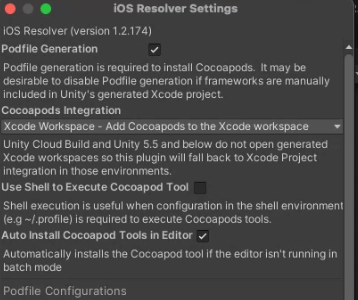
Podsfolder norxcworkspacewas generated. Even though iOS Resolver integration was correctly set to
xcworkspace, and regardless ofUse Shell to Execute Cocoapod Toolcheckbox,xcworkspacewas not generated.- iOS Resolver path
Assets - External Dependency Manager - iOS Resolver - Settings
- Another odd point: this issue had happened intermittently even before deep debugging. cocoapods and ruby gems versions were unchanged, yet it sometimes worked and sometimes failed.
- Manual Unity build generated
xcworkspacenormally.
- Possible Unity iOS Resolver misconfiguration
- Possible version conflict between cocoapods and ruby gems on mac-mini
- Check possible cocoapods version conflict
- Move to cocoapods bin folder and run
pod --version. - Part of terminal logs below:
- Move to cocoapods bin folder and run
1
2
3
4
5
6
7
8
9
10
11
12
13
14
# find cocoapods bin path
YOUR_USERNAME@YOUR_MACHINE Xcode % which pod
/opt/homebrew/bin/pod

# move to bin folder
YOUR_USERNAME@YOUR_MACHINE Xcode % cd /opt/homebrew/bin

# cocoapods version check
YOUR_USERNAME@YOUR_MACHINE bin % pod --version
1.12.1

# gem version check
YOUR_USERNAME@YOUR_MACHINE Xcode % gem --version
3.4.19
- Update cocoapods and ruby gem to latest versions
- Check current versions and update to latest.
1
2
3
4
5
6
7
8
9
10
11
12
13
14
15
16
17
18
19
20
21
22
23
24
25
# uninstall/install cocoapods via brew
# used homebrew due repeated permission issues with sudo
# uninstall
YOUR_USERNAME@YOUR_MACHINE bin % brew uninstall cocoapods
Warning: Treating cocoapods as a formula. For the cask, use homebrew/cask/cocoapods
Warning: Calling the `appcast` stanza is deprecated! Use the `livecheck` stanza instead.
Please report this issue to the adoptopenjdk/openjdk tap (not Homebrew/brew or Homebrew/homebrew-core), or even better, submit a PR to fix it:
  /opt/homebrew/Library/Taps/adoptopenjdk/homebrew-openjdk/Casks/adoptopenjdk11.rb:9

Uninstalling /opt/homebrew/Cellar/cocoapods/1.12.1... (13,430 files, 27.8MB)
YOUR_USERNAME@YOUR_MACHINE bin % brew unstall cocoapods -v 1.10.1

# install
YOUR_USERNAME@YOUR_MACHINE bin % brew install cocoapods
Warning: Treating cocoapods as a formula. For the cask, use homebrew/cask/cocoapods
==> Fetching cocoapods
==> Downloading https://ghcr.io/v2/homebrew/core/cocoapods/manifests/1.12.1
Already downloaded: /Users/YOUR_USERNAME/Library/Caches/Homebrew/downloads/092af1d0eed5d8e2252554a1d84826de8e271bcb598c43452362a690991fa2bd--cocoapods-1.12.1.bottle_manifest.json
==> Downloading https://ghcr.io/v2/homebrew/core/cocoapods/blobs/sha256:6f1fca1cb0df79912e10743a80522e666fe605a1eaa2aac1094c501608fb7ee4
Already downloaded: /Users/YOUR_USERNAME/Library/Caches/Homebrew/downloads/abfa7f252c7ffcc49894abb0d1afe0e47accb0b563df95a47f8f04ad93f8f681--cocoapods--1.12.1.arm64_ventura.bottle.tar.gz
==> Pouring cocoapods--1.12.1.arm64_ventura.bottle.tar.gz
🍺  /opt/homebrew/Cellar/cocoapods/1.12.1: 13,430 files, 27.8MB
==> Running `brew cleanup cocoapods`...
Disable this behaviour by setting HOMEBREW_NO_INSTALL_CLEANUP.
Hide these hints with HOMEBREW_NO_ENV_HINTS (see `man brew`).
- Is downgrading cocoapods the answer?
- Many posts suggest
1.10.xx, but my root cause was different. - Answer: NO, downgrade is unnecessary. Error looked like terminal locale/encoding issue.
- Detailed in solution section below.
Issue where xcworkspace is not generated in Unity iOS Resolver
- Many posts suggest
- Error when running
pod installfrom Jenkins:
1
2
3
4
5
6
7
8
9
10
11
12
13
#+ echo ------------------------------------- Pod Install
#------------------------------------- Pod Install
#+ cd /Users/YOUR_USERNAME/Xcode
#+ /opt/homebrew/bin/pod install
#    33mWARNING: CocoaPods requires your terminal to be using UTF-8 encoding.
#    Consider adding the following to ~/.profile:
#
#    export LANG=en_US.UTF-8
#    0m
#/opt/homebrew/Cellar/ruby/3.2.2_1/lib/ruby/3.2.0/unicode_normalize/normalize.rb:141:in `normalize': Unicode Normalization not #appropriate for ASCII-8BIT (Encoding::CompatibilityError)
# ... (same stack trace)
#Build step 'Execute shell' marked build as failure
#Finished: FAILURE
Solution
- After updating cocoapods and ruby gem to latest, running
pod installin Xcode project folder generated Pods and xcworkspace correctly. - Based on this, I solved it by calling
pod installfrom Jenkins shell on mac terminal.fastlane also has cocoapods action: fastlane cocoapods
- Jenkins shell script:
1
2
3
4
5
6
7
# Jenkins Shell Script

echo ------------------------------------- Pod Install
cd /Users/YOUR_USERNAME/Xcode
/opt/homebrew/bin/pod install
cd /Users/YOUR_USERNAME/.jenkins/workspace/ios_fastlane
- But this still failed with the above error.
- So first inspect Jenkins-reported locale values.
1
2
3
4
5
6
7
8
9
10
# locale check
YOUR_USERNAME@YOUR_MACHINE bin % locale
LANG="ko_KR.UTF-8"
LC_COLLATE="ko_KR.UTF-8"
LC_CTYPE="ko_KR.UTF-8"
LC_MESSAGES="ko_KR.UTF-8"
LC_MONETARY="ko_KR.UTF-8"
LC_NUMERIC="ko_KR.UTF-8"
LC_TIME="ko_KR.UTF-8"
LC_ALL=
- All locale values were Korean.
- Change to English and verify:
1
2
3
4
5
6
7
8
9
10
11
12
13
14
15
16
17
18
19
20
21
22
23
# set LC_ALL to en
YOUR_USERNAME@YOUR_MACHINE bin % export LC_ALL=en_US.UTF-8
YOUR_USERNAME@YOUR_MACHINE bin % locale
LANG="ko_KR.UTF-8"
LC_COLLATE="en_US.UTF-8"
LC_CTYPE="en_US.UTF-8"
LC_MESSAGES="en_US.UTF-8"
LC_MONETARY="en_US.UTF-8"
LC_NUMERIC="en_US.UTF-8"
LC_TIME="en_US.UTF-8"
LC_ALL="en_US.UTF-8"

# also set LANG
YOUR_USERNAME@YOUR_MACHINE bin % export LANG=en_US.UTF-8
YOUR_USERNAME@YOUR_MACHINE bin % locale
LANG="en_US.UTF-8"
LC_COLLATE="en_US.UTF-8"
LC_CTYPE="en_US.UTF-8"
LC_MESSAGES="en_US.UTF-8"
LC_MONETARY="en_US.UTF-8"
LC_NUMERIC="en_US.UTF-8"
LC_TIME="en_US.UTF-8"
LC_ALL="en_US.UTF-8"
- Even with this on mac mini, Jenkins build still failed.
- The key insight: Jenkins environment settings are different from machine shell settings.
- Therefore add locale export inside Jenkins shell script itself.
1
2
3
4
# can also add near init env setup
locale
export LANG=en_US.UTF-8
locale
- Jenkins output logs:
1
2
3
4
5
6
7
8
9
10
11
12
13
14
15
16
17
18
19
20
21
22
23
24
25
26
27
28
29
30
31
32
33
34
35
36
37
38
39
40
41
42
43
44
45
46
47
48
49
50
51
52
53
# locale check
+ locale
LANG=""
LC_COLLATE="C"
LC_CTYPE="C"
LC_MESSAGES="C"
LC_MONETARY="C"
LC_NUMERIC="C"
LC_TIME="C"
LC_ALL=

# convert
+ export LANG=en_US.UTF-8
+ LANG=en_US.UTF-8

# locale check
+ locale
LANG="en_US.UTF-8"
LC_COLLATE="en_US.UTF-8"
LC_CTYPE="en_US.UTF-8"
LC_MESSAGES="en_US.UTF-8"
LC_MONETARY="en_US.UTF-8"
LC_NUMERIC="en_US.UTF-8"
LC_TIME="en_US.UTF-8"
LC_ALL=

# pod install runs successfully
+ echo ------------------------------------- Pod Install
------------------------------------- Pod Install
+ cd /Users/YOUR_USERNAME/Xcode
+ /opt/homebrew/bin/pod install
Analyzing dependencies
Downloading dependencies
Installing Firebase (10.1.0)
Installing FirebaseAnalytics (10.1.0)
Installing FirebaseAuth (10.1.0)
Installing FirebaseCore (10.1.0)
Installing FirebaseCoreInternal (10.12.0)
Installing FirebaseInstallations (10.12.0)
Installing FirebaseMessaging (10.1.0)
Installing GTMSessionFetcher (2.3.0)
Installing GoogleAppMeasurement (10.1.0)
Installing GoogleDataTransport (9.2.3)
Installing GoogleUtilities (7.11.4)
Installing PromisesObjC (2.3.1)
Installing nanopb (2.30909.0)
Generating Pods project
Integrating client project

[!] Please close any current Xcode sessions and use `Unity-iPhone.xcworkspace` for this project from now on.
Pod installation complete! There are 4 dependencies from the Podfile and 13 total pods installed.
+ cd /Users/YOUR_USERNAME/.jenkins/workspace/ios_fastlane
Finished: SUCCESS
- Confirmed that Pods and xcworkspace were generated normally.
- I didn’t expect Jenkins env and mac shell env to differ this much.
This post is licensed under CC BY 4.0 by the author.