
Unity Netcode - Synchronization Deep Dive: RPCs vs. NetworkVariables

- Unity Netcode - Networking Components Guide
- Unity Netcode - Synchronization Deep Dive: RPCs vs. NetworkVariables
- Unity Netcode - Deep Dive into Authoritative Modes: Server vs. Client

Network Synchronization
Network synchronization is broadly divided into two methods: RPC and NetworkVariables.
NetworkVariables are most commonly used to synchronize state with clients who join the game late (Late Join).
On the other hand, if game logic relies solely on RPCs, reliability issues may arise for late-joining clients due to missed data packets.
RPC (Remote Procedure Calls)
RPCs are a way to handle direct communication between Server and Client, or Client and
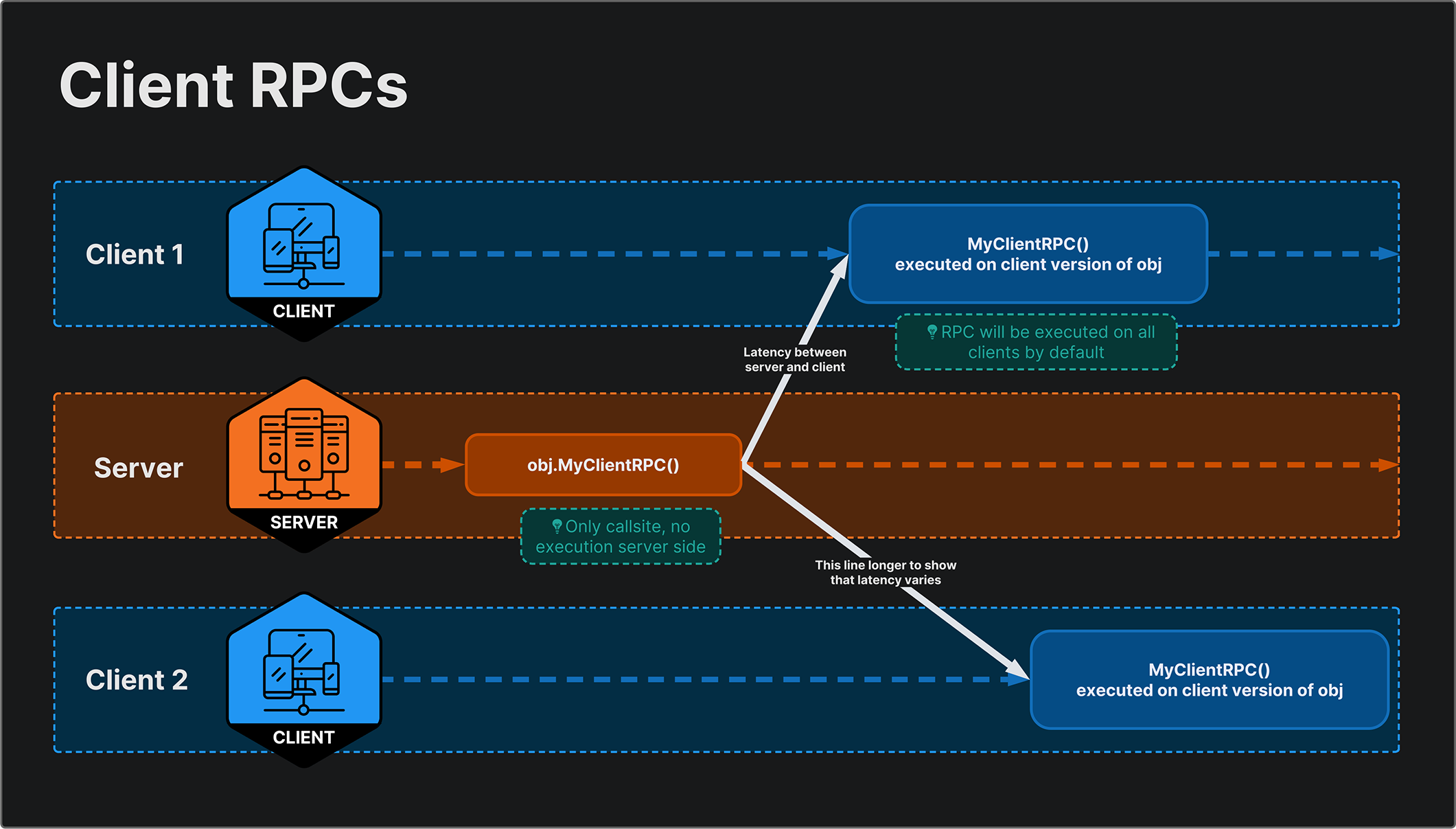
NetworkBehaviour, in addition to sending messages and event notifications.A client can invoke a Server RPC on a
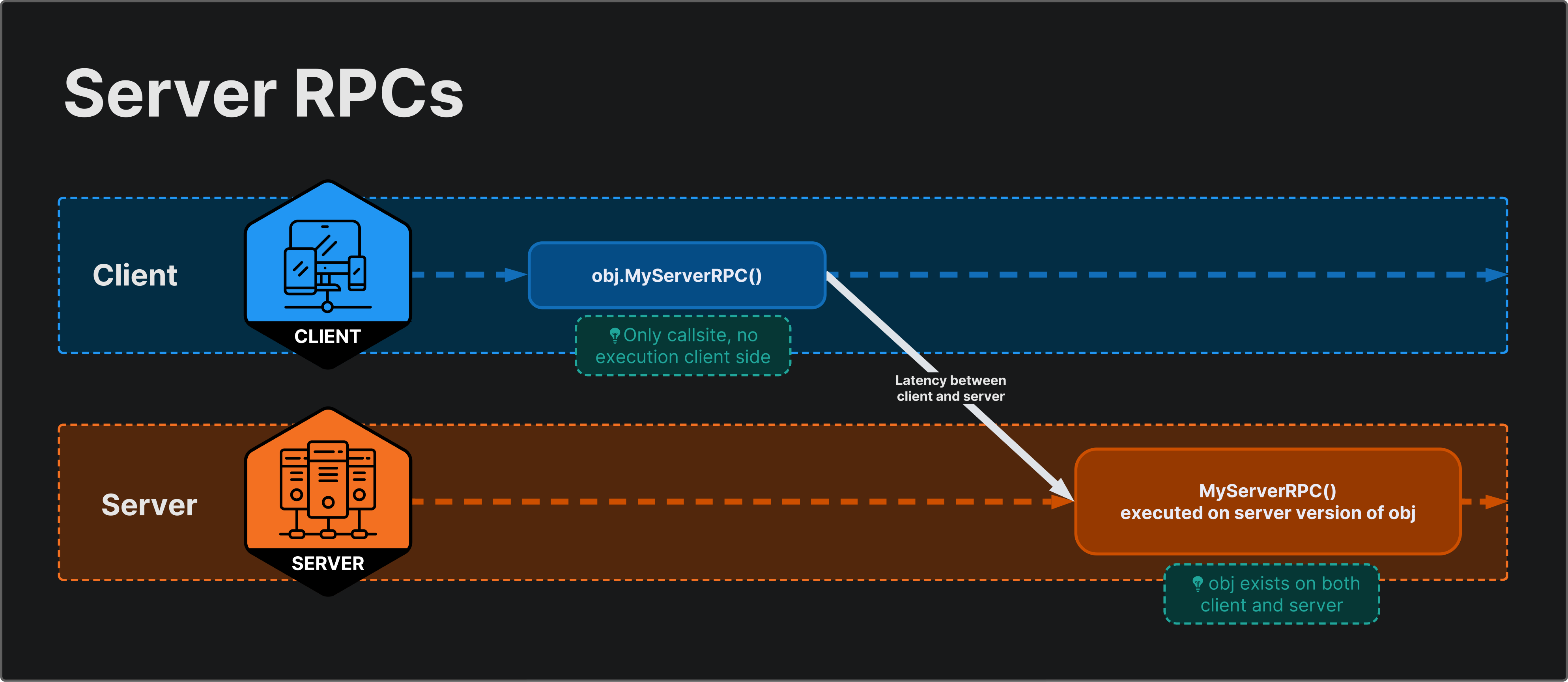
NetworkObject. The RPC is placed in a local queue, sent to the server, and executed on the server’s version of the sameNetworkObject.When a client invokes an RPC, the SDK records the object, component, method, and parameters of that RPC and transmits this information over the network.
- How Server RPC works
- How Client RPC works
How to Use RPCs
Generally, you declare an RPC by adding an attribute to the method you want to call.
Important: The method name must end with
Rpc,ServerRpc, orClientRpc.
// Suffix is mandatory in method name
// Separate attributes for ServerRpc / ClientRpc

[ServerRpc]
public void PingServerRpc(int pingCount)
{
    // Executed on Server
}

[ClientRpc]
public void PongClientRpc(
    int pingCount,
    string message)
{
    // Executed on all Clients
}// Method name only needs 'Rpc' suffix
// Target specified via SendTo (Flexible)
[Rpc(SendTo.Server)]
public void PingRpc(int pingCount)
{
// Executed on Server
}
[Rpc(SendTo.NotServer)]
void PongRpc(
int pingCount,
string message)
{
// Executed on everyone except Server
}
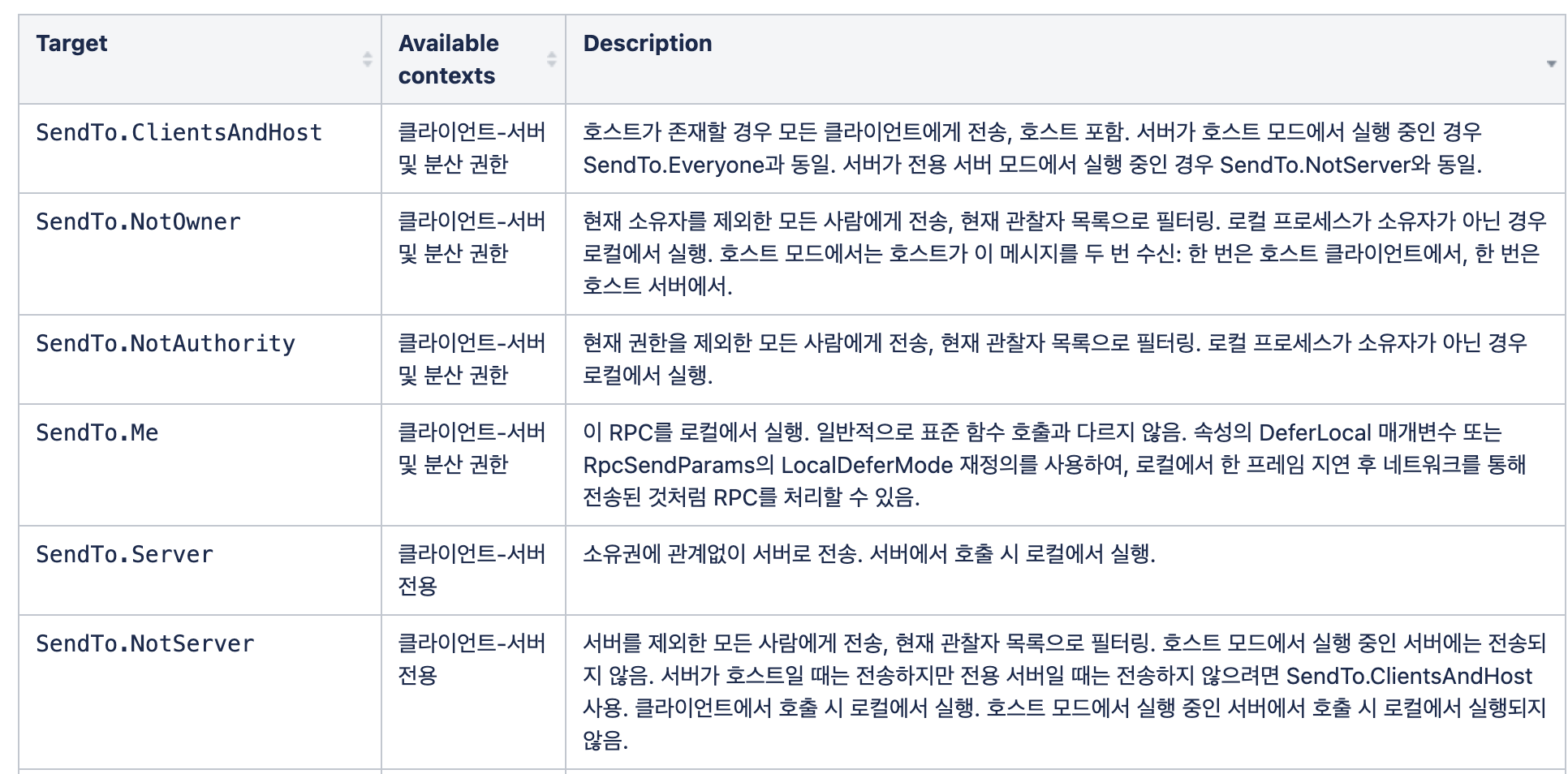
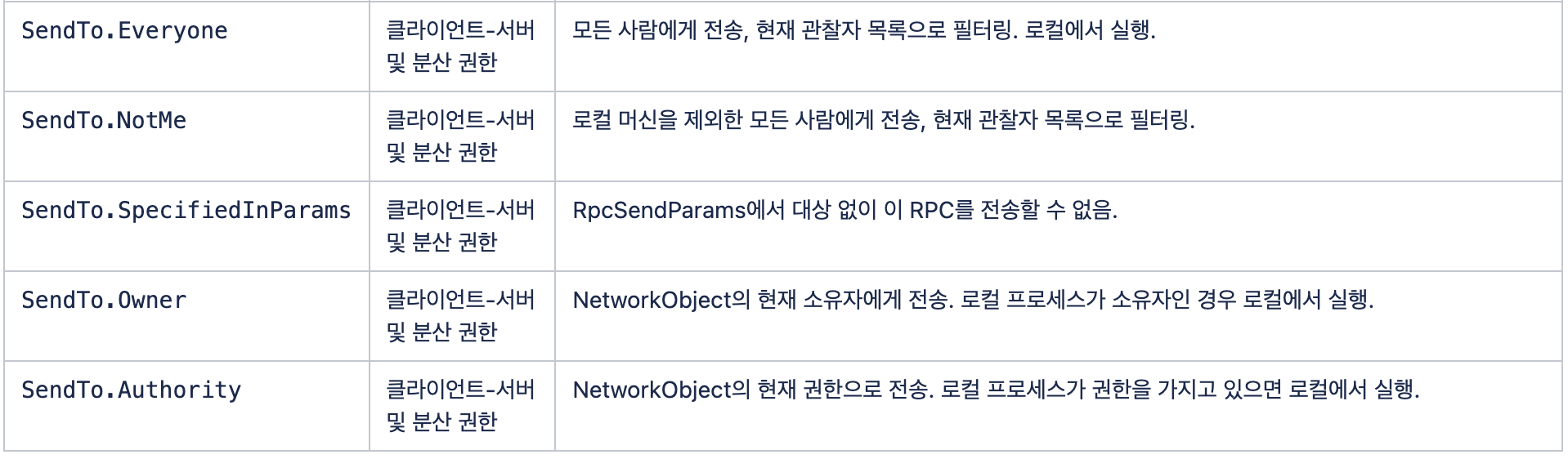
RPC Attribute Target Table
- There are many targets, but
Server,NotServer, andEveryoneare the most commonly used.
- Parameters often used with attributes:

1
2
3
[Rpc(SendTo.Everyone, RequireOwnership = false)]

[ServerRpc(RequireOwnership = false)]
- Legacy RPCs might feel more intuitive, but since they are being replaced by Universal RPC attributes, it’s better to get used to the Universal form.
- Both are currently usable, so further research on their differences might be needed.
Practical Example 1
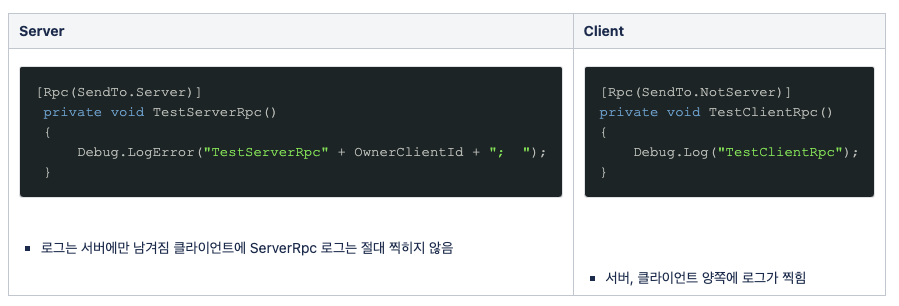
Practical Example 2
- Each client executes the client-only method
TryAddIngredient. - Then, it calls the ServerRpc
AddIngredientServerRpc. ServerRpcruns only on the server, but inside it callsAddIngredientClientRpc, which executes on all connected clients to reflect the change.
1
2
3
4
5
6
7
8
9
10
11
12
13
14
15
16
17
18
19
20
21
22
23
24
public bool TryAddIngredient(KitchenObjectSO kitchenObjectSO)
{
    AddIngredientServerRpc(GetKitchenObjectSOIndex(kitchenObjectSO))
}

[ServerRpc(RequireOwnership = false)]
private void AddIngredientServerRpc(int kitchenObjectSOIndex)
{
    AddIngredientClientRpc(kitchenObjectSOIndex);
}

[ClientRpc]
private void AddIngredientClientRpc(int kitchenObjectSOIndex)
{
    KitchenObjectSO kitchenObjectSO =
        KitchenGameMultiplayer.Instance.GetKitchenObjectSOFromIndex(kitchenObjectSOIndex);

    kitchenObjectSOList.Add(kitchenObjectSO);

    OnIngredientAdded?.Invoke(this, new OnIngredientAddedEventArgs
    {
        kitchenObjectSO = kitchenObjectSO
    });
}
NetworkVariables Synchronization
Unlike RPCs, NetworkVariables provide continuous synchronization of properties between server and client.
Unlike RPCs and messages, they are not one-off communications at a specific point in time, meaning they persist for clients connecting later.
NetworkVariableis a wrapper for a specified value typeT. To access the synchronized value, you must use theNetworkVariable.Valueproperty.Note: Type
Tmust be a Value Type (int, bool, float, FixedString, etc.). Reference types are not allowed.
1
2
3
4
5
6
7
8
9
private NetworkVariable<int> testValue = new NetworkVariable<int>();
private const int initValue = 1111;

public override void OnNetworkSpawn()
{
       testValue.Value = initValue;

       ...
}
How NetworkVariables Synchronize
1. New Client Joins Game (Late Join)
- When a
NetworkObjectwithNetworkVariableproperties is spawned on aNetworkBehaviour, the current state (Value) of theNetworkVariableis automatically synchronized to the client.
2. Connected Clients
- When a
NetworkVariablevalue changes, all connected clients subscribed toNetworkVariable.OnValueChangedare notified before the value is updated locally. - The
OnValueChangedcallback takes two parameters:previousandcurrent.
Practical Example 1
- Create a
NetworkVariablenamedstateand registerState_OnValueChangedtoOnValueChanged. - Whenever
statechanges, invoke all subscribers of theOnStateChangedevent.
1
2
3
4
5
6
7
8
9
10
11
12
13
14
15
16
17
18
19
20
21
// State is an enum type T
[SerializeField] private NetworkVariable<State> state = new NetworkVariable<State>(State.WaitingToStart);

public event EventHandler OnStateChanged;

public override void OnNetworkSpawn()
{
    state.OnValueChanged += State_OnValueChanged;
    isGamePaused.OnValueChanged += IsGamePaused_OnValueChanged;

    if (IsServer)
    {
        NetworkManager.Singleton.OnClientDisconnectCallback += NetworkManager_OnClientDisconnectCallback;
        NetworkManager.Singleton.SceneManager.OnLoadEventCompleted += SceneManager_OnLoadEventCompleted;
    }
}

private void State_OnValueChanged(State previousValue, State newValue)
{
    OnStateChanged?.Invoke(this, EventArgs.Empty);
}
Practical Example 2
- Each client calls a
ServerRpcwhen using a Door, toggling the Door’s state on the server. - Once
Door.State.Valuechanges, all connected clients sync to the new current value (bool here), andOnStateChangedis called on each client.
1
2
3
4
5
6
7
8
9
10
11
12
13
14
15
16
17
18
19
20
21
22
23
24
25
26
27
28
29
30
31
32
33
34
35
36
37
38
39
public class Door : NetworkBehaviour
{
    public NetworkVariable<bool> State = new NetworkVariable<bool>();

    public override void OnNetworkSpawn()
    {
        State.OnValueChanged += OnStateChanged;
    }

    public override void OnNetworkDespawn()
    {
        State.OnValueChanged -= OnStateChanged;
    }

    public void OnStateChanged(bool previous, bool current)
    {
        // note: `State.Value` will be equal to `current` here
        if (State.Value)
        {
            // door is open:
            //  - rotate door transform
            //  - play animations, sound etc.
        }
        else
        {
            // door is closed:
            //  - rotate door transform
            //  - play animations, sound etc.
        }
    }

    [Rpc(SendTo.Server)]
    public void ToggleServerRpc()
    {
        // this will cause a replication over the network
        // and ultimately invoke `OnValueChanged` on receivers
        State.Value = !State.Value;
    }
}
Custom NetworkVariables
- It is possible to synchronize custom “packet-like” data structures using
NetworkVariable. - Custom
NetworkVariabletypes must implement serialization, typically via generic types.
NetworkVariable Example
- When declaring a custom
NetworkVariable, you can specify initialization values as well asNetworkVariableReadPermissionandNetworkVariableWritePermission. - We used an arbitrary struct
MyCustomDatafor serialization. - This struct must implement the
INetworkSerializableinterface. - Inside, define the Value types you want to sync.
1
NetworkSerialize<T>
- Implement serialization of variables using
BufferSerializerinside this method.
1
2
3
4
5
6
7
8
9
10
11
12
13
14
15
16
17
18
19
20
21
private NetworkVariable<MyCustomData> randomNumber = new NetworkVariable<MyCustomData>(
    new MyCustomData
    {
        _int = 1,
        _bool = true,
        _message = "nan"
    }, NetworkVariableReadPermission.Everyone, NetworkVariableWritePermission.Owner);

public struct MyCustomData : INetworkSerializable
{
    public int _int;
    public bool _bool;
    public string _message;

    public void NetworkSerialize<T>(BufferSerializer<T> serializer) where T : IReaderWriter
    {
        serializer.SerializeValue(ref _int);
        serializer.SerializeValue(ref _bool);
        serializer.SerializeValue(ref _message);
    }
}
- Subscribe to
randomNumberviaOnValueChangedwith a lambda to log the output. - Pressing “T” sets a new
MyCustomDatavalue. Note who has ownership of theNetworkVariable. - In the Door example,
statewas changed viaServerRpc(Server-owned). Here,randomNumberis Client-owned. - Summary: Roles are divided based on ownership: Server-managed (FSM states, game logic) vs. Client-managed (Player stats).
1
2
3
4
5
6
7
8
9
10
11
12
13
14
15
16
17
18
19
20
21
22
public override void OnNetworkSpawn()
{
    randomNumber.OnValueChanged += (MyCustomData previousValue, MyCustomData newValue) =>
    {
        Debug.Log(OwnerClientId + ";  " + newValue._int + ";  " + newValue._bool + ";  " + newValue._message);
    };
}

private void Update()
{
    if (!IsOwner) return;

    if (Input.GetKeyDown(KeyCode.T))
    {
        randomNumber.Value = new MyCustomData
        {
            _int = Random.Range(0, 100),
            _bool = Random.Range(0, 1) == 0 ? true : false,
            _message = "Hello, World!",
        };
    }
}
NetworkList Example
NetworkListis a List version ofNetworkVariable.- Note the addition of the
IEquatableinterface. This allowsNetworkVariableorNetworkListstructs to perform efficient equality checks. - It also helps reduce network traffic by detecting if data actually changed.
1
2
3
4
5
6
7
8
9
10
11
12
13
14
15
16
17
18
19
20
21
22
23
public struct PlayerData : IEquatable<PlayerData>, INetworkSerializable
{
    public ulong clientId;
    public int colorId;
    public FixedString64Bytes playerName;
    public FixedString64Bytes playerId;

    public bool Equals(PlayerData other)
    {
        return clientId == other.clientId &&
               colorId == other.colorId &&
               playerName == other.playerName &&
               playerId == other.playerId;
    }

    public void NetworkSerialize<T>(BufferSerializer<T> serializer) where T : IReaderWriter
    {
        serializer.SerializeValue(ref clientId);
        serializer.SerializeValue(ref colorId);
        serializer.SerializeValue(ref playerName);
        serializer.SerializeValue(ref playerId);
    }
}
- Since it’s a List type, the event arguments are not
previousandcurrent. Instead,NetworkListEventcontains: - Value and PreviousValue.
1
2
3
4
5
6
7
8
9
10
11
12
13
14
public event EventHandler OnPlayerDataNetworkListChanged;

private NetworkList<PlayerData> playerDataNetworkList;

private void Awake()
{
    playerDataNetworkList = new NetworkList<PlayerData>();
    playerDataNetworkList.OnListChanged += PlayerDataNetworkList_OnListChanged;
}

private void PlayerDataNetworkList_OnListChanged(NetworkListEvent<PlayerData> changeEvent)
{
    OnPlayerDataNetworkListChanged?.Invoke(this, EventArgs.Empty);
}
RPC vs NetworkVariable
- Use RPC: For transient events or information transfer. Useful only at the moment the info is received.
Use NetworkVariables: Useful for managing persistent state information. “Persistent state” should be maintained in-game and consistently delivered to all players.
- The quickest way to decide is to ask: “Does a player joining midway need to receive this information?”
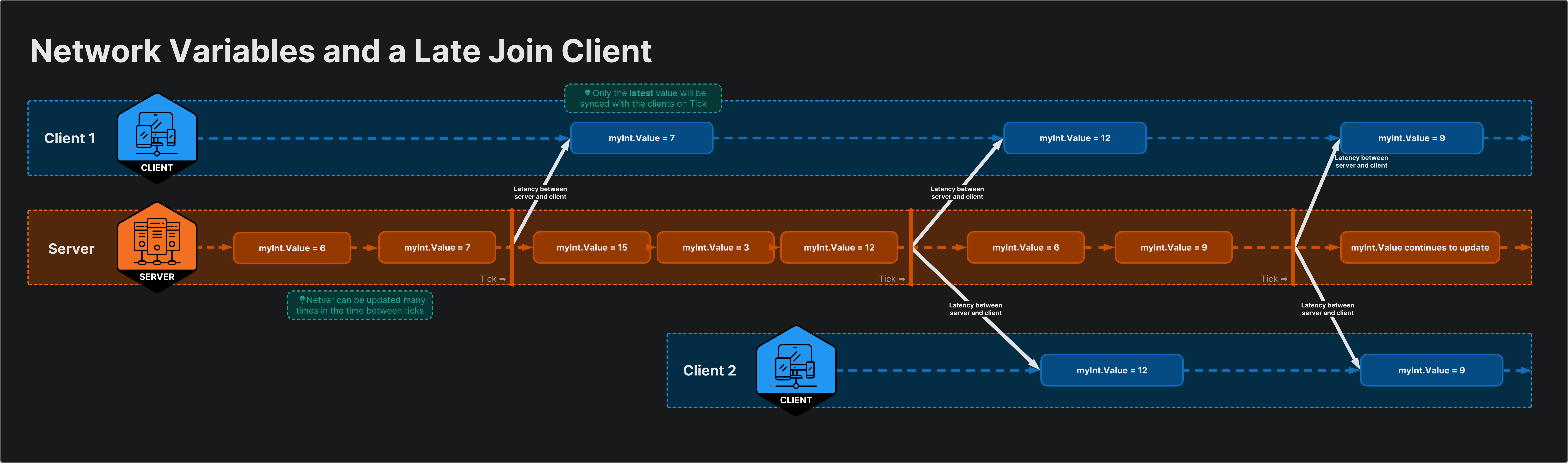
NetworkVariable sends the current state, allowing late-joining clients to easily catch up.
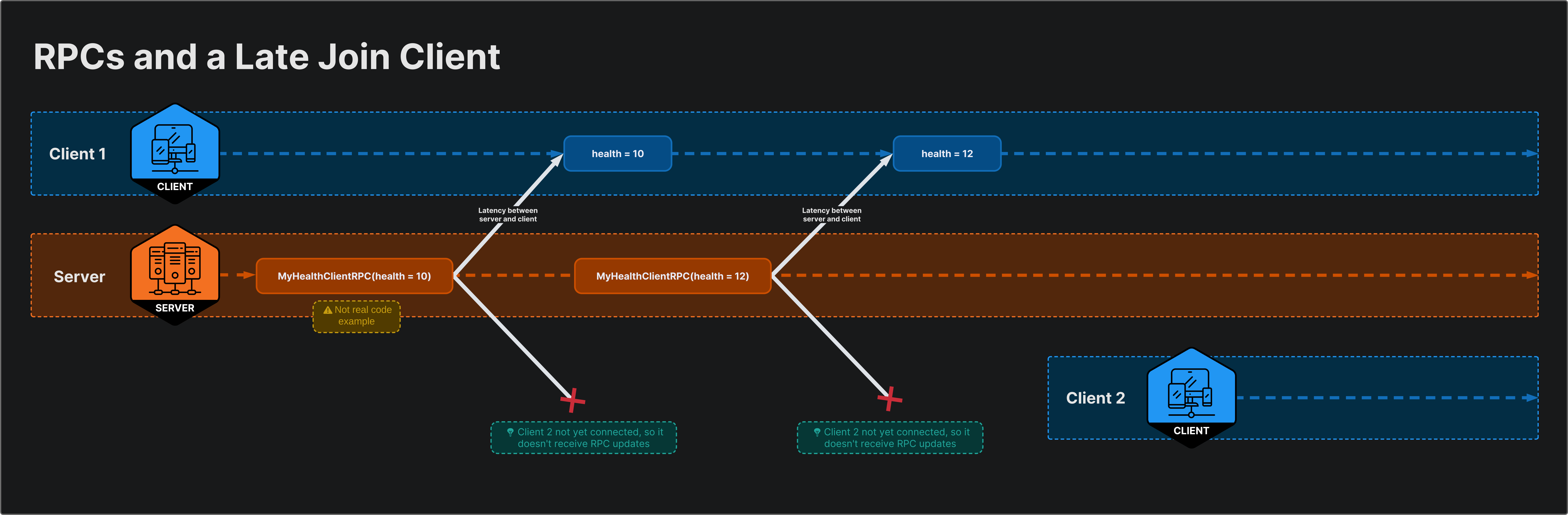
If an RPC is sent to all clients, players joining after the RPC was sent will miss that info and see incorrect visuals.
- You might think, “Then isn’t RPC useless? Can’t I just use NetworkVariables for everything?” But…
Why Not Use NetworkVariables for Everything?
- RPCs are simpler.
- You don’t need to declare a
NetworkVariablefor every transient event in the game (like explosions, object spawning).
- RPCs are better for synchronized delivery of multiple values.
- If you change
NetworkVariables“a” and “b”, there is no guarantee that the client receives both changes in the same frame.
- Due to latency, clients might receive updates at different times.
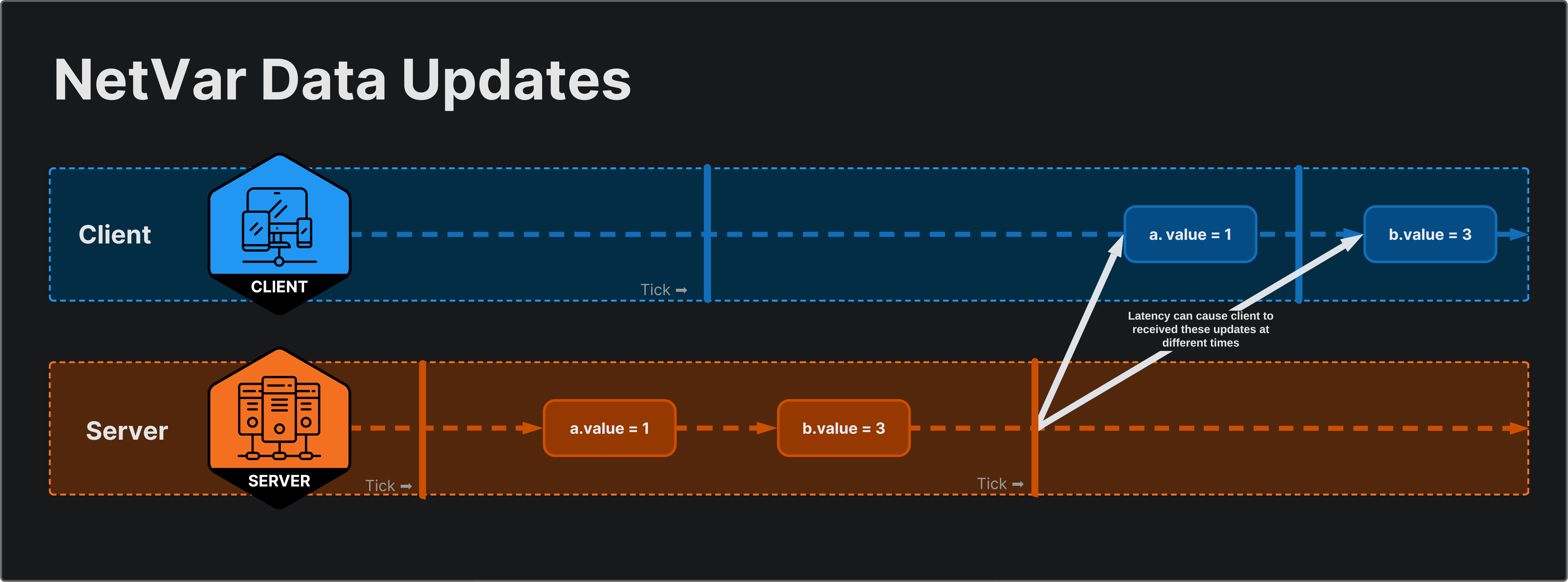
There is no guarantee that different NetworkVariables updated in the same tick are delivered to clients simultaneously.
- On the other hand, if sent as two parameters of the same RPC, the client receives both values simultaneously.
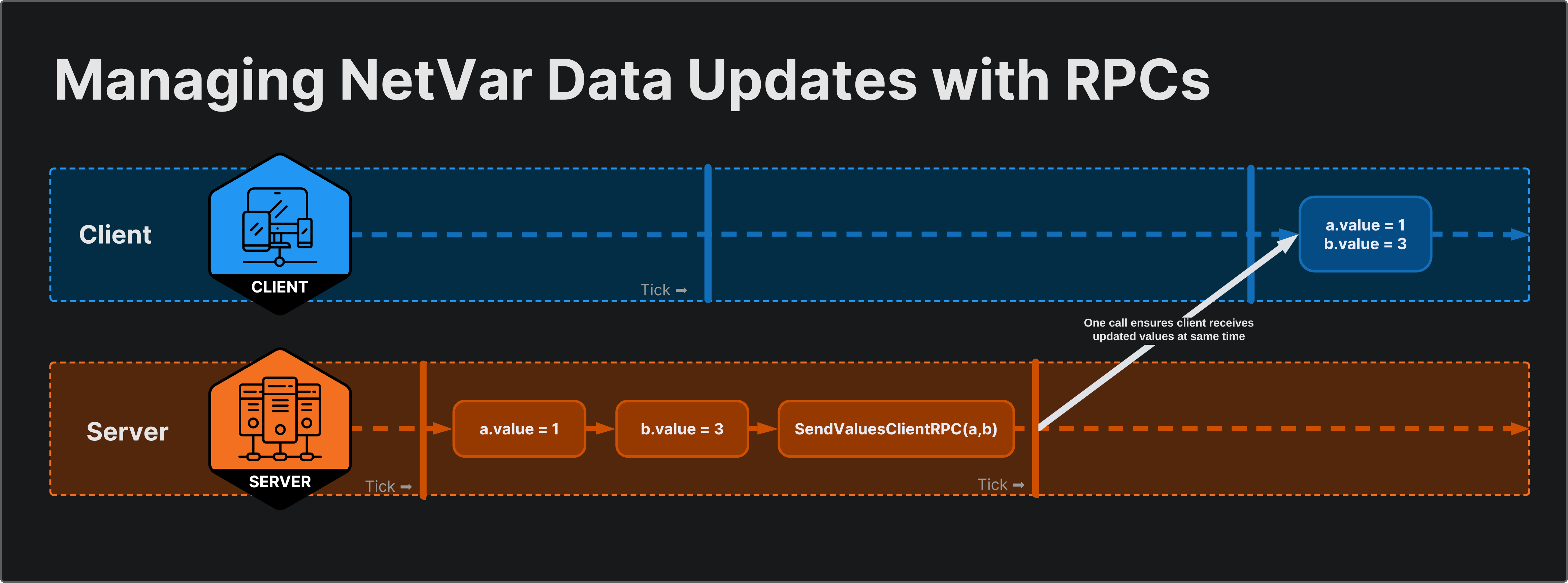
To ensure multiple values sync at the exact same time, you can bundle them into a Client RPC.
Summary
- Use NetworkVariable for persistent state information.
- Persistent state means information that must be maintained in the game and consistently delivered to all players.
- This allows new players to immediately sync to the latest state upon connection, ensuring everyone shares the same state.