
Unity Build Issue Fix Collection - Gradle build failed, type initializer exception

Unity Build Issue Fix Collection - Gradle build failed, type initializer exception
Build Error Series (3 / 8)
- Unity Build Issue Fix Collection - ID 238, Strip Engine Code, cs0246
- Unity - Fix for xcworkspace Not Being Generated
- Unity Build Issue Fix Collection - Gradle build failed, type initializer exception
- How to Fix Unity Android Permission Not Being Removed Issue
- Unity Android Build Error Fix - DexArchiveMergerException & MultiDex
- Unity iOS Build Error - Microphone Usage Description & BeeBuildPostprocessor
- Unity iOS TestFlight Upload Error Fix - Asset validation failed (90206) Invalid Bundle
- Unity Addressable Error Fix - RuntimeData is null, Invalid path in TextDataProvider

Table of Contents
3. Android app bundle size warning
1. Gradle build failed error
- Error logs encountered:
1
2
3
4
5
6
Picked up JAVA_TOOL_OPTIONS: -Dfile.encoding=UTF-8

FAILURE: Build failed with an exception.

* What went wrong:
Execution failed for task ':launcher:checkReleaseDuplicateClasses'.
1
2
3
4
5
6
7
8
9
Starting a Gradle Daemon, 3 stopped Daemons could not be reused, use --status for details
WARNING:We recommend using a newer Android Gradle plugin to use compileSdk = 33

This Android Gradle plugin (7.1.2) was tested up to compileSdk = 32

This warning can be suppressed by adding
    android.suppressUnsupportedCompileSdk=33
to this project's gradle.properties
1
2
CommandInvokationFailure: Gradle build failed.
/Applications/Unity/Hub/Editor/2022.3.4f1/PlaybackEngines/AndroidPlayer/OpenJDK/bin/java -classpath "/Applications/Unity/Hub/Editor/2022.3.4f1/PlaybackEngines/AndroidPlayer/Tools/gradle/lib/gradle-launcher-7.2.jar" org.gradle.launcher.GradleMain "-Dorg.gradle.jvmargs=-Xmx4096m" "assembleRelease"
Main symptom
- Error occurred during Android build.
- It was caused by
Minimum API Level/Target API Levelsettings in Project Settings - Other Settings.
Solution
- From Android 13 (API 33), policies changed so apps need explicit permissions for notifications/media access. Add required permissions in
Assets/Plugins/Android/AndroidManifest.xml.Currently target policy has moved to API 34, so keep tracking latest requirements.
1
2
3
4
5
6
7
  <uses-permission android:name="android.permission.POST_NOTIFICATIONS" android:minSdkVersion="33"/>
          <uses-permission android:name="android.permission.READ_MEDIA_IMAGES" android:minSdkVersion="33"/>
          <uses-permission android:name="android.permission.READ_MEDIA_VIDEO" android:minSdkVersion="33"/>
          <uses-permission android:name="android.permission.READ_MEDIA_AUDIO" android:minSdkVersion="33"/>
          <uses-permission android:name="android.permission.WRITE_EXTERNAL_STORAGE" android:maxSdkVersion="32"/>
          <uses-permission android:name="android.permission.READ_EXTERNAL_STORAGE" android:maxSdkVersion="32"/>
          android:requestLegacyExternalStorage="true"
- Also set
Minimum API Level: 22,Target API Level: 33, then rebuild. - Sometimes Jenkins build passes but manual build fails; in that case, setting
Target API Levelto auto can make manual build succeed.
2. Error: The type initializer for ‘Google.Protobuf.WellKnownTypes.StructReflection’ threw an exception.
Main symptom
- Occurred when building on mac mini build machine.
- Additional note (2023-08-22)
- Even after successful iOS automation build, below error appeared:
1
2
3
4
Exception: DescriptorValidationException: google.protobuf.Value.kind: Method ClearKind not found in Google.Protobuf.WellKnownTypes.Value
Google.Protobuf.Reflection.OneofDescriptor.CreateAccessor (System.String clrName) (at <00000000000000000000000000000000>:0) Google.Protobuf.Reflection.OneofDescriptor..ctor
(Google.Protobuf.Reflection.OneofDescriptorProto proto, Google.Protobuf.Reflection.FileDescriptor file, Google.Protobuf.Reflection.MessageDescriptor parent, System.Int32 index, System.String
clrName) (at <00000000000000000000000000000000>:0) Google.Protobuf.Reflection.MessageDescriptor+<>c__DisplayClass5_0.<.ctor>b__0 (Google.Protobuf.Reflection.OneofDescriptorProto oneof,
- Looking at logs (
Reflection...) showedGoogle.Protobufpreserve was missing inlink.xml.
Cause
- Likely related to C# reflection + enums under Unity IL2CPP build.
- Since some code was only referenced through reflection, IL2CPP stripped required parts.
Solution
- Add below to
link.xmlunder projectAssetsfolder:
1
2
3
<linker>
    <assembly fullname="Google.Protobuf" preserve="all"/>
</linker>
- If still unresolved, add this too:
1
<linker> <assembly fullname="DataModelBindings" preserve="all"/> </linker>
3. App Bundle Size Warning
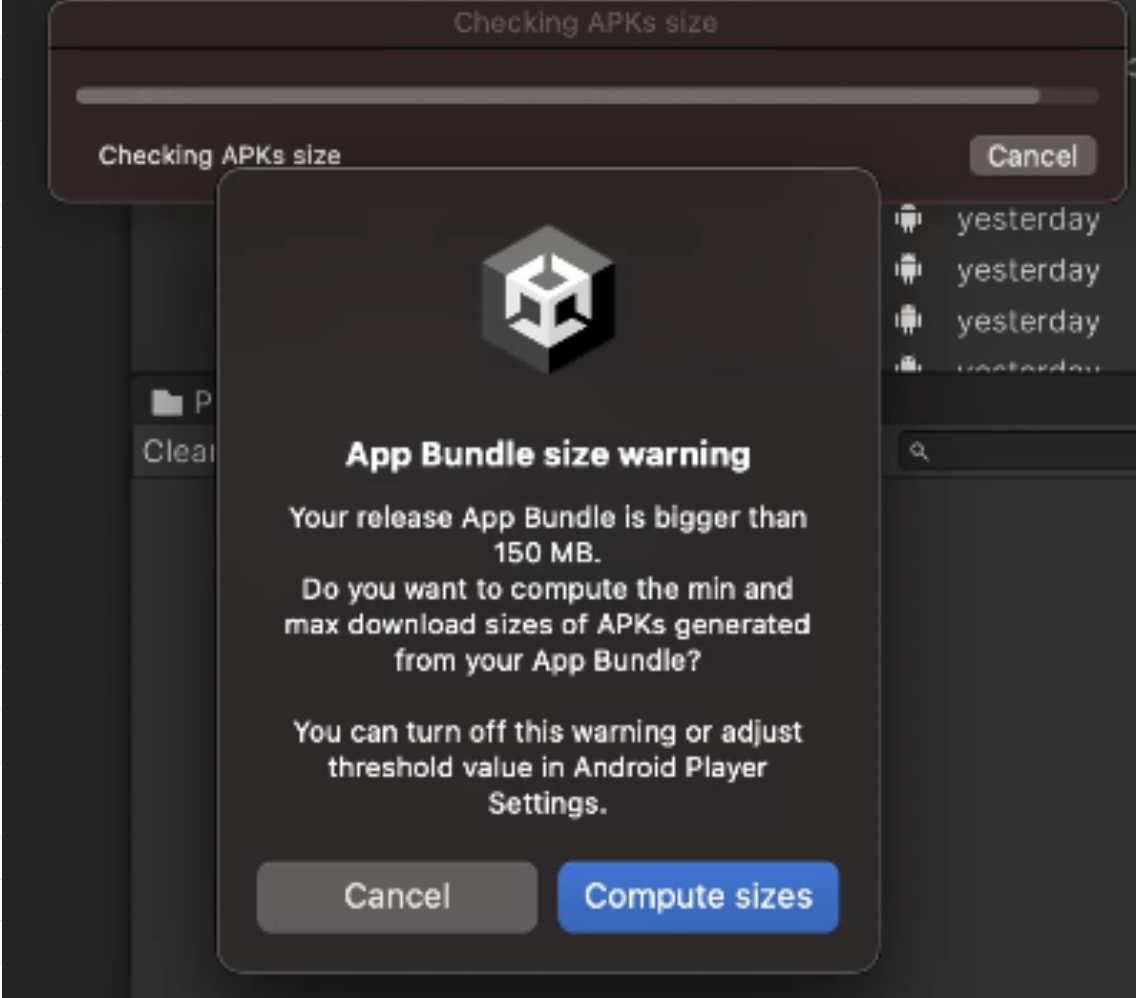
Main symptom
- To upload to Google Play Store, you must build as
.aab. - Enabling
Build Settings - Build App Bundle (Google Play)outputs.aab. - But if app size exceeds 150MB, warning like above appears.
- Therefore you need Addressable asset system to reduce base app size.
- Keep only startup-essential resources in app and move the rest into Addressable groups so they can be downloaded via patch system.
This post is licensed under CC BY 4.0 by the author.