
Unity Build Issue Fix Collection - ID 238, Strip Engine Code, cs0246

Unity Build Issue Fix Collection - ID 238, Strip Engine Code, cs0246
Build Error Series (1 / 8)
- Unity Build Issue Fix Collection - ID 238, Strip Engine Code, cs0246
- Unity - Fix for xcworkspace Not Being Generated
- Unity Build Issue Fix Collection - Gradle build failed, type initializer exception
- How to Fix Unity Android Permission Not Being Removed Issue
- Unity Android Build Error Fix - DexArchiveMergerException & MultiDex
- Unity iOS Build Error - Microphone Usage Description & BeeBuildPostprocessor
- Unity iOS TestFlight Upload Error Fix - Asset validation failed (90206) Invalid Bundle
- Unity Addressable Error Fix - RuntimeData is null, Invalid path in TextDataProvider

1. Error: Could not produce class with ID 238. This could be caused by a class being stripped from the build even though it is needed. Try disabling ‘Strip Engine Code’ in Player Settings.
Main symptom
- After build, specific animations/prefabs disappear or runtime errors occur.
Cause
- When using Addressables (Asset Bundles), this can happen if classes that must be included manually are not preserved.
Solution
Strip Engine Codeis a feature for reducing build size.- Reference
The easiest workaround is disabling Strip Engine Code as mentioned in the link above,
but that caused build-size issues in my case.
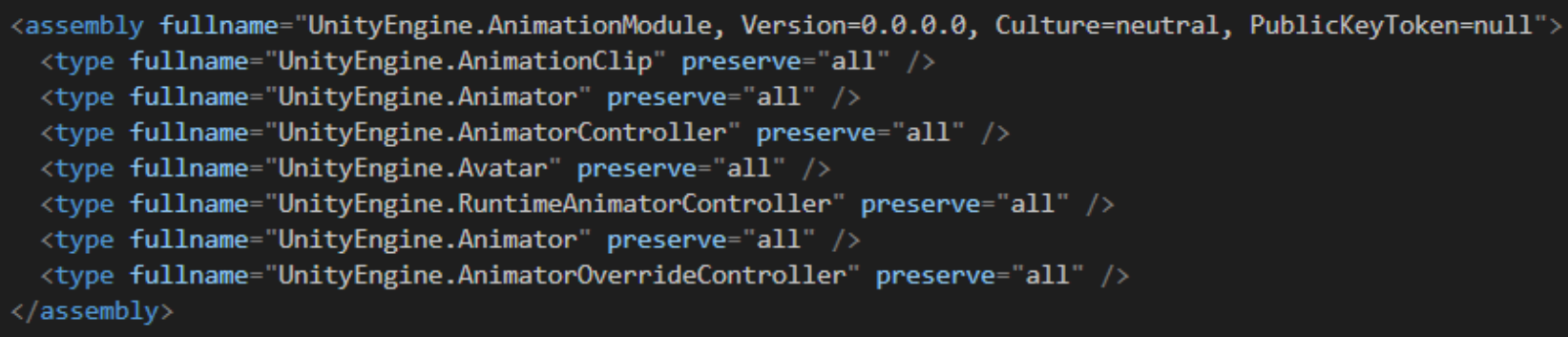
So the best fix is to add required classes to link.xml so they are preserved in the build.
Important caution
- Even if you write entries in
link.xml, some types may still not be included in certain cases. - Also, when using .NET runtime, a larger .NET class library API set is provided than legacy scripting runtime, which can increase code size.
To mitigate that size increase,Strip Engine Codeshould be enabled. (Especially because it removes unused dummy code, so it is practically required.) - Reference
In my case, animation sync was broken, so I added AnimatorController and Animator components to link.xml.
When a crash occurs, Unity also prints the related ID value (e.g., ID 238).
This ID maps to class IDs defined in the YAML Class ID Reference.
So to match a reported error ID, refer to the link below:
2. cs0246: The type or namespace name could not be found (are you missing a using directive or an assembly reference?)
Main symptom
- Namespace issues when writing classes.
- If
using UnityEditoris used -> UnityEditor classes are not included in builds. - If
using xxxxis written but never used.
-> Build error occurs and build is force-stopped.
Cause
- Basically this error occurs when a class is not declared properly or not imported via
using.
Build environment when it happened
- No typos in written code.
- Runs normally in the editor.
- No functional error during editor run.
- But build fails with this error.
Solution
- Wrap UnityEditor code with preprocessor directives.
- Remove unused
usingnamespaces.
This post is licensed under CC BY 4.0 by the author.