
Unity Android Build Error Fix - DexArchiveMergerException & MultiDex

Unity Android Build Error Fix - DexArchiveMergerException & MultiDex
Build Error Series (5 / 8)
- Unity Build Issue Fix Collection - ID 238, Strip Engine Code, cs0246
- Unity - Fix for xcworkspace Not Being Generated
- Unity Build Issue Fix Collection - Gradle build failed, type initializer exception
- How to Fix Unity Android Permission Not Being Removed Issue
- Unity Android Build Error Fix - DexArchiveMergerException & MultiDex
- Unity iOS Build Error - Microphone Usage Description & BeeBuildPostprocessor
- Unity iOS TestFlight Upload Error Fix - Asset validation failed (90206) Invalid Bundle
- Unity Addressable Error Fix - RuntimeData is null, Invalid path in TextDataProvider

Identifying the Cause
- Upgraded Unity version from 2022.3.4f1 to 2022.3.19f1.
- Updated Build Machine (Mac Mini) to MacOS Sonoma 14.3.1 and Xcode 15.2.
- An unknown error occurred during remote build for DEV Android via Jenkins.
First Failure Cause and Solution: Enabling MultiDex
1
2
3
4
User
ERROR:/Users/YOUR_USERNAME/.jenkins/workspace/(DEV)android/Library/Bee/Android/Prj/IL2CPP/Gradle/unityLibrary/build/.transforms/f5f2117adcaee1eb1097391e7bb3025e/transformed/classes/classes.dex: D8: Type com.google.firebase.MessagingUnityPlayerActivity is defined multiple times: ...
com.android.builder.dexing.DexArchiveMergerException: Error while merging dex archives:
Type com.google.firebase.MessagingUnityPlayerActivity is defined multiple times: ...
- It seems the cause was a duplicate class definition:
com.google.firebase.MessagingUnityPlayerActivity. Specifically, classes defined more than once cause conflicts in two dex archives. - To resolve this, enabling MultiDex was required. Similar issues have been reported in Unity forums and discussions.
- Although some threads date back to 2014 or 2019, I decided to proceed with enabling the MultiDex option as I needed to try every possible solution to fix this build.
Reference: StackOverflow Answer
- According to the forums and discussions, setting
multiDexEnabled trueresolves theDexArchiveMergerException. - I found the
mainTemplate.gradlefile inside thePlugin - Androidfolder and added the following code:
1
2
3
4
5
6
7
8
9
10
android {
    ...

    defaultConfig {
        ...
        multiDexEnabled true
    }

    ...
}
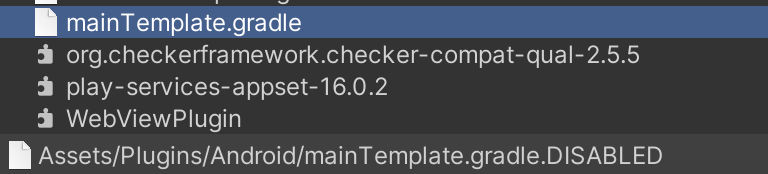
- Note: In the image below,
DISABLEDis appended to the filename, suggesting it might not be included in the build or is disabled. It’s a mystery why it affects the build…
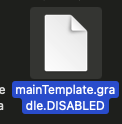
Result: Enabling MultiDex resolved this error. However, another error occurred…
Second Failure Cause and Solution: Execution failed for task ‘:launcher:mergeDexRelease’ & gradle build failed
1
2
3
4
5
6
7
8
9
FAILURE: Build failed with an exception.

* What went wrong:
Execution failed for task ':launcher:mergeDexRelease'.
> A failure occurred while executing com.android.build.gradle.internal.tasks.DexMergingTaskDelegate
   > There was a failure while executing work items
      > A failure occurred while executing com.android.build.gradle.internal.tasks.DexMergingWorkAction
         > com.android.builder.dexing.DexArchiveMergerException: Error while merging dex archives:
           Type com.google.firebase.MessagingUnityPlayerActivity is defined multiple times:
- The above log appeared during the Jenkins build. I suspect this error occurred due to enabling MultiDex.
Reference: app:mergeDexRelease Error
Reference: Gradle Build Failed Fix Blog
- The referenced blog was also outdated, so the settings environment was quite different.
There is a checkbox in ProjectSettings - Android - Publishing Settings - Minify - Release. Enabling this checkbox solves it.However, be warned that like “Strip Engine Code,” this might exclude specific binary files from the build. No one knows what issues that might cause…
- Update 2024.3.6: It says it deletes or excludes Java Code binary files, and it actually did… Adjust was not included in the build, so I had to disable this option again.
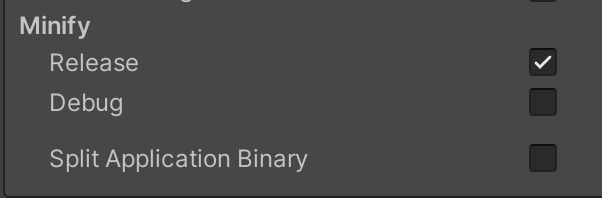
- Warning text…

Result: Enabling that option in Project Settings solved it!! But… yet another error occurred… (This part was due to internal project code issues)
Third Failure Cause and Solution: Native Crash Reporting (Caused by Internal Project Code)
1
2
3
4
5
6
7
8
9
10
11
12
13
14
Filename: Assets/Editor/Build/ShaderCleanup.cs Line: 68


=================================================================
	Native Crash Reporting
=================================================================
Got a segv while executing native code. This usually indicates
a fatal error in the mono runtime or one of the native libraries
used by your application.
=================================================================

=================================================================
	Native stacktrace:
=================================================================
- This code removes unnecessary shaders during build post-processing… Strangely, it had no issues before but started crashing now.
ImportAssetseems to be the problem. - Since it was a Native Crash, I couldn’t see detailed error logs… It is presumed that it tried to remove a non-existent shader.
1
2
3
4
5
6
7
8
9
10
11
12
13
14
15
16
public void OnPreprocessBuild(BuildReport report)
{
    // Logic to identify and disable unused shaders or assets

    // Example: Find and disable all unused shaders
    DeactivateUnusedShaders();
}

 private void DeactivateUnusedShaders()
{
  ...

     AssetDatabase.ImportAsset(AssetDatabase.GUIDToAssetPath(shaderPath), ImportAssetOptions.ForceUpdate);

  ...
}
- Solved by commenting out this code and proceeding with the build…
This post is licensed under CC BY 4.0 by the author.