
Using Unity Localization More Efficiently

Using Unity Localization More Efficiently
Localization Series (2 / 3)
- Unity Localization Integration
- Using Unity Localization More Efficiently
- Unity Localization - Smart Strings 활용 방법

Localization Manager (StringManager)
Making Localization easier and reusable as a utility
- In this localization post, the main methods were either assigning the
StringEventcomponent directly on UGUI - or fetching
StringEventitself and setting it in code. - However, this approach made it difficult to compose strings with more complexity and flexibility.
- So I used the Smart feature in Localization and made a utility manager called
StringManagerso everyone could use localization in a shared way. StringManageralso includes Cysharp’sZStringfeatures and anNGWordfilter to avoid boxing/unboxing or unnecessary allocations while composing strings.- In short, it works as a utility class specialized for strings.
Unity Localize Table: Smart option
- Before looking at the code, let’s first review both the Unity Localization table and the actual Google Spreadsheet table.
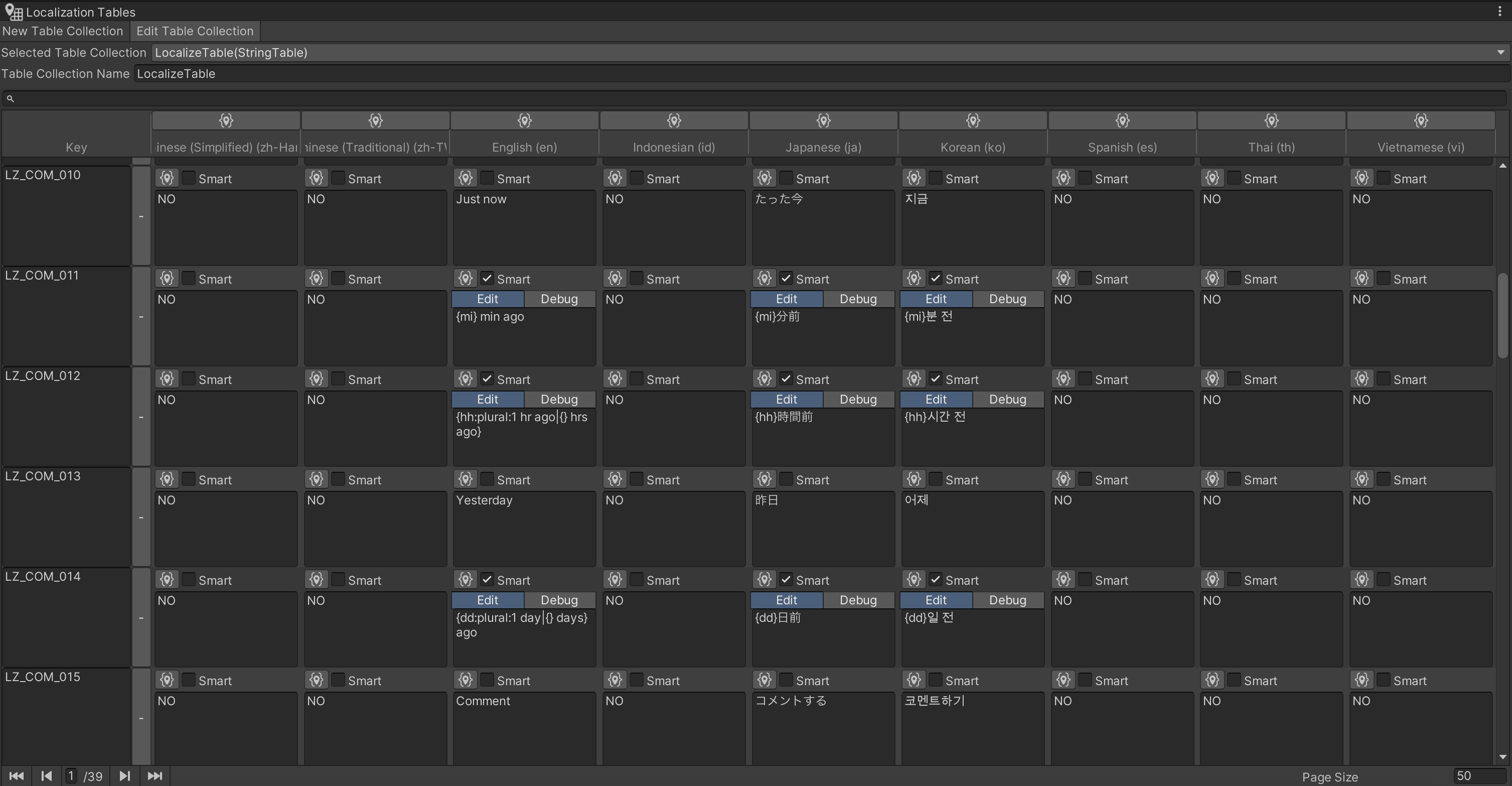
- In the image, you can see that the Smart option is enabled for each data entry.
- If you use placeholders like
{}in table data, each developer can insert the values they want. For example, you can placeintvalues such as time, amount, or date, and also strings such as user names.

This is what it looks like inside the actual Google Spreadsheet.
Using this Smart feature reduces the work of taking localized text and manually combining it with additional values to build a new string.
- The following code is a utility function that sets a localization key and Smart data values, then returns localized text as the result.
- In the
valuesarray parameter, check the table schema to confirm what data goes where, then pass values in that order. GetLZStringis the overloaded main function that performs the actual work.
1
2
3
4
5
6
7
8
9
10
11
12
13
14
15
16
17
18
19
20
21
22
23
24
25
26
27
28
29
30
31
32
/// <summary>
/// the given values replace indexed placeholders in the string.
/// e.g.) {0} is {1} old. -> He is 13 old.
/// </summary>
/// <param name="key">Key.</param>
/// <param name="values">Values for the replacing</param>
public static string GetLZString(string key, params object[] values)
{
	try
	{
		string txt = key;

		if (LocalizationSettings.StringDatabase.GetTable(LOCALIZE_TABLE_NAME).GetEntry(key).IsSmart)
		{
			txt = GetLZString(key, LOCALIZE_TABLE_NAME, values);
			return txt;
		}
		else
		{
			txt = GetLZString(key);
			if (txt != null)
			    return Smart.Format(txt, values);
			else
			    return txt;
		}
	}
	catch (Exception e)
	{
		Debug.LogError("The count of prameters is wrong!!!!! [" + key + "][" + e.ToString() + "]");
		return key;
	}
}
- This is the main function that actually retrieves and sets localized values by referencing the table and key.
1
2
3
4
5
6
7
8
9
10
11
12
13
14
15
// main Localize string function
public static string GetLZString(string key, string table, params object[] values_)
{
  LocalizedString lzString = new LocalizedString() { TableReference = table, TableEntryReference = key };
  var stringOperation = values_ != null ? lzString.GetLocalizedStringAsync(values_) : lzString.GetLocalizedStringAsync();
  if (stringOperation.IsDone && stringOperation.Status == AsyncOperationStatus.Succeeded)
  {
      return stringOperation.Result;
  }
  else
  {
      Debug.LogError("GetLZString|stringOperation fail...key:" + key);
      return key;
  }
}
- Here is a real usage example.
- It directly assigns a string value to the
textof aTMP_Textcomponent. It is worth checking how data is passed through the second parameter. - If you are concerned about GC caused by boxing/unboxing and dynamic allocation, there are certainly more efficient alternatives depending on your case.
1
2
3
4
5
6
7
8
9
10
11
12
13
14
15
 public async void Renew()
    {
		// ...

        switch (_data.RecentMessage.MessageType)
        {
			// ...
			case MsgType.MsgLoginbonusDaily:

                _recentMsgText.text = StringManager.GetLZString("LZ_LB_011", new { nn = _data.RecentMessage.Text });
                break;
			// ...
		}
		// ...
	}
This post is licensed under CC BY 4.0 by the author.