
Tailscale Series Part 1 — A Korean-IP Bypass Built on a Garage Laptop (Motivation, Measurements, Architecture)
- Tailscale Series Part 1 — A Korean-IP Bypass Built on a Garage Laptop (Motivation, Measurements, Architecture)
- Tailscale Series Part 2 — Family Home Setup, Unattended Operation, and Security (What to Finish in One Visit)
- Tailscale Series Part 3 — Internals, Cost, and Limits (DERP·MagicDNS·hole punching·a $7-per-year retrospective)
- Solving a year+ accumulated need for a Korean IP from Fukuoka, using a garage laptop and Tailscale's Personal Free plan
- A 3-node mesh (Busan Win + Fukuoka Mac + Fukuoka Win) in operation — P2P direct 50ms / Tunnel DOWN 24.9 Mbps / 15+ hours of unattended stability
- Tailscale is a mesh VPN — data plane (WireGuard, E2E) and control plane (coordination) are split. Traffic does not flow through company infrastructure
- The company was founded in Toronto in 2019 by four ex-Googlers (including Brad Fitzpatrick), with $272M in cumulative funding. The Personal plan is free for 6 users / unlimited devices


What this series covers
Living in Fukuoka for over a year, the moments when a Korean IP would have been useful kept piling up. Korean payments, banking, and some content services either don’t behave properly from a foreign IP or demand additional verification. Briefly firing up a commercial Korean VPN every time was unsatisfying on cost, trust, and OS compatibility all at once.
The solution was to drag out an old laptop that had been gathering dust in a garage at my family home in Busan for seven years (Samsung Galaxy Book 950SBE, Intel Core i7-8565U / 16GB / Windows 11 Home), revive it as an unattended exit node, and operate it remotely over SSH from a Mac in Fukuoka. After a few days of validation, the data is in: Tunnel DOWN 24.9 Mbps, P2P direct 50ms RTT, 15+ hours of unattended stable operation — Korean-IP bypass and remote operation are entirely feasible without buying any new hardware.
This series breaks the whole process into three parts.
| # | Title | Coverage |
|---|---|---|
| Part 1 (this post) | Motivation, measurements, architecture | Live measurements from the running infrastructure + the structural foundations of Tailscale, mesh VPNs, and WireGuard |
| Part 2 | Family-home setup + unattended ops + security | Single-visit setup / self-healing SchTasks / security audit |
| Part 3 | How it works + costs and limits | DERP, MagicDNS, hole punching / a retrospective on annual cost (~$7) |
This Part 1 follows a flow of showing the measurements from the already-running infrastructure first, then unpacking the structural reasons that make those numbers possible.
Hold on — let’s pause here for a sec
“exit node? tailnet? peer? That’s a lot of jargon before we even start.”
Here are the four core terms that show up most often, briefly defined before we go further.
- Tailnet — A private virtual network of Tailscale nodes belonging to one user (or organization). In our scenario, the Busan laptop, the Fukuoka Mac, and the Fukuoka Windows desktop are all in the same tailnet.
- Peer — A node inside a tailnet. There is no client/server distinction; every member sits at an equal position and can talk directly to every other member. The same “peer” as in P2P (peer-to-peer).
- Mesh — A network topology where peers connect directly to one another without going through a central hub. We compare it with hub-and-spoke in detail later.
- Exit node — A feature that designates one node in the tailnet as the gateway through which “this node will go out to the Internet.” When the Fukuoka Mac picks the Busan laptop as its exit node, all of the Mac’s Internet traffic exits through the Busan laptop and appears under a Korean IP. This is the core tool the series is building.
The system at a glance — currently running
Here is the node status as captured in the Tailscale admin console. Personal Free plan; two nodes are continuously Connected; the Busan laptop is advertising itself as an Exit Node.
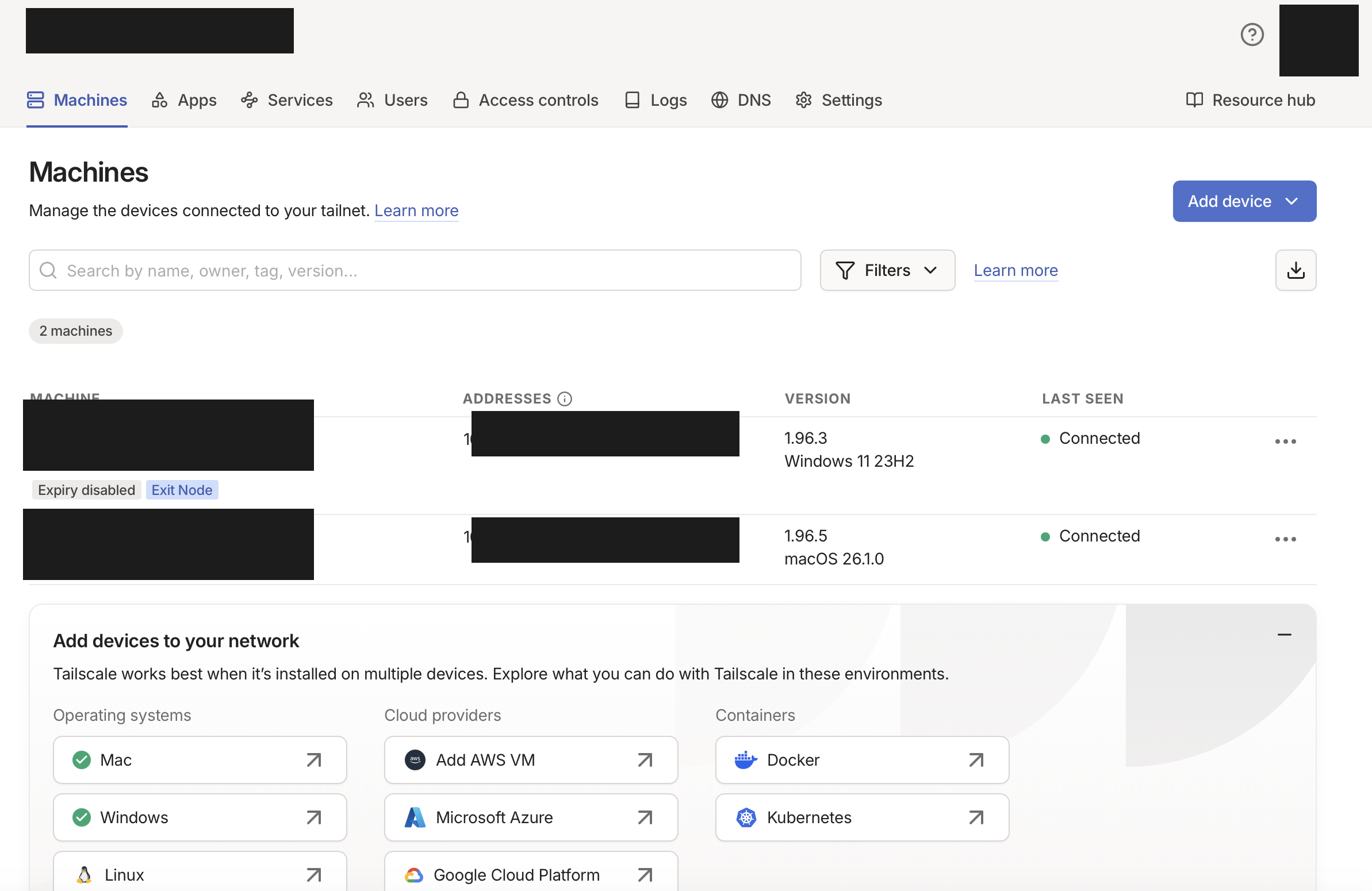 A single admin-console screen with Win 11 (Busan) and macOS 26 (Fukuoka) bound to the same tailnet. A mesh that is OS-agnostic is one of Tailscale’s core strengths.
The key numbers, summarized as four cards (based on 30 hours of continuous measurement, 2026-05-04 to 05-05).
3-node mesh topology
The tailnet currently has three nodes bound together: one exit node in Busan, two clients on the Fukuoka side (Mac + Windows). Nodes connect to each other over P2P direct, falling back to the Tokyo DERP only when a direct connection is impossible (the closest East Asian region).
Tokyo DERP fallback
| Node | Role | OS | Location | Connection mode |
|---|---|---|---|---|
| samsung-home-laptop | Exit node (Korean-IP egress) | Windows 11 Home | Busan family home | direct |
| fukuoka-mac | Main client | macOS 26.1 | Fukuoka home | direct |
| fukuoka-home-pc | Additional client | Windows 11 | Fukuoka home | direct |
All three nodes run direct P2P — they communicate directly without DERP relay. The mechanism that lets a direct path succeed even through two layers of home NAT is called hole punching, and Part 3 of the series covers it in depth.
Hold on — let’s pause here for a sec
“What does ‘direct’ mean in the last column? And what does the 100.64.x.x IP signify?”
Two things at once.
(1) Communication path — direct vs DERP
- P2P direct — A state where two nodes exchange UDP packets directly over the Internet using each other’s public IP and port. Fastest, and no traffic crosses Tailscale’s company infrastructure.
- DERP relay — A fallback through Tailscale’s public relay server (Designated Encrypted Relay for Packets) when direct doesn’t work. DERP only forwards already-encrypted packets — it never decrypts them.
(2) Tailscale IPs —
100.64.0.0/10The private IPs Tailscale assigns to nodes look like
100.64.x.x. This range was originally reserved for ISP CGNAT (Carrier-Grade NAT) use, but Tailscale simply borrows it as the addressing space for its own virtual network. Since the range is unreachable directly from the Internet, it doesn’t collide with other Internet traffic.
Measurements
DERP latency — measured from the Busan laptop
Here are the RTTs to a curated 8 regional DERP servers, as measured by tailscale netcheck. Tokyo is overwhelmingly the closest at 28ms, and all four East Asian regions are within 100ms.
| Region | RTT (Busan → DERP) | Continent |
|---|---|---|
| Tokyo | 28ms | East Asia (in use) |
| Hong Kong | 61ms | East Asia |
| Singapore | 74ms | Southeast Asia |
| Bengaluru | 100ms | South Asia |
| San Francisco | 127ms | North America (West) |
| Ashburn | 190ms | North America (East) |
| Sydney | 199ms | Oceania |
| London | 238ms | Europe |
If you need the full 28-region measurements, run tailscale netcheck on your own host.
What 28ms to Tokyo means: even if hole punching fails and traffic falls back to DERP relay, the Busan↔Fukuoka RTT over a free public relay network still sits at the best-case range for the same regional cluster. The fact that this global DERP infrastructure is provided for free is, as we’ll see later, a major axis of the cost model.
Bandwidth — Tunnel UP/DOWN vs Internet backbone
Here are the results of bidirectional scp on a 50MB file, compared against the Internet backbone. Tunnel DOWN at 24.9 Mbps is the overall bottleneck — the upload-side limit of the home line in Busan shows through directly.
Interpretation:
- The Internet backbone delivers 245 Mbps, but Tunnel UP is 59.2 Mbps — the cumulative result of WireGuard encryption, the Wi-Fi channel, and protocol overhead. This lines up with general benchmarks showing the i7-8565U (15W TDP) caps WireGuard around ~100–200 Mbps.
- Tunnel DOWN at 24.9 Mbps reflects the asymmetric upload-side cap of the Busan home FTTH line — Korean home Internet’s standard “down ≫ up” structure showing through.
- Against an average of 5 Mbps for 1080p video streaming, that is 5x headroom; for 4K (~25 Mbps) the cap is effectively reached, with no margin.
Stability — 368 samples over 30 continuous hours of metrics
Here are the 7-day statistics of metrics auto-collected every 5 minutes. Every key indicator has a standard deviation that is essentially zero — a stable state.
| Metric | mean | min | p50 | p95 | max | samples |
|---|---|---|---|---|---|---|
| Battery (AC connected) | 84.8% | 84 | 85 | 85 | 85 | 368 |
| Wi-Fi signal | 99.0% | 99 | 99 | 99 | 99 | 365 |
| RTT 8.8.8.8 | 29.3ms | 28 | 29 | 30 | 90 | 368 |
| RTT 1.1.1.1 | 9.2ms | 8 | 9 | 10 | 25 | 368 |
Operational record of the self-healing system:
Reboot auto-recovery — about 1 minute 30 seconds on average after warm-up
The most important scenario for a remote-operations safety net is “after a reboot, does SSH come back up without anyone touching the machine?” Validation across four reboots, including clamshell mode (lid closed):
| Run | Boot complete | SSH recovery | First health check | Notes |
|---|---|---|---|---|
| 1st | n/a | ~5 min | reboot +19s | First attempt (cold start) |
| 2nd | +29s | ~1 min 34 s | n/a | |
| 3rd | +29s | ~1 min | +48s | |
| 4th (lid closed) | +28s | n/a | +80s | Clamshell validation |
The first run accumulated cold-start costs from DNS and service initialization, taking ~5 minutes; after warm-up, the average from the second run onward is about 1 minute 30 seconds. The decisive evidence for clamshell validation is that all services started cleanly with WmiMonitorBasicDisplayParams Count = 0 (zero active monitors). That means even if family members close the laptop’s lid at the home in Busan, the infrastructure keeps running.
That’s the proof-of-operation for the infrastructure. From here, we move into the structural reasons why this result is possible.
Who builds Tailscale
Let’s start with the company itself. Tailscale was founded in 2019 in Toronto, Canada, by four engineers who had all worked at Google (per Wikipedia).
| Founder | Notes |
|---|---|
| Avery Pennarun | CEO. His blog post “How NAT traversal works” is, in practice, the standard introduction to NAT |
| David Crawshaw | Systems and languages, with a career closely tied to the Go ecosystem |
| David Carney | Chief Strategy Officer |
| Brad Fitzpatrick | Creator of LiveJournal, memcached, and Perlbal, later a long-tenured engineer on Google’s core Go team |
Brad Fitzpatrick’s joining especially carries weight. According to Wikipedia, he started LiveJournal as a college freshman, sold it to Six Apart in January 2005, then worked as a Staff Software Engineer on Google’s Go core team for 12.5 years from August 2007, before leaving in January 2020 and joining Tailscale as a “late-stage co-founder” three days later — meaning he was the fourth member to join the original three (Avery / Crawshaw / Carney) who founded the company in 2019. The timeline of someone who personally created core Internet infrastructure (memcached, OpenID, Perkeep) spending 12.5 years on the Go team and then moving directly into Tailscale shapes a credibility profile distinct from a generic new startup.
The funding is also non-trivial (Wikipedia).
| Round | Date | Amount | Lead |
|---|---|---|---|
| Series A | 2020-11 | $12M | Accel |
| Series B | 2022-05 | $100M | CRV, Insight Partners |
| Series C | 2025-04 | $160M | Accel |
The fact that a company holding $272M of cumulative capital provides the Personal plan that this series uses as “zero-cost infrastructure” is, in itself, an interesting asymmetry. The structural reason for that asymmetry is unpacked below.
Traditional VPNs are hub-and-spoke
Picture a corporate VPN. Laptop → client app → company gateway → internal network. Every packet passes through the central hub (the gateway) once. Even when two employees connect to each other’s laptops, traffic first has to go up to the gateway and back down.
Hold on — let’s pause here for a sec
“What exactly are a VPN and a gateway?”
- VPN (Virtual Private Network) — A virtual private network layered on top of the Internet. It defines a private IP range that’s invisible to outsiders, letting nodes inside it communicate as if they were on the same LAN. Packets typically flow encapsulated inside an encrypted tunnel.
- Gateway — A gatekeeper node that receives packets from one network and forwards them to another. A home router is a gateway between the home LAN and the Internet; a corporate VPN server is a gateway between the company LAN and the Internet.
Gateway
- All traffic passes through the gateway (1 extra hop)
- Gateway is a single point of failure
- If geographically far, all traffic detours there
- Nodes talk P2P directly; no traffic touches a central server
- The central server only handles key exchange and coordination
- Geographically close nodes get a short path
This model is great for enforcing corporate security policy at a single point, but it’s awkward for a scenario where two home laptops set up a Korean-IP bypass. The Busan laptop could just play the gateway role itself — except that requires the two nodes to talk directly. And two home laptops behind two layers of NAT generally cannot talk directly. Even if the outside knocks on port 22 of the home router, the router has no way of knowing which internal device to forward to. Mesh VPNs solve this problem differently.
Mesh VPN — nodes talk directly
The premise of a mesh VPN is simple: skip the central gateway and let nodes connect to each other directly. Simple to state, hard to execute. As noted above, when both nodes are behind NAT, neither can be the one to accept a connection first.
The trick is for both peers to fire outbound packets at each other simultaneously (hole punching, covered in depth in Part 3). For that to happen, somebody has to send a “now — fire at the same time” signal to both peers. The job of carrying that signal is the coordination server in a mesh VPN.
This is where the core split of a mesh VPN appears: think of communication as two distinct planes.
- Registers and distributes each node's WireGuard public key
- Distributes node lists, ACLs, and MagicDNS mappings
- Relays hole-punching signals between peers (DERP)
- Actual data traffic does not flow through here
- E2E-encrypted tunnel between nodes
- Most of the time flows P2P direct
- Does not pass through Tailscale's company infrastructure
- The company structurally cannot see traffic content
The coordination server only handles keys and metadata; actual packets travel between nodes.
This split determines almost every property of a mesh VPN.
- The company cannot see traffic content — the data plane is end-to-end encrypted between nodes, with keys generated inside the nodes themselves. The coordination server only receives public keys.
- Company-side infrastructure costs are small — the coordination server only handles metadata (node lists, ACLs, keys), so even if a single user watches video all day, the company-side traffic barely grows.
- Things keep working for a while even if the company goes down — if nodes have already cached keys and peer info, the data plane keeps flowing while the coordination server is briefly down.
DERP relay is in the same vein — when UDP is blocked and P2P direct fails, both nodes exchange packets through Tailscale’s DERP server, but DERP still only forwards already-encrypted packets without decrypting them. That’s why the table of 28 regional DERP RTTs above matters: that infrastructure is provided for free, while it’s still structurally guaranteed that the company cannot inspect content.
On top of this structural guarantee, Tailscale also commits to the same promise via external authentication and audits.
“Private keys never leave the device. All traffic is end-to-end encrypted, always.”
“Tailscale cannot read your traffic.”
— Tailscale Security (tailscale.com/security)
- SOC 2 Type II certification (AICPA Trust Services Criteria — security / availability / confidentiality)
- Periodic audits by external security firm Latacora
- On the code side: peer review + automated static analysis + dependency vulnerability scans
This is where deduction (the data plane is E2E, so the company can’t see) meets explicit promise (the company commits not to look). Either alone wouldn’t be enough; the trust model gains stability where both guarantees overlap.
For how P2P direct is actually achieved, here’s Avery Pennarun’s one-line summary.
“There is no magic bullet for NAT traversal. Tailscale’s approach: try everything at once, and pick the best thing that works.”
— Avery Pennarun, “How NAT traversal works”
WireGuard — the data plane standard
The data plane itself isn’t something Tailscale invented; it’s a separate protocol called WireGuard, used as-is. WireGuard is a VPN protocol created by Jason A. Donenfeld, merged into Linus Torvalds’ net-next tree in January 2020 and shipped in the Linux 5.6 mainline (2020-03-29).
Its defining feature is a small, clear codebase. Linus’s remark, frequently quoted from the LKML in 2018, captures the sentiment.
“Maybe the code isn’t perfect, but I’ve skimmed it, and compared to the horrors that are OpenVPN and IPsec, it’s a work of art.”
— Linus Torvalds, LKML (cited in Ars Technica, 2018-08)
WireGuard’s crypto stack is a simple composition of standard building blocks.
| Role | Algorithm |
|---|---|
| Key exchange | Curve25519 |
| Symmetric encryption + authentication | ChaCha20-Poly1305 (AEAD) |
| Hash function | BLAKE2s |
| Key derivation | HKDF |
| Hash table key | SipHash24 |
The handshake adopts the Noise Protocol Framework’s IK pattern (Noise_IKpsk2_25519_ChaChaPoly_BLAKE2s) verbatim, finishing in 2 messages. Because there is no algorithm negotiation (no cipher-suite negotiation), downgrade attacks are structurally blocked — the most striking difference from the IPsec/TLS family.
Tailscale doesn’t reimplement this; it embeds the official wireguard-go implementation as-is. Even if there were flaws on the mesh-metadata side, the data plane’s encryption inherits the properties of a separate, independently-verified system.
WireGuard’s level of trust is confirmed not just by Linus’s quote but also by adoption and academic verification.
- Commercial VPN adoption — NordVPN, IPVanish, TunnelBear, and others adopt WireGuard as the data plane of their own VPN service (Wikipedia)
- Formal verification — In May 2019, INRIA researchers published a machine-checked proof of the WireGuard protocol — i.e. its security properties are mathematically proven
So WireGuard stands on three lines of evidence: (a) Linus accepted it into mainline, (b) INRIA published a formal verification, and (c) commercial VPNs adopted it directly into their products. Tailscale’s decision to use it without reimplementing it is a natural consequence of that foundation.
The free plan’s limits (Personal)
Now to costs. Tailscale’s free plan, Personal, has the following limits (as of 2026-05, per the official pricing page).
For personal infrastructure, the ceiling is effectively invisible. The 3-node mesh in this series sits well within the device-count limits.
What stands out here is that most of the “advanced features” found on paid plans are also included in the free plan. Exit node, MagicDNS, ACL, subnet router, access to the DERP infrastructure — almost everything the series covers is in Personal. That contrasts with commercial VPNs, whose free tiers usually impose “data caps” or “server count limits”.
So why give it away
It seems strange at first that commercial infrastructure offers limits this generous for free. But half the answer falls out naturally from the control/data plane split above.
The traffic flowing through company infrastructure is small. Even if a user streams 1080p video for five hours between Busan and Fukuoka, the additional cost on Tailscale’s company-side infrastructure is just a few KB of messages — key refreshes and metadata sync. Video packets only flow P2P direct between the Fukuoka Mac and the Busan laptop. Put differently, the marginal cost of adding one user is effectively zero.
The other half is the company’s GTM (go-to-market) strategy. Tailscale has explicitly chosen the “let individuals use it for free, convert to paid when their company adopts it” model. An engineer who has gotten comfortable with the Personal plan on their own laptop, then proposes adopting the same tool at their company, is the cheapest possible sales channel for the company.
The company doesn’t dress this up purely as capitalist rationality; it also states it as a mission-level commitment.
“If we’re going to fix the Internet, there’s no point only fixing it for big companies who can pay a lot.”
— Tailscale official blog
On top of the funding above ($272M cumulative), the personal free plan is something the company can comfortably absorb on the cost side, while simultaneously serving as the channel through which the next generation of engineers carry adoption into companies.
Why Tailscale, not another mesh VPN
A short summary of why this series chose Tailscale. The mesh VPN / Zero Trust space has plenty of other options.
| Tool | Coordination server | Data plane | Free tier limits | In this series’ scenario |
|---|---|---|---|---|
| Tailscale | SaaS (run by Tailscale) | WireGuard | 6 users / unlimited devices | What this series adopts |
| Headscale | Self-hosted (open source) | WireGuard | Unlimited (your server) | Need to operate the coordination server yourself |
| ZeroTier | SaaS | Custom protocol | 25 nodes | Node cap fills quickly, and not WireGuard |
| Nebula | Self-hosted | Custom (from Slack) | Unlimited (your PKI) | Need to operate PKI yourself |
| Twingate | SaaS (B2B-focused) | Custom | 5 users, user-device limits | Free tier runs out quickly |
| raw WireGuard | None | WireGuard | Unlimited | Key distribution and NAT traversal entirely DIY. Two-layer home NAT is essentially impossible |
| OpenVPN | Your server | OpenSSL | DIY ops | Hub-and-spoke; a poor fit for home laptops behind NAT |
The two decisive requirements for this scenario are (a) it must work for free and (b) it must traverse NAT on both sides automatically. (a) rules out the self-hosted operational burden of Headscale and Nebula; (b) rules out the hub-and-spoke shape of raw WireGuard and OpenVPN. The remaining candidates are Tailscale and ZeroTier; ZeroTier is weakened by its free-tier cap (25 nodes) and by not using the WireGuard protocol.
Summary
| Question | Answer |
|---|---|
| Motivation | After 1+ year of living in Fukuoka, the pattern of Korean payments / banking / content being blocked from foreign IPs piled up |
| Solution | A garage laptop at the family home in Busan as an unattended exit node, operated remotely from a Mac in Fukuoka over SSH |
| Operational result (measured) | P2P direct 50ms / Tunnel DOWN 24.9 Mbps / 15+ hours of unattended stability / 0 self-healing triggers |
| Tailscale (the company) | Founded 2019 in Toronto, four ex-Googlers (including Brad Fitzpatrick), $272M cumulative funding |
| Mesh VPN core idea | WireGuard (data plane) + Tailscale coordination server (control plane), split apart |
| WireGuard’s strengths | Linux 5.6 mainline, Noise IK + ChaCha20-Poly1305, code simplicity (“a work of art” — Linus) |
| Why the company can’t see traffic | Data plane is E2E between nodes, private keys never leave the node, DERP only forwards ciphertext |
| Why “free” is feasible | Marginal cost on company infrastructure ≈ 0 + PLG sales model + stated mission |
| Personal plan | 6 users / unlimited devices / Exit Node, MagicDNS, ACL all included |
If Part 1 was the series’ motivation, results, and the structural reasons that make them possible, Part 2 moves on to actually building that infrastructure.
References
Epheria/tailnet-ops— All operational code for this series- Donenfeld, J. A. WireGuard: Next Generation Kernel Network Tunnel. NDSS 2017. (wireguard.com/papers/wireguard.pdf)
- Pennarun, A. How NAT traversal works. Tailscale Blog. (tailscale.com/blog/how-nat-traversal-works)
- Tailscale. How Tailscale works. Tailscale Blog. (tailscale.com/blog/how-tailscale-works)
- Tailscale. Pricing — Personal plan. (tailscale.com/pricing)
- Tailscale. Wikipedia. (en.wikipedia.org/wiki/Tailscale)
- WireGuard. Wikipedia. (en.wikipedia.org/wiki/WireGuard)
- Salter, J. WireGuard VPN review: A new type of VPN offers serious advantages. Ars Technica, 2018-08. (Source for the Linus Torvalds quote)
Next post
Part 2 covers, all in one go, actually turning the Busan family-home laptop into an unattended exit node, plus the self-healing system for unattended ops, plus the security audit. It walks through the full flow of what to finish in a single visit to the family home, along with the remote-ops model that lets you add new devices from Fukuoka without ever going back to Busan.
Part 2 — Family-home setup + unattended ops + security (coming soon)