
CS Roadmap Part 7 — OS Architecture: The Forking Paths of Unix, NT, and XNU
- CS Roadmap (0) — Why CS Knowledge Matters More Than Ever in the AI Era
- CS Roadmap (1) — Arrays and Linked Lists: Reading the Terrain of Memory
- CS Roadmap (2) — Stack, Queue, Deque: Powerful Abstractions Born from Restriction
- CS Roadmap (3) — Hash Tables: Conditions and Limits of O(1) Lookup
- CS Roadmap (4) — Trees: Order, Balance, and Guaranteeing O(log n)
- CS Roadmap (5) — Graphs: The Network of Relationships, the Science of Paths
- CS Roadmap (6) — Memory Management: Stack & Heap, GC, and the Things That Eat Your Frames
- CS Roadmap (Bonus) — Heaps and Priority Queues: The Economics of Partial Order
- CS Roadmap Part 7 — OS Architecture: The Forking Paths of Unix, NT, and XNU
- CS Roadmap Part 8 — Processes and Threads: How the OS Abstracts Execution Units
- CS Roadmap Part 9 — Scheduling: Whom Does the OS Give the CPU To?
- The three OSes differ not by "technical choice" but by "historical path dependency" — decisions made in the 1970s–80s around Unix, VMS, and NeXTSTEP shape today's Linux, Windows, and macOS
- Their kernel architectures diverge (Linux monolithic, Windows NT hybrid, macOS XNU is a dual structure layering BSD on top of the Mach microkernel)
- macOS introduced Grand Central Dispatch for thread abstraction, Apple Silicon for heterogeneous P/E cores and 16KB pages, and Rosetta 2 for a hardware TSO mode
- Executable binary formats (ELF/PE/Mach-O) differ, making cross-compilation complex in game multi-platform builds


Introduction: Why Start with the OS
Stage 1 covered data structures and memory. Arrays and linked lists, hash tables, trees and graphs, and heaps — all of these were stories of “how to organize data.”
Stage 2 asks a different question.
“When two threads use the same variable, why does the program crash only sometimes?”
To answer this, you need to know how programs execute, who hands out the CPU, and how memory is protected. That is the role of the operating system (OS).
Studying OSes, however, hits an odd wall right away. Textbooks describe things abstractly: “a process has a PCB.” But when you actually run ps on macOS and open Task Manager on Windows, the three OS worlds look completely different.
- On Linux, creating a process is a two-character call:
fork() - On Windows,
CreateProcess()takes 12 parameters - On macOS, the same
fork()sits atop something entirely different — the Mach kernel
These three-OS differences are not technical choices but products of history. Unix’s birth in 1969, Berkeley’s fork in 1977, NeXTSTEP’s gamble in 1989, Windows NT’s design in 1993 — these decisions determine whether your Unity build today produces a .exe or an .app.
The first post of Stage 2 is about drawing a map before diving into theory. We trace the lineage of each OS, why they took different shapes, and what that means for game developers. From the next post onward we dig into concrete topics — processes, threads, scheduling — but each time we compare “this concept is A on Linux and B on Windows,” we need to understand the bones of these three systems first.
Especially for Mac users among our readers, we cover macOS-specific sections in detail: the XNU kernel’s unusual dual structure, the design philosophy of Grand Central Dispatch, and the hardware tricks of Apple Silicon — topics pushed to the margins in other OS books, but which take center stage here.
Part 1: The Three OS Lineages — How a 1969 Decision Shaped 2026
The Birth of Unix (1969)
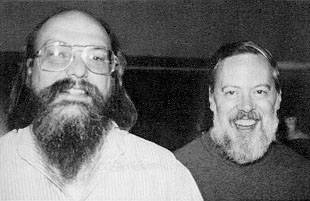 Ken Thompson (left) and Dennis Ritchie (right), 1973. Creators of Unix and the C language. Source: Jargon File (Public Domain)
Every story starts at AT&T Bell Labs in New Jersey, 1969. Ken Thompson and Dennis Ritchie had been working on Multics, a sprawling OS project on the GE-645 mainframe, and came away frustrated. Multics was too ambitious, too slow, too complex.
In a neglected corner of Bell Labs, Thompson found an unused PDP-7 and started building, as a hobby, a simple OS that stripped away Multics’s unnecessary complexity. Instead of “Multi-“, he used “Uni-“: UNICS (Uniplexed Information and Computing Service). The name later settled as Unix.
Unix’s design principles became known as “the Unix philosophy”:
- Do one thing and do it well
- Everything is a file
- Compose programs (pipe stdout of one as stdin of the next with
|) - Text is the universal interface
In 1973, Ritchie rewrote Unix in C. This was decisive. Before this, OSes were written in assembly and couldn’t be ported to different hardware. A C-written Unix opened the era of portable operating systems.
In the late 1970s, AT&T distributed Unix source code to universities at low cost. UC Berkeley took it up enthusiastically, and students began fixing and redistributing Unix. This was the branching point.
The BSD Branch: Berkeley’s Students
From 1977 onward, the Berkeley-derived Unix came to be called Berkeley Software Distribution (BSD). BSD added many features absent from the original Unix:
- TCP/IP networking stack (1983, the foundation of the Internet)
- Berkeley Sockets API (still the standard for network programming)
- Improved virtual memory
- Fast File System (FFS)
By the mid-1980s, BSD had become a de facto Unix standard. But AT&T filed licensing lawsuits, and Berkeley endured years of legal disputes. The result was a fully AT&T-free BSD, the ancestor of FreeBSD, NetBSD, and OpenBSD.
A key point: BSD is fully open source, with a license far more permissive than Linux’s GPL. This is why Apple later chose BSD as the foundation of macOS. Under GPL, Apple would have had to publish all their modifications; the BSD license imposed no such obligation.
NeXTSTEP → macOS: The Return of Steve Jobs
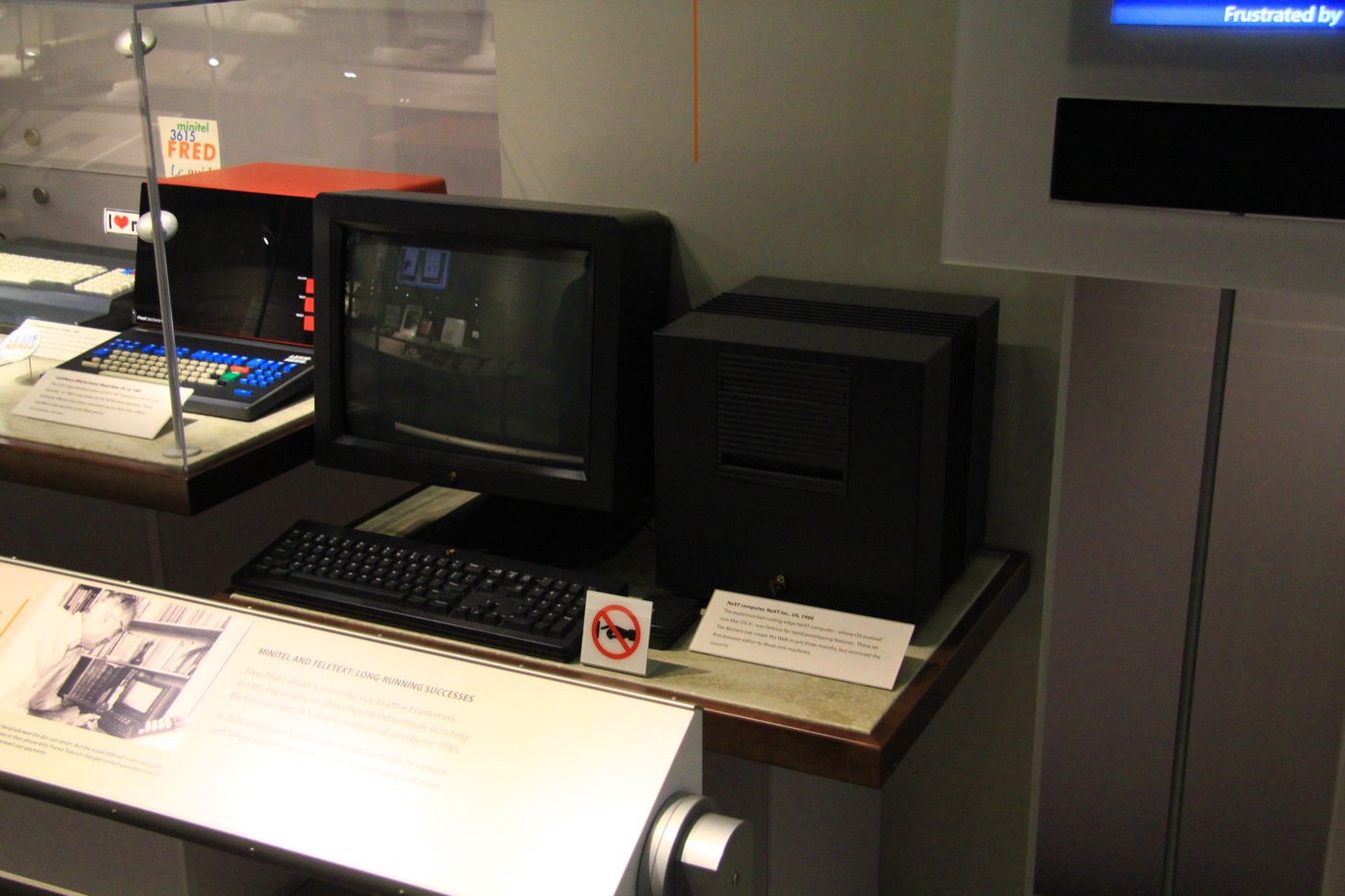 NeXTcube (1990), held at the Computer History Museum. The NeXTSTEP that ran on this machine is the root of today’s macOS. Photo: Michael Hicks, CC BY 2.0
In 1985, pushed out of Apple, Steve Jobs founded NeXT. NeXT’s goal was “a high-end workstation for universities and researchers.” The OS for that computer was NeXTSTEP (1989).
NeXTSTEP’s design was unusual:
- The kernel was the Mach microkernel (developed at Carnegie Mellon University)
- Layered on top was a BSD Unix layer for POSIX compatibility
- The application framework was Cocoa (originally AppKit) written in Objective-C
This layout was the practical expression of the then-fashionable “microkernels are the future” school. But NeXT computers flopped commercially. The company abandoned hardware to survive and shifted to porting NeXTSTEP to other hardware (1993~).
In 1996, something remarkable happened. Apple acquired NeXT. At the time Apple was bleeding from the failed “Copland” project meant to succeed Mac OS 9; they had no next-generation OS foundation. Apple debated between BeOS and NeXTSTEP as an outside purchase, and chose NeXTSTEP. The price was roughly $400 million.
Steve Jobs returned to Apple with NeXT and became interim CEO in 1997. And NeXTSTEP became the foundation of macOS.
- 1999: Mac OS X Server 1.0 (NeXTSTEP-based)
- 2001: Mac OS X 10.0 Cheetah — for general users
- 2007: iPhone OS (a shrunken Mac OS X)
- 2016: renamed from “Mac OS X” to macOS
So the kernel running on your MacBook today was sold by 1980s NeXT to 1990s Apple, and its roots trace back to the Mach research project at Carnegie Mellon University. A design over 30 years old is still alive.
Linux: A Finnish Student’s Hobby Project (1991)
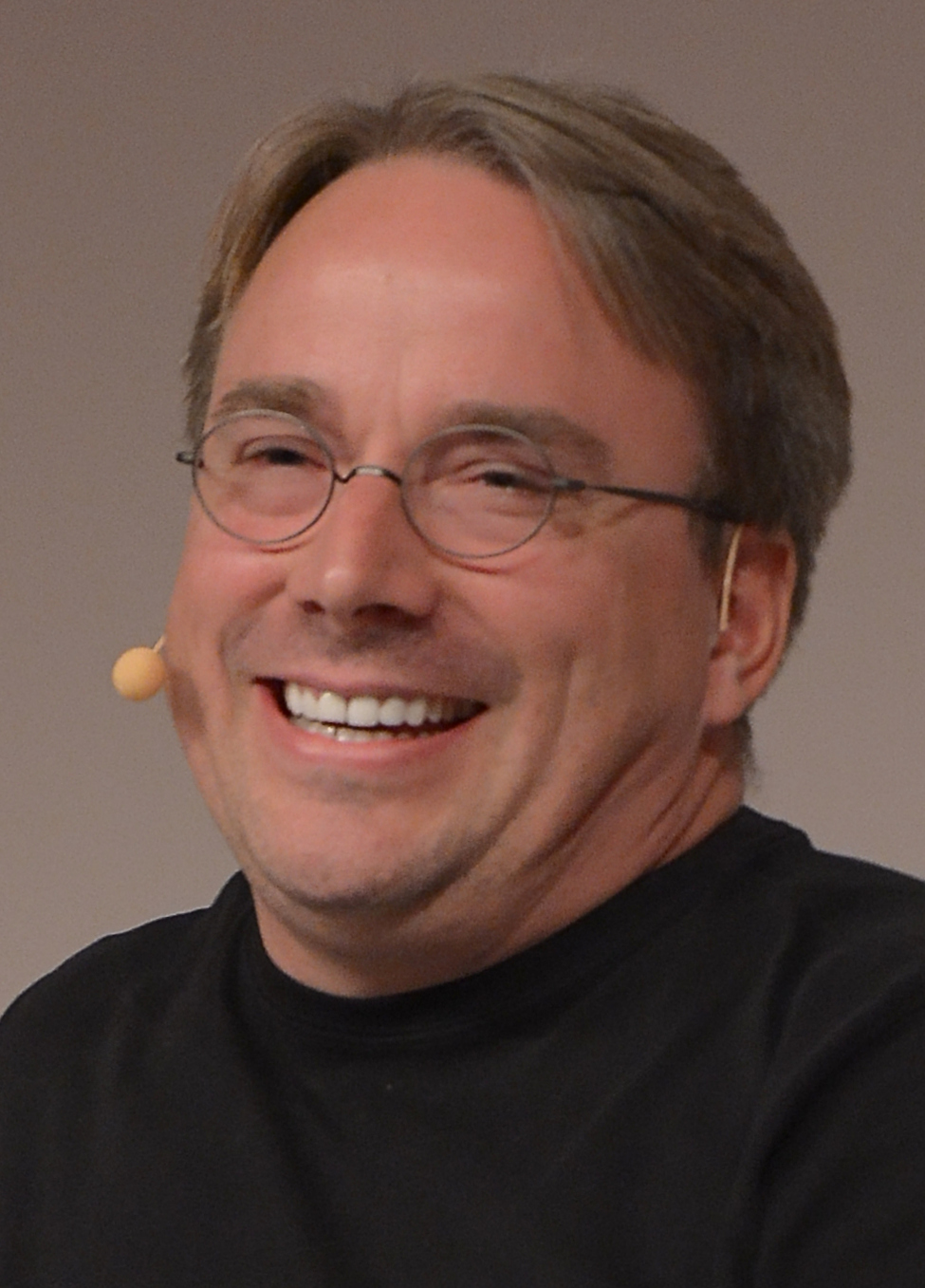 Linus Torvalds at LinuxCon Europe 2014, reflecting on how a 23-year-old hobby project became a backbone of the world’s infrastructure. Photo: Krd, CC BY-SA 4.0
In 1991, at the University of Helsinki, Linus Torvalds was taking an OS course and using Minix, Andrew Tanenbaum’s educational OS. Minix was an excellent learning tool but its commercial license restricted use, and Linus wanted something he could freely use on his home 386 PC.
So he started building an OS, as a hobby. His August 25 post to comp.os.minix is famous:
“Hello everybody out there using minix — I’m doing a (free) operating system (just a hobby, won’t be big and professional like gnu)…”
“Not big, not professional” — that hobby project runs today on the vast majority of the world’s servers, smartphones, and supercomputers, 30 years later.
Linux was GPL-licensed from the start and established a model where developers worldwide could contribute. It combined with the GNU project’s userland tools (gcc, bash, coreutils) to become a complete OS — which is why strictly it’s called GNU/Linux.
Linux’s defining trait — in kernel architecture:
- Monolithic kernel: following Unix tradition, all functionality (filesystem, networking, drivers, memory management) lives inside the kernel
- Tanenbaum’s 1992 critique that “microkernels are superior” and Linus’s retort became one of the famous debates in OS history
- Thirty years later, Linux has evolved into a partially modularized monolithic kernel (kernel modules)
VMS → Windows NT: Dave Cutler’s Comeback
Up to here every story is Unix-lineage. But Windows comes from a completely different bloodline.
In the 1970s, Digital Equipment Corporation (DEC) dominated the minicomputer market. Its OS was VMS (Virtual Memory System), a high-reliability server OS. VMS’s lead architect was Dave Cutler.
In 1988, with a new project canceled at DEC, Dave Cutler took his team and moved to Microsoft. Bill Gates had proposed: “build the next-generation 32-bit OS to succeed OS/2.”
Cutler designed Windows NT (NT = New Technology). Internally he carried many VMS ideas over — there’s even the joke that shifting each letter of VMS by one gives WNT (V→W, M→N, S→T).
Key characteristics of Windows NT:
- Hybrid kernel: it separates subsystems like a microkernel but keeps much in kernel space for performance
- POSIX subsystem, OS/2 subsystem, Win32 subsystem — in theory it could support multiple OS APIs concurrently
- Unicode-first: Unicode (UTF-16) was assumed from the design phase
- Multi-architecture support: x86, MIPS, Alpha, PowerPC (early on)
Windows NT 3.1 shipped in 1993, and NT 4.0, Windows 2000, XP, 7, 10, and 11 all follow the same NT kernel lineage. So when you build a Unity project on Windows 11, the kernel underneath traces back to DEC VMS (1977).
Meanwhile, Windows 95, 98, and ME were a completely separate lineage — a MS-DOS-based line from Windows 1.0–3.1. Microsoft unified the two lineages on the NT side with Windows XP in 2001, ending the DOS line.
Lineage Tree
Visualizing the story so far:
Part 2: The Design Philosophies of the Three OSes
Different lineages produce different philosophies. That’s why the three OSes respond differently to the same problem — “what to do when memory runs low.”
Linux: Openness and Performance
Linux culture places supreme value on “hackability.”
- Everything is exposed: the entire kernel source is GPL-open, readable and modifiable by anyone
- Control through the filesystem:
/procand/sysexpose kernel state as files- Examples:
cat /proc/meminfo,echo 3 > /proc/sys/vm/drop_caches
- Examples:
- Text first: configuration files are almost all plain text. There is no binary config DB (registry)
- Performance first: performance trumps compatibility. For instance, ABI compatibility is guaranteed but kernel-internal APIs can change at any time
- Accepting diversity: distros (Ubuntu, Arch, Fedora, Alpine…) each carry different philosophies
Downsides: fragmentation. We lump everything as “Linux,” but Ubuntu and Alpine are almost separate OSes in practice. Desktop UX also lags.
Windows: Binary Backward Compatibility Taken to the Extreme
Microsoft’s culture says, “a program a customer paid for ten years ago must still run today.”
- Backward compatibility is near-sacred: most Windows 95 programs still run on Windows 11
- Famous anecdote: Windows contains code to work around a specific game’s (SimCity) bug inside the kernel. SimCity had a bug reading freed memory; when Windows 95 became Windows NT and that memory was freed immediately, SimCity crashed — so Microsoft added code that delays memory frees when SimCity is running (documented on Raymond Chen’s blog)
- Strong binary APIs: Win32 has been effectively unchanged for 30 years. Higher layers (COM, .NET) maintain backward compatibility too
- Registry: system-wide config database — structured key-value rather than text files
- GUI first: GUI was designed before the command line. PowerShell arrived later
- Enterprise focus: Active Directory, Group Policy, and other large-organization management features are very strong
Downsides: accumulated compatibility code makes the kernel heavy and widens the security surface. That’s why bugs in 30-year-old APIs don’t disappear in 2025.
macOS: Controlled Experience and Hardware Integration
Apple’s culture says, “we design the hardware and the software together.”
- Vertical integration: Apple designs CPUs (Apple Silicon), OS (macOS), GUI (Aqua), app frameworks (Cocoa), and dev tools (Xcode) in-house
- A single official path: unlike Linux with many distros, unlike Windows with multiple subsystems. Only one official way exists
- Willingness to make bold transitions: Apple drops old versions aggressively
- PowerPC → Intel (2006, Rosetta 1 for transition)
- 32-bit → 64-bit (2019 macOS Catalina removed 32-bit app support entirely)
- Intel → Apple Silicon (2020, Rosetta 2 for transition)
- UX-first: animations, font rendering, color management are consistent at the OS level
- Security control: hierarchical security (Gatekeeper, notarization, SIP) places every app under Apple’s vetting
Downsides: low freedom. Once Apple drops support, there’s no recourse (e.g., Macs older than ~7 years can’t run the latest macOS). Compatibility outside the Apple ecosystem is secondary.
Philosophy Comparison
| Criterion | Linux | Windows | macOS |
|---|---|---|---|
| Core value | openness, performance | compatibility, enterprise | integration, experience |
| Kernel modification | anyone can | only Microsoft | only Apple |
| Binary compatibility | kernel ABI only | maintained for 30 years | Rosetta during big transitions |
| User interface | many choices (GNOME, KDE…) | Windows Shell (fixed) | Aqua (fixed) |
| Config storage | text files | registry | plist (XML/binary) |
| Package management | per-distro (apt, dnf, pacman) | MSI/EXE/Store | App Store / Homebrew / dmg |
| Main usage | servers, embedded, developers | enterprise, gaming, consumers | creative, developers, consumers |
| Gaming | poor (Proton improving) | best | moderate (Metal + Apple Silicon) |
Part 3: Kernel Architecture — Monolithic, Micro, Hybrid
The kernel is the heart of the OS. It manages resources between hardware and applications. How to organize the kernel has been an OS designer’s long-running debate since the 1980s.
Three Styles
1. Monolithic kernel
The entire kernel runs as one big program. Filesystem, network stack, drivers, memory management — all run in the same address space.
- Pros: fast; internal kernel calls are regular function calls
- Cons: a single driver bug can take the whole kernel down; the kernel becomes enormous
- Examples: Linux, traditional Unix, FreeBSD
2. Microkernel
The kernel holds only the minimum — processes, memory, IPC (inter-process communication). Filesystem, drivers, and so on live as server processes in user space.
- Pros: modular, stable, secure
- Cons: IPC cost makes it slow (messages go through the kernel one extra time)
- Examples: pure Mach, MINIX 3, QNX, L4, seL4
3. Hybrid kernel
Aims for microkernel modularity but keeps much in kernel space for performance.
- Pros: compromise between the two
- Cons: criticized as “not a real microkernel”
- Examples: Windows NT, macOS (XNU)
Linux — Monolithic at its Peak
The Linux kernel is enormous: over 30 million lines of source code as of 2024. Internally it is modular — drivers and filesystems can be loaded and unloaded as kernel modules.
1
2
3
4
5
6
7
8
# List currently loaded modules on Linux
lsmod

# Load a module
sudo modprobe nvidia

# Unload
sudo rmmod nvidia
These modules run in the same kernel address space. A malicious or buggy driver module can bring down the entire system. Linux adds additional security layers like module signing and SecureBoot for this reason.
Windows NT — A Hybrid in Practice
Windows NT separates an upper layer called the Executive from a lower layer called the Microkernel. But despite the name “Microkernel,” drivers, filesystems, and network stack all run in kernel space in practice.
The Windows NT stack:
A curious detail: early Windows NT had POSIX and OS/2 subsystems. In theory, POSIX programs could run on Windows unmodified. It proved impractical — POSIX was removed in Windows 8, and WSL (Windows Subsystem for Linux) emerged later via a completely different approach (running a real Linux kernel inside a VM).
XNU — A Mach + BSD Dual Structure
macOS’s kernel is called XNU (“X is Not Unix”). XNU has two layers:
- Mach 3.0 microkernel (lower): from CMU research, providing tasks, threads, message passing (Mach ports), and virtual memory
- BSD layer (upper): the Unix implementation ported from FreeBSD — process model (POSIX), network stack, filesystem (HFS+/APFS)
- I/O Kit: driver framework (written in C++)
Why such an odd structure?
Originally NeXTSTEP tried a “pure microkernel = Mach” with “BSD as a server process” on top. But that design was too slow. Even reading a file had to pass through multiple IPCs between a user-space BSD server and the Mach kernel.
So they compromised: ported BSD code into the same kernel space as Mach. The “microkernel” architectural philosophy broke, but performance was secured. That’s today’s XNU — theoretically a microkernel, practically a hybrid.
Hold on, let’s clarify this
“If microkernels are theoretically good, why does nobody use pure microkernels?”
The answer is IPC cost. Reading a file in a microkernel goes roughly like:
- App sends “read me a file” to the kernel
- Kernel forwards that message to the filesystem server process
- Filesystem server sends a message to the disk driver server
- Disk driver actually reads the disk, returns the result to the filesystem server
- Filesystem server returns the result to the app
Each step is a context switch plus message copy. On 1980s–90s hardware this cost was unbearable.
A monolithic kernel completes the same work in a single function call.
So most practical OSes converged on a hybrid — “adopt the microkernel philosophy, compromise for performance”. Pure microkernels survive only in specialized fields: real-time systems (QNX) or security-critical systems (seL4 — a mathematically verified kernel).
Part 4: Executable Binary Formats — Same C Code, Different Output
When you build the same C++-based Unity game, the three OSes produce different binaries:
- Linux: ELF (Executable and Linkable Format)
- Windows: PE / PE32+ (Portable Executable)
- macOS: Mach-O
These formats are completely different. Not just extension differences — the internal file structures diverge, so a binary from one OS can’t run on another without an emulator.
ELF — The Linux Standard (1988~)
Executable and Linkable Format was introduced in System V and is now used by most Unix-like systems (Linux, FreeBSD, Solaris).
ELF file structure:
Inspecting ELF:
1
2
3
4
5
6
7
8
9
10
$ file /bin/ls
/bin/ls: ELF 64-bit LSB pie executable, x86-64, version 1 (SYSV), ...

$ readelf -h /bin/ls
ELF Header:
  Magic:   7f 45 4c 46 02 01 01 00 00 00 00 00 00 00 00 00
  Class:                             ELF64
  Data:                              2's complement, little endian
  Type:                              DYN (Position-Independent Executable file)
  Machine:                           Advanced Micro Devices X86-64
PE — The Windows Lineage (1993~)
Portable Executable is the format introduced by Windows NT. It derives from Unix’s COFF (Common Object File Format) but has many Microsoft-specific extensions.
PE file structure:
An amusing detail: PE files still start with a DOS-compatible “MZ” magic (MZ are the initials of DOS developer Mark Zbikowski). A format designed in 1993 still carries a 1981-era DOS-compatibility string in 2026. This epitomizes Windows’s backward-compatibility culture.
Mach-O — The macOS Format
Mach-O (Mach Object) was designed alongside the Mach kernel. It started with NeXTSTEP and is still used by macOS and iOS.
Mach-O file structure:
Universal Binary (Fat Binary): one file can contain Mach-O for several architectures.
This is the structure that lets “the same app run natively on Intel Macs and M1 Macs”. The PowerPC→Intel transition in 2006 and the Intel→Apple Silicon transition in 2020 were both done the same way.
What It Means for Multi-platform Builds
Engines like Unity and Unreal advertise “build once, run on many platforms,” but the reality is that the engine rebuilds internally for each of the three formats. When you switch platform in Build Settings:
- Windows: compile with MSVC or clang-cl → emit PE32+, link Windows SDK
- macOS: clang/Xcode toolchain → emit Mach-O, link Cocoa frameworks (Universal Binary for Intel+ARM)
- Linux: gcc or clang → emit ELF, link glibc
Same C++ code, entirely different final binaries. That’s why dropping a .exe built on Windows onto macOS does nothing.
Another gotcha: game engines use many dynamic libraries.
- Windows:
.dll - macOS:
.dylibor.framework(bundles) - Linux:
.so
Each needs its own build per platform. That’s a common reason Unity native plugins only ship for Windows.
Part 5: macOS-specific Stories — What Apple Built Up
Now a section that will be especially fun for Mac users. We dig into Apple-proprietary systems that set macOS apart.
The Behind-the-Scenes of XNU
We said XNU is a Mach + BSD dual structure. But there’s a history of failure and compromise behind it.
Phase 1 (1985~88) — The dream of pure Mach The Mach project at Carnegie Mellon was an academic experiment to “reimplement BSD Unix features as a microkernel.” Rashid and students produced Mach 2.0, which was actually a hybrid where “Mach + BSD server” cohabited in one kernel.
Phase 2 (1990) — The attempt at Mach 3.0 Mach 3.0 aimed at a pure microkernel by completely separating BSD code into user-space servers. Theoretically elegant, but performance was dreadful. OSF/1, a commercial OS on Mach 3.0, failed in the market.
Phase 3 (1989~96) — NeXTSTEP’s pragmatic choice NeXT originally built NeXTSTEP on Mach 2.0, merging some BSD features directly into the Mach kernel for performance. That became NeXTSTEP’s kernel foundation.
Phase 4 (2000~) — XNU When Apple pulled NeXTSTEP into macOS, they significantly updated the BSD side pulling from FreeBSD 5.x. The result is XNU. That’s why uname -a on macOS reports “Darwin” — Darwin = XNU + BSD userland = the open-source portion of macOS.
1
2
$ uname -a
Darwin MacBook.local 23.0.0 Darwin Kernel Version 23.0.0: ...
Apple publishes Darwin as open source. You can download XNU sources from opensource.apple.com and build them yourself.
Mach Port — The Root of Everything
The central abstraction of the Mach microkernel is the port. A Mach port plays a role similar to Unix’s file descriptor but is far broader.
- Inter-process communication: messages are sent and received via ports
- Signal handling: Unix signals are translated into Mach port messages
- IOKit drivers: user-space apps communicate with drivers via ports
- Bootstrap: name services (provided by
launchd) also live on ports
Why does this matter? macOS’s security model and IPC are all built on top of ports. App sandboxes, for example, are implemented as “this app may only use these specific ports.” iOS’s strict app isolation is fundamentally Mach-port-based.
1
2
3
/* Sending a message via a Mach port (heavily simplified) */
mach_port_t target_port = ...;
mach_msg_send(&msg_header);
Developers rarely touch this directly, but it runs inside tools like the lldb debugger and Xcode Instruments.
Grand Central Dispatch (2009)
In macOS 10.6 Snow Leopard (2009), Apple introduced Grand Central Dispatch (GCD, libdispatch). It was Apple’s answer to the multi-core era.
Problems with traditional thread models:
1
2
3
4
/* Traditional C/Unix style */
pthread_t thread;
pthread_create(&thread, NULL, worker_function, arg);
pthread_join(thread, NULL);
- Developer manages thread count, lifetime, synchronization manually
- Without knowing core count, you create too many or too few
- Synchronization primitives are easy to misuse
GCD’s answer: throw work onto a queue instead of a thread.
1
2
3
4
5
6
7
8
/* Swift */
DispatchQueue.global(qos: .userInitiated).async {
    /* this runs in the background */
    let result = heavyComputation()
    DispatchQueue.main.async {
        updateUI(result)
    }
}
The OS automatically creates and reuses threads given core count and system load. The developer only specifies “what priority to run at” (QoS: User Interactive, User Initiated, Utility, Background).
GCD was open-sourced as libdispatch and is used by Swift on Linux. That is, GCD-style programming is available on other languages and platforms.
From a game developer’s angle: Unity’s Job System shares GCD’s philosophy — “delegate work, not threads, to a scheduler.” We cover this in detail in Part 13.
launchd — Five Years Before systemd
In macOS 10.4 Tiger (2005), Apple introduced launchd, unifying Unix’s traditional init system (SysVinit, cron, xinetd, inetd, atd — historically spread across many daemons) into one process.
Before launchd in Unix:
init(PID 1): system boot initcron: periodic jobsatd: one-shot scheduled jobsinetd: start daemons on network connection- Each daemon runs separately
launchd consolidates these into a universal daemon manager:
- runs as PID 1, manages all system processes
- services are defined via XML plist files
- supports on-demand launches based on file access or network activity
- auto-restart on failure
Historical significance: Linux’s systemd (Lennart Poettering, 2010) was inspired by launchd. When systemd landed, the Linux community criticized it as “against Unix philosophy” — but launchd had already taken the same approach five years earlier, quietly running well on macOS.
Managed via launchctl:
1
2
3
4
5
6
7
8
# List running services
launchctl list

# Start a service
launchctl load ~/Library/LaunchAgents/com.example.myservice.plist

# Stop it
launchctl unload ~/Library/LaunchAgents/com.example.myservice.plist
Apple Silicon — Heterogeneous P/E Cores
In 2020 Apple introduced its in-house CPU M1 (Apple Silicon) to the Mac. M1 is ARM64-based, but with a distinctive structure unlike a typical ARM server.
P-core (Performance) and E-core (Efficiency)
M1 has two core types running the same ARM ISA:
- P-core “Firestorm”: high performance, high power. Games, compilation, rendering
- E-core “Icestorm”: low performance, low power. Background tasks, system daemons, battery saving
| Spec | P-core | E-core |
|---|---|---|
| Clock | 3.2 GHz | 2.0 GHz |
| L1 cache | 192KB | 128KB |
| L2 cache | shared 12MB | shared 4MB |
| Power | ~15W | ~1W |
| Perf ratio | ~100% | ~25% |
| M1 count | 4 | 4 |
macOS’s QoS-based scheduling: GCD’s QoS classes reappear here.
- User Interactive / User Initiated QoS → mostly P-cores
- Utility QoS → context-dependent
- Background QoS → mostly E-cores
A developer writes DispatchQueue.global(qos: .userInitiated), and the OS decides which cores to run on. This reflects Apple’s philosophy of “developers shouldn’t need to know hardware details.”
16KB page size
Another oddity of Apple Silicon: the page size is 16KB. The Linux/Windows standard is 4KB.
- Pros: fewer TLB (Translation Lookaside Buffer) misses, better performance for large-memory apps
- Cons: changed memory alignment requirements. Legacy apps assuming 4KB pages can break
Early in the 2020 Apple Silicon transition, Homebrew, Docker, and some binary compatibility tools struggled with the 16KB page issue. Most are resolved today, but Unity native plugin developers should still be careful with page alignment in calls like mprotect().
Rosetta 2 — Not an Emulator, a Translator
One reason the Apple Silicon transition succeeded is Rosetta 2. It runs x86_64 Mach-O binaries on ARM64, achieving 70–80% of native performance. Impressive.
Rosetta 2 is not a JIT emulator. When an app is installed (or on first launch), x86 instructions are AOT-translated (Ahead-of-Time) to ARM and cached as a file. Subsequent runs execute an already-translated ARM binary and are fast.
The decisive trick — hardware TSO mode: this is the most interesting part.
x86 has a strong memory model (TSO, Total Store Order). The order in which one CPU’s writes become visible to other CPUs closely matches program order.
ARM has a weak memory model. The CPU may freely reorder memory reads/writes for performance. Programmers must insert explicit memory barriers to guarantee order.
The problem arises when programs written for x86 implicitly assume TSO. Translating such programs naively to ARM introduces new race conditions caused by ARM’s reordering.
Apple’s answer: they put a “TSO mode” into the M1’s hardware. When a Rosetta 2 translated binary runs, the CPU sets a “this thread runs in TSO mode” flag. Then the ARM CPU behaves with x86-like strong memory ordering.
💡 This topic returns in Part 12 (Memory Models and Atomics). For now, remember that Apple pulled off a compatibility trick at the hardware level.
Limits of Rosetta 2:
- Latest x86 extensions like AVX-512 are not translated
- Kernel extensions (.kext) can’t run under Rosetta — the OS itself must be native
- Programs with built-in JITs (Chrome V8 etc.) incur double translation (Rosetta + JIT) and can be slow
XNU Internals
Apple Silicon Heterogeneous Cores
Hold on, let’s clarify this
“Why is Rosetta 2 fast? It’s an emulator — how does 70% of native perf make sense?”
Three overlapping reasons.
- AOT translation (translate in advance): it’s not an emulator. At install time (or on first run), x86 binaries are fully translated to ARM and cached. After that, only native ARM executes.
- M1 is simply faster than contemporary x86 in absolute terms: M1’s single-core performance is excellent against same-era Intel CPUs. Even dropping to 70%, absolute perf remains strong.
- Hardware TSO mode: emulating x86 memory ordering in software on ARM is expensive. Apple moved that cost into hardware, making it free.
Limits: the hardware TSO mode is active only when x86 binaries run. Native ARM apps use ARM’s weak model as-is.
Part 6: The Three OSes Side by Side
Let’s consolidate what we’ve covered. Strengths and weaknesses of each, laid out objectively.
Developer Perspective
| Area | Linux | Windows | macOS |
|---|---|---|---|
| Kernel source access | ✅ Fully open | ❌ Closed | 🟡 Darwin only (GUI/Cocoa closed) |
| CLI ecosystem | ✅ Best (bash, coreutils native) | 🟡 PowerShell great, needs WSL | ✅ Unix-standard tools included |
| Package management | ✅ apt/dnf/pacman | 🟡 winget/choco (latecomer) | 🟡 Homebrew (unofficial) |
| Virtualization/containers | ✅ Docker native | 🟡 WSL 2 / Hyper-V | 🟡 Docker Desktop (via VM) |
| Language support | ✅ All | ✅ All (especially .NET) | ✅ All (Swift first-class) |
| IDE | 🟡 VS Code, CLion | ✅ Visual Studio best | ✅ Xcode, JetBrains |
| Documentation | 🟡 Scattered, man pages | ✅ MSDN systematic | ✅ Apple Developer docs |
| Community | ✅ Huge, open | 🟡 Enterprise-centric | 🟡 Apple ecosystem-centric |
Game Development Perspective
| Area | Linux | Windows | macOS |
|---|---|---|---|
| Primary graphics APIs | Vulkan, OpenGL | DirectX 11/12, Vulkan | Metal (OpenGL/Vulkan deprecating) |
| Engine support | 🟡 Unity/Unreal target only | ✅ Best (including editors) | 🟡 Unity/Unreal editor improving |
| Audio APIs | ALSA, PulseAudio, PipeWire | XAudio2, WASAPI | Core Audio |
| Debugger/profiler | 🟡 GDB, Valgrind | ✅ Visual Studio | ✅ Instruments, Xcode |
| Steam gameplay | 🟡 Proton (improving) | ✅ Native | 🟡 Limited |
| VR/AR support | 🟡 SteamVR | ✅ WMR, SteamVR | 🟡 Vision Pro ecosystem |
Server Operations Perspective
| Area | Linux | Windows | macOS |
|---|---|---|---|
| Web server share | ~75% | ~20% | ~0% (not server-oriented) |
| Containers native | ✅ | 🟡 LCOW (Linux containers via WSL) | ❌ |
| Low-resource ops | ✅ Runs in hundreds of MB | 🟡 Several GB needed | 🟡 Rarely used as server |
| License cost | ✅ Free | 💰 Paid (Windows Server) | 🟡 Apple hardware required |
Key Takeaways
- There is no “best OS” — it depends on use case
- Server/dev: Linux dominates
- Enterprise/gaming client: Windows dominates
- Creative work/individual dev: macOS is strong
- All OSes borrow each other’s strengths:
- Windows with WSL gains Linux compatibility
- macOS leverages Linux tooling via Homebrew
- Linux is investing in desktop UX
Part 7: Security and Sandboxing — Briefly
Each OS has a different security model. Focusing only on what’s relevant to game developers.
macOS — Layered Security
SIP (System Integrity Protection): protects system files. Even root cannot modify /System, /bin. Introduced in El Capitan, 2015.
Gatekeeper: blocks execution of unsigned apps. The “developer not verified by Apple” warning comes from this.
Notarization: apps must be submitted to Apple for malware verification before running without Gatekeeper warnings. Mandatory since 2019.
App Sandbox: Mac App Store apps must be sandboxed. General apps optional. Filesystem, network, camera are declared via entitlements.
Hardened Runtime: additional security layer blocking JIT, library injection, etc.
Developer angle: shipping commercial Mac apps requires an Apple Developer account ($99/year) for signing + notarization. Critical for game distribution.
Windows — UAC and Defender
UAC (User Account Control): prompts the user for admin-level actions. Introduced with Vista (unpopular then), now an essential security layer.
Windows Defender: built-in AV. Since Windows 10, third-party AV is rarely needed.
Code Signing: Authenticode signatures. EV certificates allow execution without SmartScreen warnings. Recommended for game distribution.
AppContainer: UWP app isolation. Similar to Mac App Sandbox but narrower in use.
Linux — A Flexible Toolbox
User/Group permissions: Unix tradition. rwx bits, UID/GID.
Capabilities: slice root’s privileges into specific ones (CAP_NET_BIND_SERVICE, CAP_SYS_ADMIN, etc.).
SELinux / AppArmor: Mandatory Access Control for fine-grained policy.
cgroups + namespaces: the foundation of Docker. Resource limits and isolation for process groups.
seccomp: syscall filtering. Sandbox apps to only allowed syscalls.
For game distribution, packaging formats like AppImage, Flatpak, and Snap use these technologies internally.
Part 8: From a Game Developer’s Angle
Finally, how do these OS differences show up from a game dev perspective?
Platform-specific Considerations
1. Unity Editor
- Windows: full features, recommended
- macOS: well supported, native Apple Silicon builds available
- Linux: limited support (official Editor exists, plugin compatibility weaker)
2. Unreal Engine Editor
- Windows: full features, default
- macOS: supported with some feature limits (Vulkan support, etc.)
- Linux: officially supported, editor buildable
3. Graphics API choice
- If cross-platform, abstract across Vulkan + DirectX 12
- If Apple-only, consider Metal (Apple is deprecating OpenGL/Vulkan)
- Engines abstract this, but native optimization requires direct engagement
4. Crash handlers
- Windows: SEH (Structured Exception Handling),
SetUnhandledExceptionFilter - Linux/macOS: POSIX signals (
SIGSEGV,SIGABRT),signal()orsigaction() - The two approaches differ, making cross-platform crash reporters (Sentry, Crashlytics) complex
5. File paths
- Windows:
C:\Users\name\AppData\..., backslash - macOS:
/Users/name/Library/Application Support/..., slash - Linux:
/home/name/.local/share/...(XDG spec), slash - Use engine abstractions like
Application.persistentDataPath; be careful when dealing directly
6. Thread priority
- Windows:
SetThreadPriority, 7 levels (IDLE~TIME_CRITICAL) - macOS: QoS classes (4) + pthread priorities
- Linux: nice (-20~19) + pthread SCHED_FIFO/RR
- APIs differ when you need to elevate e.g. audio threads
Cross-platform Engine Abstractions
Engines have layers to hide OS differences. For Unreal Engine:
1
2
3
4
5
6
7
8
9
10
11
/* UE platform abstraction (conceptual example) */
#if PLATFORM_WINDOWS
#include "Windows/WindowsPlatformFile.h"
typedef FWindowsPlatformFile FPlatformFile;
#elif PLATFORM_MAC
#include "Apple/ApplePlatformFile.h"
typedef FApplePlatformFile FPlatformFile;
#elif PLATFORM_LINUX
#include "Unix/UnixPlatformFile.h"
typedef FUnixPlatformFile FPlatformFile;
#endif
Engine developers (those modifying the engine) need to understand all three OS APIs. Game programmers (who consume the engine) can operate at the FPlatformFile abstraction.
Toolchain Compatibility
| Tool | Linux | Windows | macOS |
|---|---|---|---|
| Primary compiler | gcc/clang | MSVC/clang-cl | clang |
| Standard library | glibc/libstdc++/libc++ | MSVC STL | libc++ |
| Linker | ld/lld | link.exe/lld-link | ld64 |
| Debugger | gdb, lldb | Visual Studio, WinDbg | lldb, Xcode |
| Profiler | perf, Tracy | Visual Studio Profiler, PIX | Instruments |
| CI/CD availability | ✅ Best | ✅ GitHub Actions Windows Runner | 🟡 Mac Runner is paid/limited |
The Apple catch: building iOS/macOS apps requires Xcode, and Xcode only runs on macOS. Building Apple-target games requires a Mac build machine. That’s why Mac Runners are expensive on CI/CD.
Platform Debugging Experience
Windows (Visual Studio)
- Best-in-class IDE + debugger integration
- Edit and Continue, conditional breakpoints, data breakpoints — all smooth
- PIX for GPU profiling
macOS (Xcode + Instruments)
- Instruments is one of the world’s best profilers (System Trace, Time Profiler, Allocations)
- Visualizes Apple Silicon P/E core timelines
- Metal Frame Debugger
Linux (gdb/lldb + Tracy)
- CLI tools primarily; VS Code has improved UX greatly
- Valgrind (Memcheck) is powerful but slow
- Tracy Profiler is one of the top cross-platform options
Wrap-up
One-page summary of what this post covered.
Lineages:
- Unix (1969) → BSD (1977) → NeXTSTEP (1989) → macOS (2001)
- Unix → Minix → Linux (1991)
- VMS (1977) + Dave Cutler → Windows NT (1993)
Design philosophies:
- Linux: openness + performance
- Windows: backward compatibility
- macOS: vertical integration + experience
Kernel architecture:
- Linux: monolithic
- Windows NT: hybrid
- macOS XNU: Mach microkernel + BSD layer (dual structure)
Binary formats:
- Linux: ELF
- Windows: PE (still carries the 1981 DOS MZ header)
- macOS: Mach-O (Universal Binary for multiple architectures)
macOS-proprietary items:
- XNU: microkernel in theory, hybrid in practice
- Mach port: root of macOS IPC and security
- Grand Central Dispatch (2009): “queues not threads” abstraction
- launchd (2005): systemd’s five-year forerunner
- Apple Silicon: P/E heterogeneous cores + 16KB pages
- Rosetta 2: AOT translation + hardware TSO mode
Remember for game dev:
- Executable formats differ — multi-platform builds are per-OS builds
- Seemingly small details — crash handlers, thread priority, file paths — diverge at the API level
- Trust engine abstractions, but performance-critical code often needs per-platform optimization
- Apple platform targets require a Mac build machine
From the next post we enter concrete theory atop this map. Part 8 is Processes and Threads — PCB/TCB structures, the actual difference between fork() and CreateProcess(), thread mapping models, and context-switching costs linked to game engines’ execution models.
References
Textbooks
- Silberschatz, Galvin, Gagne — Operating System Concepts, 10th ed., Wiley, 2018 — OS standard textbook, chapters 3 (Processes) and 4 (Threads)
- Tanenbaum, Bos — Modern Operating Systems, 4th ed., Pearson, 2014 — origin of the microkernel vs. monolithic debate
- Bovet, Cesati — Understanding the Linux Kernel, 3rd ed., O’Reilly, 2005 — Linux kernel internals
- Russinovich, Solomon, Ionescu — Windows Internals, 7th ed., Microsoft Press, 2017 — NT kernel details
- Singh — Mac OS X Internals: A Systems Approach, Addison-Wesley, 2006 — XNU, Mach, BSD layer
- Levin — *OS Internals: Volume I — User Mode and Volume II — Kernel Mode, Technologeeks, 2019 — the most detailed modern writing on macOS/iOS internals
- Gregory — Game Engine Architecture, 3rd ed., CRC Press, 2018 — OS use in game engines
Papers and Research
- Accetta, Baron, Bolosky, Golub, Rashid, Tevanian, Young — “Mach: A New Kernel Foundation for UNIX Development”, USENIX Summer 1986 — Mach’s first exposition
- Young, Tevanian, Rashid, Golub, Eppinger, Chew, Bolosky, Black, Baron — “The Duality of Memory and Communication in the Implementation of a Multiprocessor Operating System”, SOSP 1987
- Rashid, Baron, Forin, Golub, Jones, Julin, Orr, Sanzi — “Mach: A Foundation for Open Systems”, Workshop on Workstation Operating Systems, 1989
- Bershad, Anderson, Lazowska, Levy — “Lightweight Remote Procedure Call”, SOSP 1989 — microkernel IPC optimization
- Anderson, Bershad, Lazowska, Levy — “Scheduler Activations: Effective Kernel Support for the User-Level Management of Parallelism”, SOSP 1991 — M:N thread model
Official Docs and Sources
- Apple Open Source — opensource.apple.com — XNU, Darwin sources
- Apple Developer — Dispatch Queues and Concurrency — developer.apple.com/documentation/dispatch
- Apple Developer — About the Rosetta Translation Environment — developer.apple.com
- Linux Kernel Documentation — kernel.org/doc
- Microsoft Docs — Windows Kernel-Mode Architecture — learn.microsoft.com
- FreeBSD Architecture Handbook — docs.freebsd.org/en/books/arch-handbook/
Blogs / Articles
- Raymond Chen — The Old New Thing — Windows backward-compat anecdotes (including the SimCity case)
- Howard Oakley — The Eclectic Light Company — macOS internals
- Hector Martin (marcan) — Apple Silicon reverse engineering — Asahi Linux project
- Dougall Johnson — “M1 Memory and Performance” series — Apple Silicon hardware analysis
- Linus Torvalds — comp.os.minix “Hello everybody” post (1991-08-25)
- Linus vs. Tanenbaum debate (1992) — microkernel debate archives
Tools
file,readelf,objdump(Linux) — ELF analysisdumpbin,PEview(Windows) — PE analysisotool,nm,lipo(macOS) — Mach-O analysislaunchctl,ps,top— common observability tools across the three- Instruments (macOS) — Apple’s official profiler
Image Credits
- Ken Thompson & Dennis Ritchie (1973) — Jargon File, Public Domain — Wikimedia Commons
- Linus Torvalds at LinuxCon Europe 2014 — photo by Krd, CC BY-SA 4.0 — Wikimedia Commons
- NeXTcube (1990) at Computer History Museum — photo by Michael Hicks, CC BY 2.0 — Wikimedia Commons

.jpg)
_-_Computer_History_Museum.jpg)