
C# LSP vs JetBrains MCP Token Efficiency Analysis — Which Tool Is More Efficient in Claude Code?

- AI in Game Development: Insights from 2,165 Messages - A Developer's 47-Day Log
- Claude Opus 4.5 → 4.6 Transition: Performance, Tokens, Workflow Changes Experienced by a Game Developer
- Does AGENTS.md Really Help? - Analysis of a Paper Verifying the Impact of Context Files on Coding Agents
- Claude Memory Goes Free, /simplify & /batch — and the Hidden Cost of CLAUDE.md
- Complete Guide to Installing Claude Code on Windows — With Real-World Troubleshooting
- The Complete Claude Code Guide for Game Designers — From Specs to Balancing
- Complete Guide to Setting Up C# LSP for Claude Code on macOS — From csharp-ls Installation to Troubleshooting
- C# LSP vs JetBrains MCP Token Efficiency Analysis — Which Tool Is More Efficient in Claude Code?
- LSP consumes 3.1x fewer tokens than MCP on average while providing higher information quality
- LSP and MCP have zero overlapping features — they complement each other, so using both is the optimal strategy
- A hybrid strategy (LSP first + MCP as backup) saves approximately 60%+ tokens per session

Introduction
When working with C# projects in Claude Code, there are two main tools available: csharp-ls (LSP) and JetBrains Rider MCP. Both help with code analysis, but their mechanisms and efficiency differ significantly.
This report performs the same 7 tasks on the same Unity project file using both tools and measures response size and information quality. It answers the question “Which tool is more efficient for the same task?” with data.
Why Does This Matter?
AI coding tools like Claude Code consume tokens (text fragments) to operate. The fewer tokens needed to get the same information:
- Faster responses
- Lower costs
- Better context retention in long conversations (context window savings)
1. Executive Summary
| Metric | Result |
|---|---|
| Average Token Savings | 3.1x (LSP uses fewer than MCP) |
| LSP Information Quality | A+ (type info + API docs included) |
| MCP-Only Capabilities | 3 (error diagnostics / refactoring / code formatting) |
| Verdict | Use both (LSP first, MCP when needed) |
2. Test Environment
| Item | Value |
|---|---|
| Project | psv-client (Unity 2022.3.31) |
| Target File | Assets/App/Editor/EditorStartup.cs (56 lines) |
| csharp-lsp | Claude Code built-in |
| JetBrains MCP | Rider MCP plugin |
3. Test Methodology
The same 7 tasks were performed on the same file using both tools, and response sizes were compared.
Token estimation: approximately 4 characters = 1 token for English/code mixed text
| Test | Task | LSP Operation | MCP Operation |
|---|---|---|---|
| T1 | Class info lookup (EditorStartup) | hover | get_symbol_info |
| T2 | In-file text search (“SessionState”) | Grep | search_in_files_by_text |
| T3 | Project-wide reference search (“EditorStartup”) | findReferences | search_in_files_by_text |
| T4 | File structure overview | documentSymbol | N/A |
| T5 | External API info lookup (Canvas) | hover | get_symbol_info |
| T6 | Go to definition (Shader.Find) | goToDefinition | get_symbol_info |
| T7 | Error/warning diagnostics | N/A | get_file_problems |
4. Results
| Test | LSP Response (chars) | MCP Response (chars) | LSP Efficiency | Winner | Key Difference |
|---|---|---|---|---|---|
| T1: Class Info | 280 | 22 | Info dominance | LSP | MCP returns {"documentation":""} (empty) |
| T2: File Search | 180 | 448 | 2.5x | LSP | Same 4 results but MCP has heavy JSON wrapping |
| T3: Project Search | 110 | 520 | 4.7x | LSP | LSP finds only 2 real refs, MCP includes strings for 5 total |
| T4: File Structure | 280 | - | - | LSP Only | MCP doesn’t have this feature |
| T5: External Type | 120 | 22 | Info dominance | LSP | MCP returns empty again, LSP has signature + docs |
| T6: Go to Def | 125 | 22 | - | Draw | Both fail on external library |
| T7: Diagnostics | - | 55 | - | MCP Only | LSP doesn’t have this feature |
Note: In T1 and T5, MCP responses appear smaller, but the content is
{"documentation":""}(empty). Smaller doesn’t mean better — what matters is whether there’s useful information.
5. Visual Comparison
5.1 Response Size Comparison (Characters)
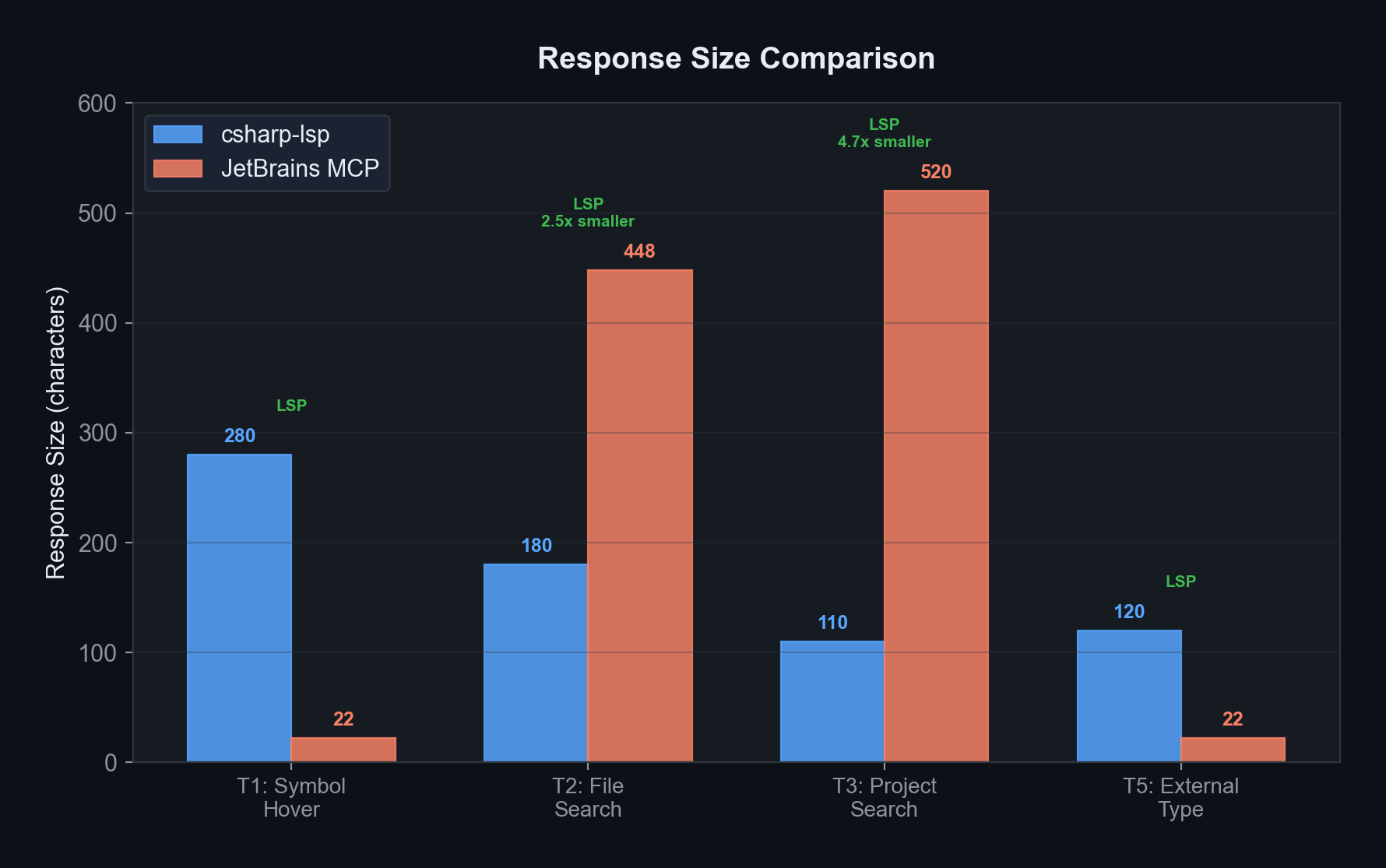
File search (T2) shows 2.5x difference, project search (T3) shows a 4.7x gap. LSP is much lighter.
5.2 Token Consumption Comparison
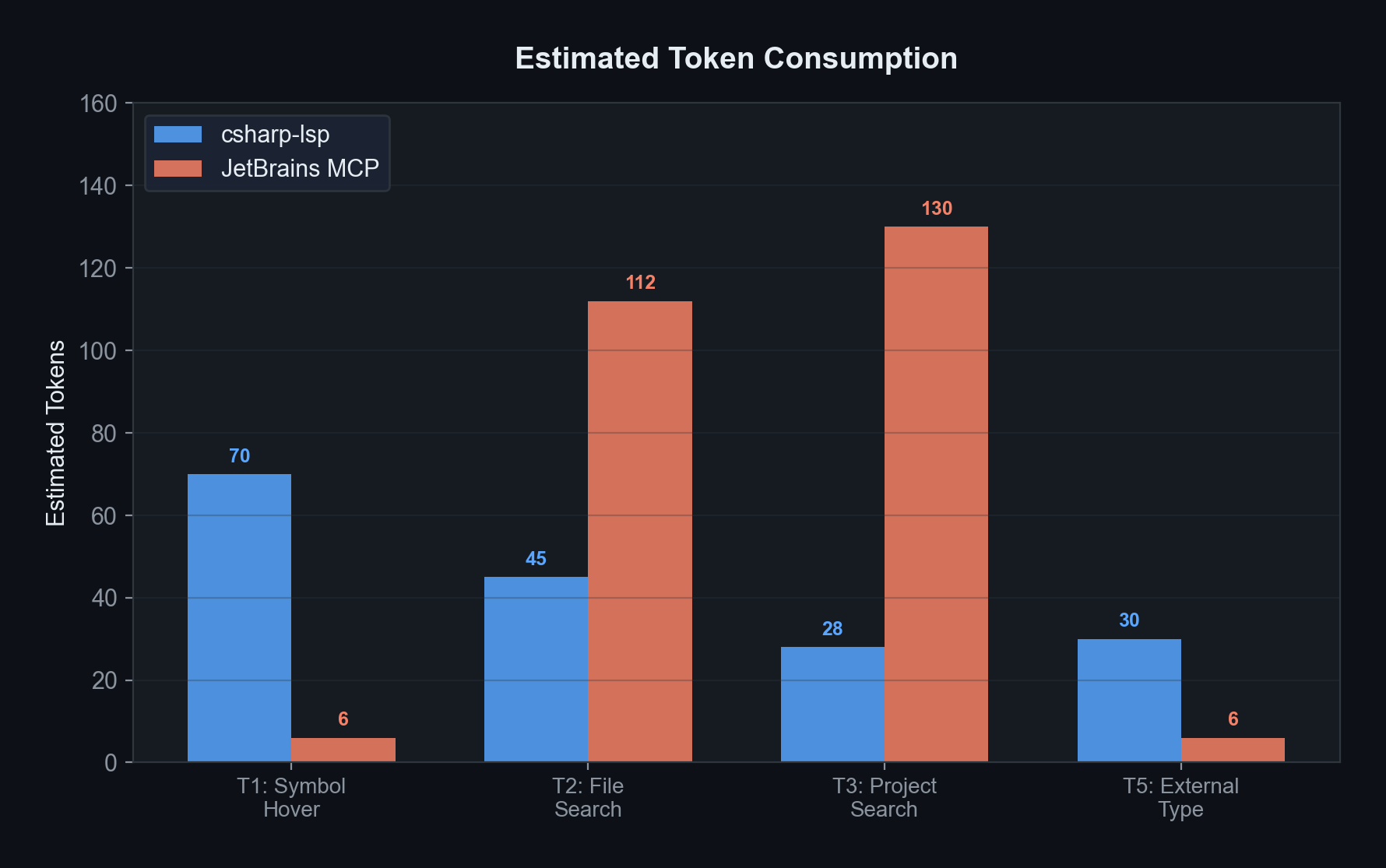
For the same tasks, LSP uses 3.1x fewer tokens on average. This difference compounds as conversations grow longer.
5.3 Information Quality Scores (Radar Chart)
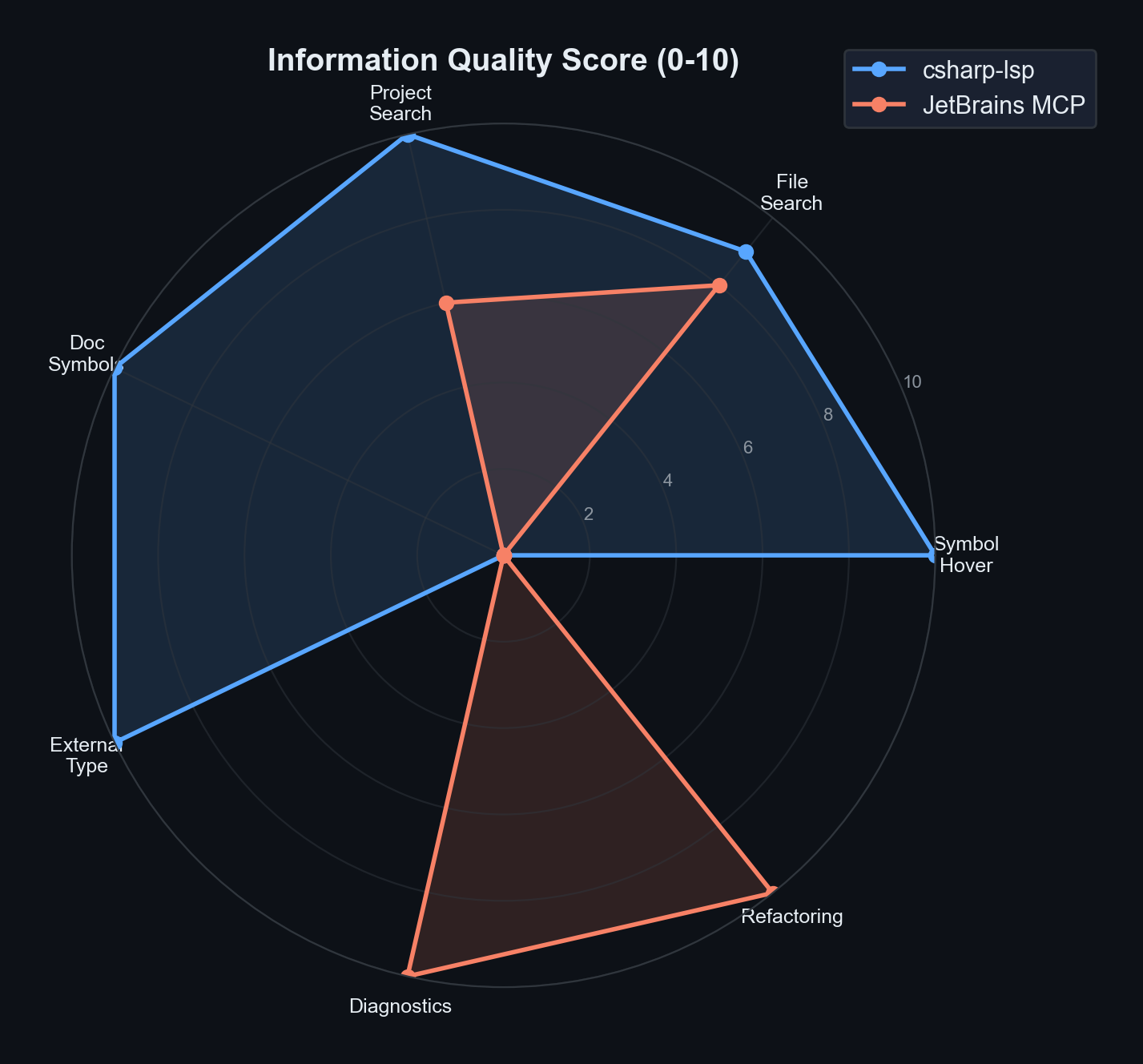
The two tools’ strengths lie in completely different areas:
- LSP excels at: type information, code search, file structure analysis
- MCP excels at: error diagnostics, refactoring
With almost no overlap, they are complementary, not competitive.
5.4 Test Winner Distribution
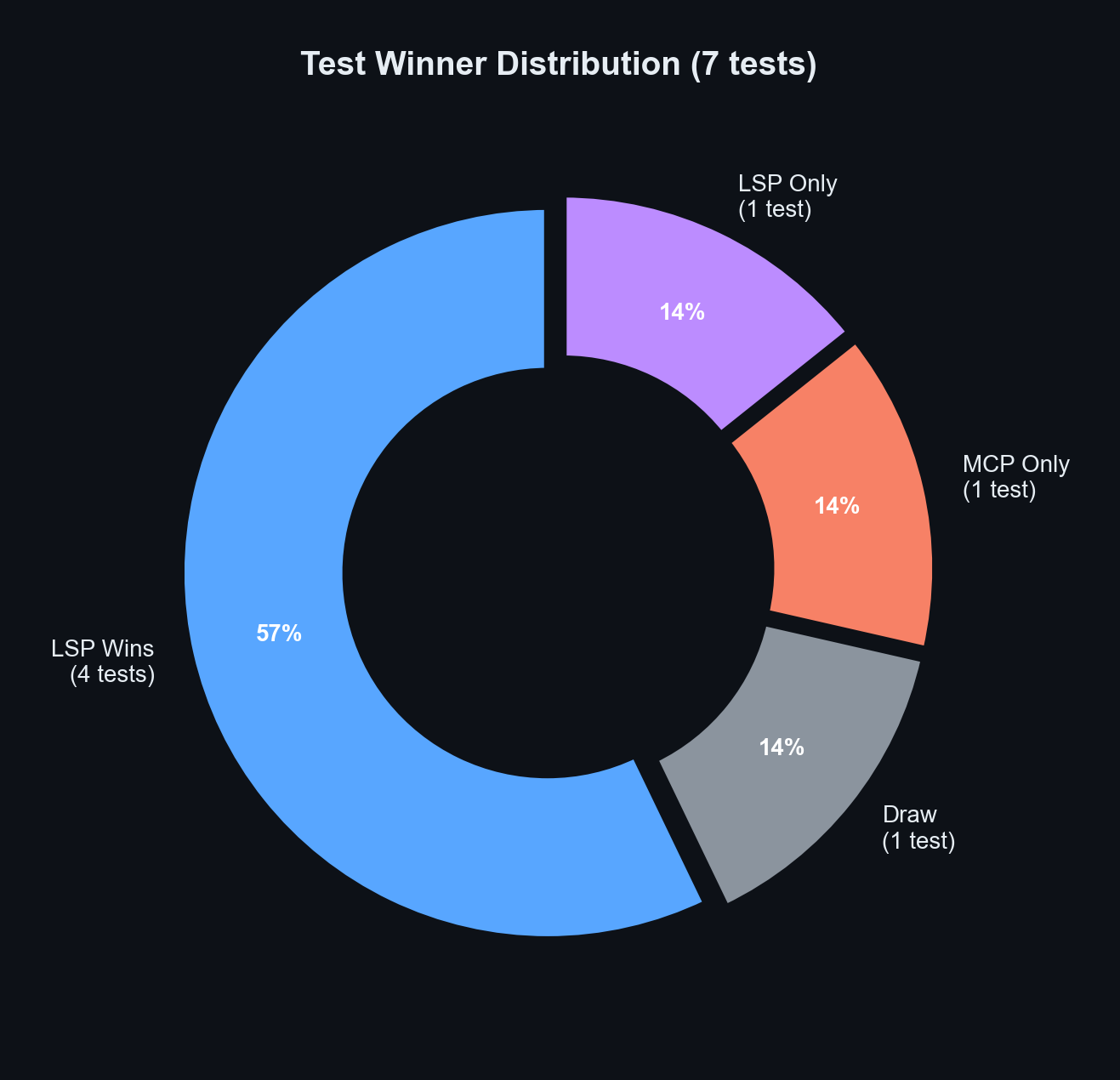
Out of 7 tests:
- LSP wins: 4 (57%) — most everyday code exploration
- LSP only: 1 (14%) — file structure view
- MCP only: 1 (14%) — error diagnostics
- Draw: 1 (14%) — external library limitation
5.5 Feature Support Matrix
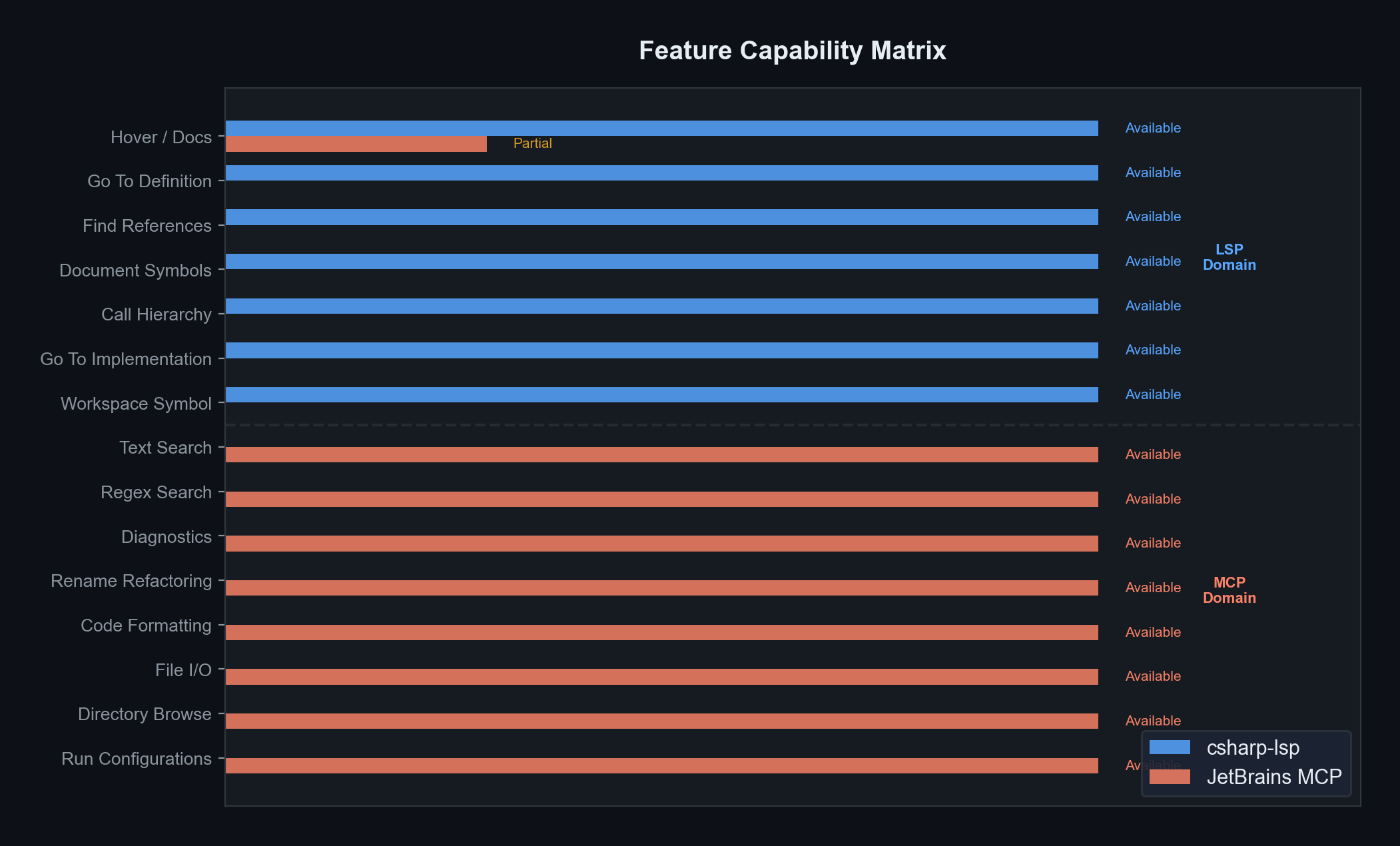
Divided by the dotted line:
- Top 7 = LSP-only capabilities (code analysis domain)
- Bottom 8 = MCP-only capabilities (IDE features domain)
The two tools have zero overlapping features — this is why a hybrid approach is essential.
5.6 Per-Session Token Savings
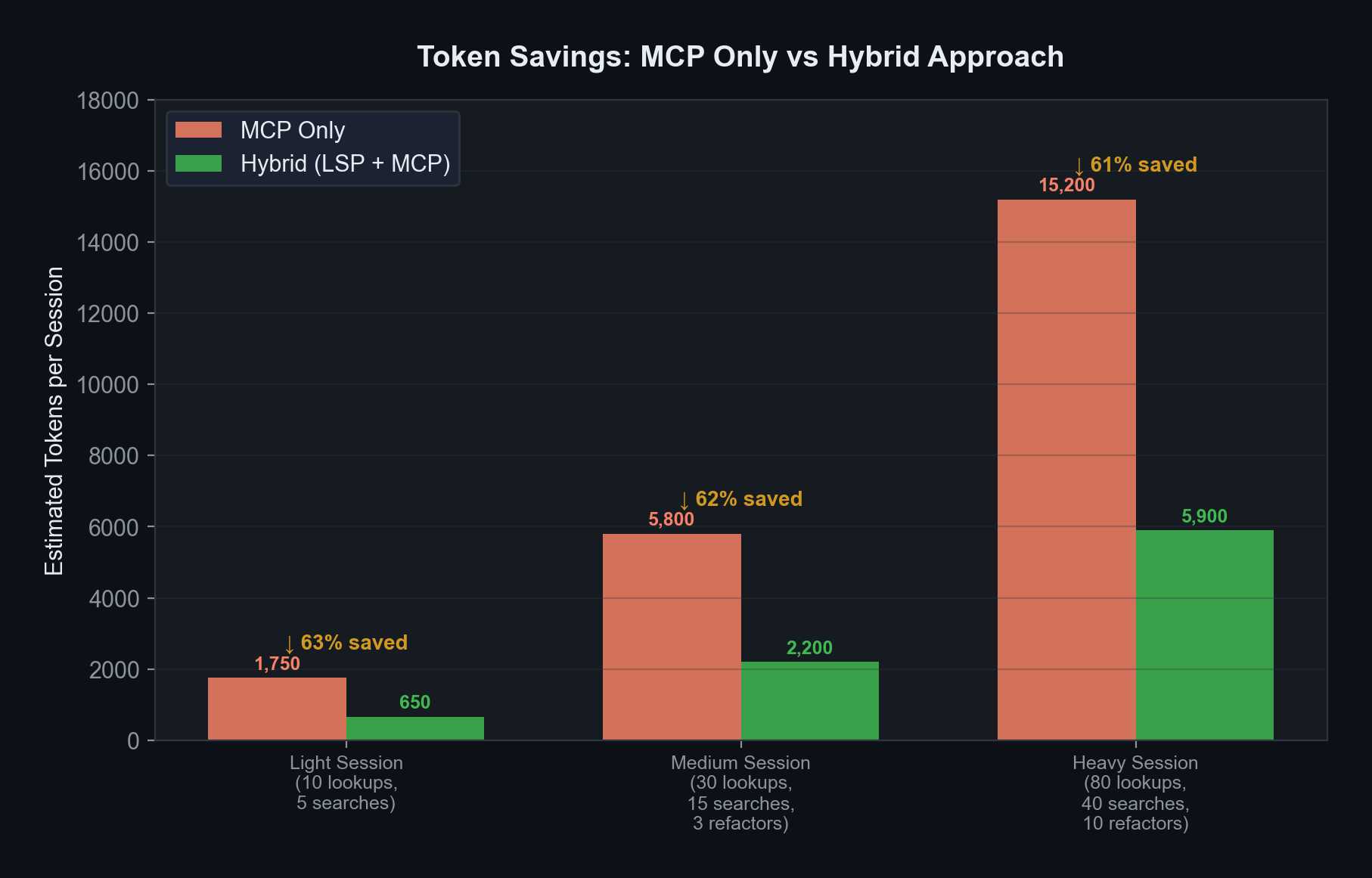
Estimated savings by work scenario:
- Light session (10 lookups, 5 searches): 63% savings
- Medium session (30 lookups, 15 searches, 3 refactors): 62% savings
- Heavy session (80 lookups, 40 searches, 10 refactors): 61% savings
In every case, approximately 60%+ token savings.
5.7 Smart Search vs Simple Search
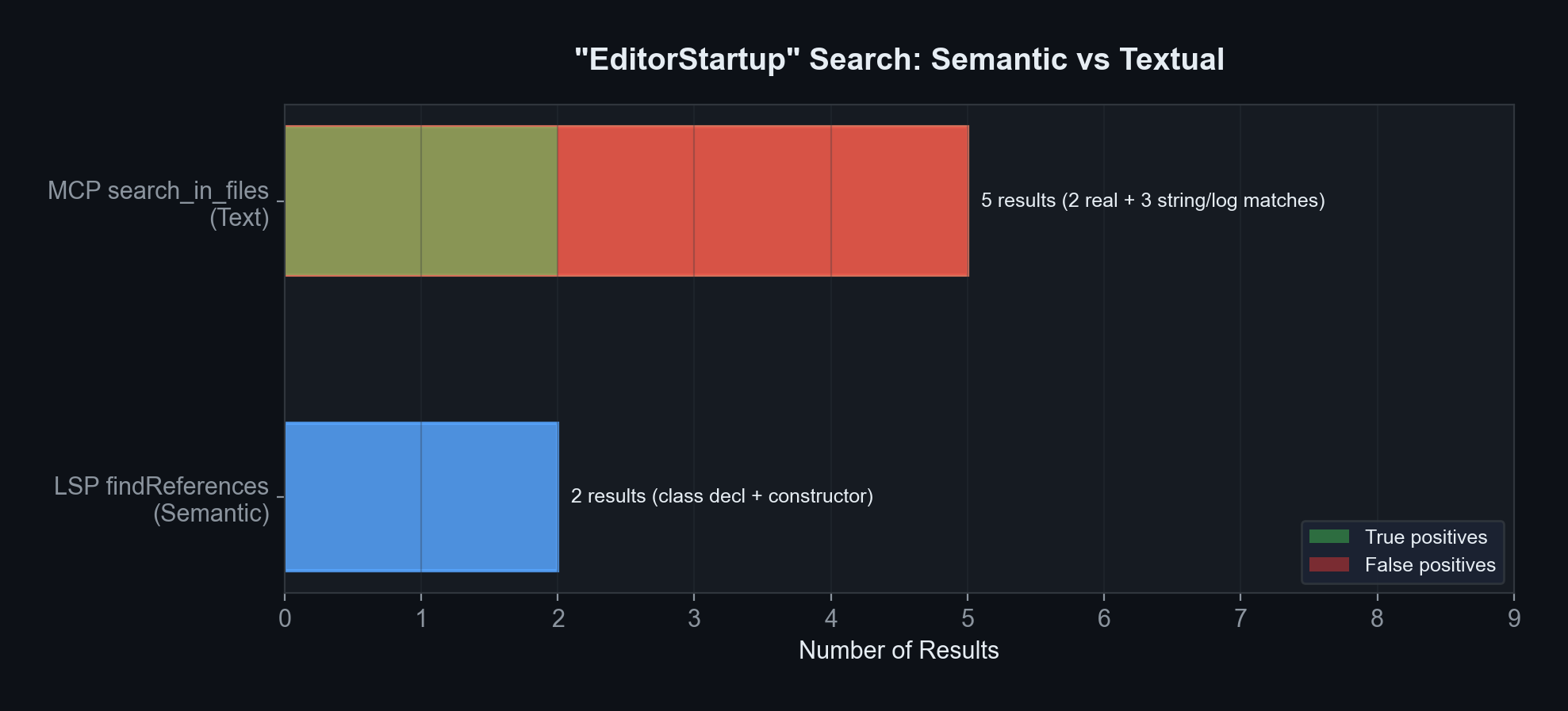
The biggest difference appears when searching for "EditorStartup":
| Tool | Results | What was found |
|---|---|---|
| LSP (semantic search) | 2 | Class declaration and constructor — real code references only |
| MCP (text search) | 5 | Above 2 + string "EditorStartup.Reloading" + log messages = 3 false positives included |
Why it matters: Showing false results to AI can lead to incorrect judgments. LSP picks out only “code references,” while MCP fetches everything that contains the text.
5.8 Quality-Adjusted Efficiency
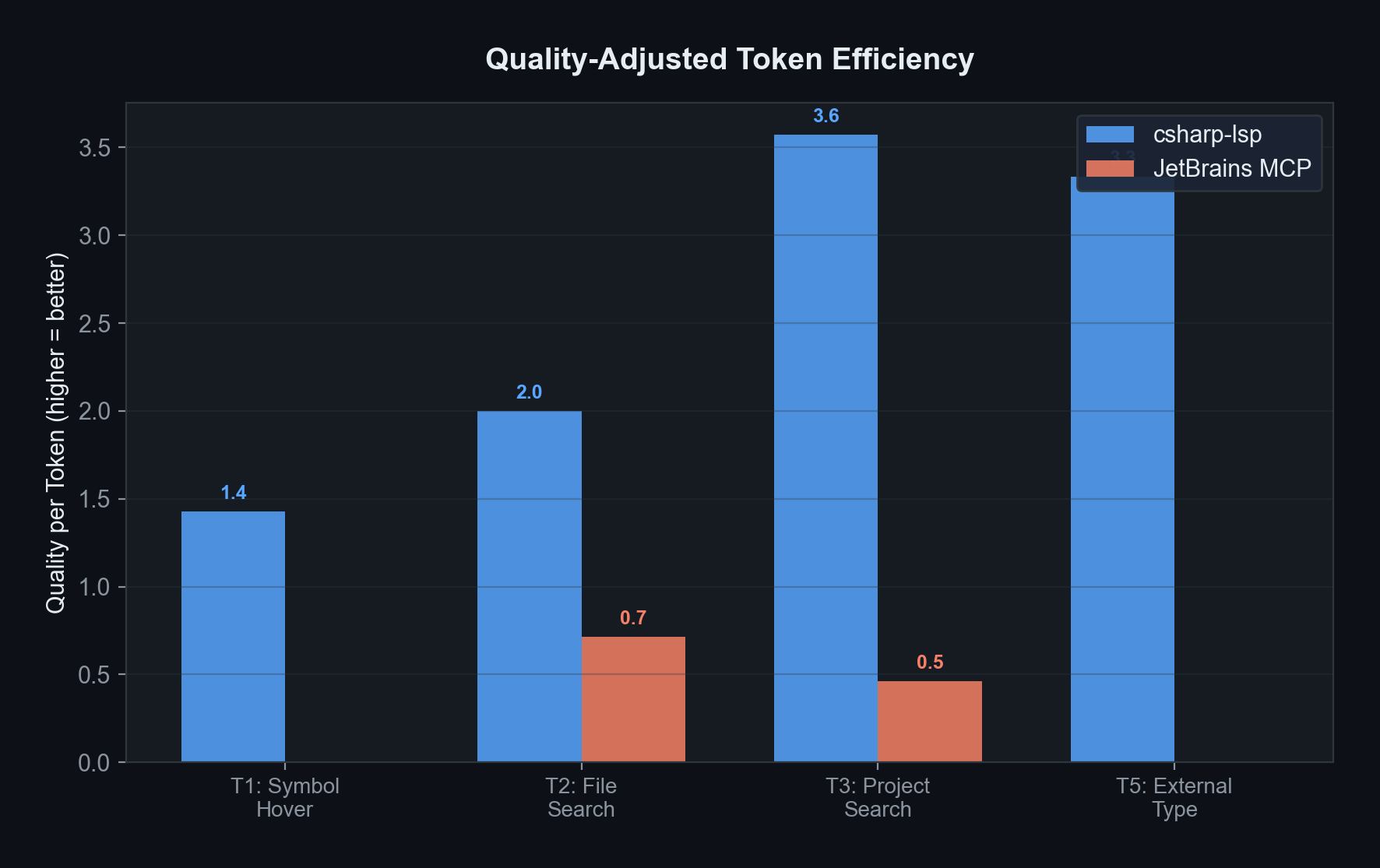
This chart calculates “how much useful information per token.”
- In T1 (class info) and T5 (external type), MCP responses are small but content is empty, so effective efficiency is zero
- LSP maintains high information density across all tests
6. Information Quality Deep Dive
Quality per Token
| Test | LSP Quality | MCP Quality | Effective Comparison |
|---|---|---|---|
| T1: Class Info | 10/10 (signature + API docs) | 0/10 (empty) | LSP overwhelming win |
| T2: File Search | 9/10 (clean format) | 8/10 (same data, noisy format) | LSP 2.5x advantage |
| T3: Project Search | 10/10 (real refs only) | 6/10 (false positives included) | LSP 7.7x advantage |
| T5: External Type | 10/10 (return type + description) | 0/10 (empty) | LSP overwhelming win |
| T7: Diagnostics | N/A | 10/10 (Rider inspections) | MCP exclusive feature |
Key Insight: “Search That Understands Code” vs “Search That Finds Text”
LSP’s findReferences understands the meaning of code:
class EditorStartupdeclaration → foundnew EditorStartup()constructor call → found"EditorStartup.Reloading"text inside a string → ignored (not a code reference)
MCP’s search_in_files_by_text finds literal text:
- Finds all 3 above + log messages = noise included
7. Feature Support Comparison
| Feature | csharp-lsp | JetBrains MCP | Description |
|---|---|---|---|
| Type/Doc Lookup | O (detailed) | △ (often empty) | LSP includes API docs; MCP often returns empty for Unity |
| Go to Definition | O | X | Not available in MCP |
| Reference Search (Semantic) | O | X | MCP only has text search |
| File Structure View | O | X | Class/method list at a glance |
| Call Hierarchy | O | X | Who calls this / what does this call |
| Find Implementation | O | X | Interface → implementation class |
| Workspace Symbol Search | O | X | Find class/method by name |
| Text Search | X | O | Log strings, comments, etc. |
| Regex Search | X | O | Pattern-based search |
| Error/Warning Diagnostics | X | O | Rider code inspections |
| Rename Refactoring | X | O | Safe rename across YAML, strings |
| Code Formatting | X | O | Rider code style auto-apply |
| File Read/Write | X | O | Also available via Read/Edit tools |
| Directory Browse | X | O | Folder structure view |
| Run Configurations | X | O | IDE build/test execution |
LSP 7 vs MCP 8 — zero overlapping features. Not competition, but cooperation.
8. Optimal Strategy: How to Use Them
Default: csharp-lsp First (Token Savings)
When exploring or analyzing code, always start with LSP.
| Command | When to Use |
|---|---|
hover | “What is this variable/class?” |
findReferences | “Where is this being used?” |
documentSymbol | “What’s the structure of this file?” |
goToDefinition | “Let me see the source code” |
goToImplementation | “Which class implements this interface?” |
callHierarchy | “Who calls this function?” |
workspaceSymbol | “Where is the PlayerManager class?” |
This alone saves 3.1x tokens on average.
Supplementary: JetBrains MCP (Only When Needed)
| Command | When to Use |
|---|---|
get_file_problems | Check for errors after code changes |
rename_refactoring | Safely rename variables/classes |
reformat_file | Clean up code style |
search_in_files_by_text | Find specific strings in logs or comments |
execute_terminal_command | Run builds or tests |
These features are MCP-only — cannot be replaced by LSP.
9. Estimated Token Savings per Session
| Workload | MCP Only | Hybrid (LSP+MCP) | Savings |
|---|---|---|---|
| Light (10 lookups, 5 searches) | ~1,750 tokens | ~650 tokens | 63% |
| Medium (30 lookups, 15 searches, 3 refactors) | ~5,800 tokens | ~2,200 tokens | 62% |
| Heavy (80 lookups, 40 searches, 10 refactors) | ~15,200 tokens | ~5,900 tokens | 61% |
Refactoring always uses MCP. Savings come from routing lookups and reference searches to LSP.
10. Quick Reference Card
1
2
3
4
5
6
7
8
9
10
11
12
13
14
15
16
17
18
19
20
21
22
┌─────────────────────────────────────────────────────┐
│  Optimal Tool Selection Guide by Task                │
├─────────────────────────────────────────────────────┤
│                                                     │
│  csharp-lsp (Token Savings)                         │
│  ├─ hover (type/doc lookup)                         │
│  ├─ findReferences (semantic reference search)      │
│  ├─ documentSymbol (file structure overview)        │
│  ├─ goToDefinition / goToImplementation             │
│  └─ callHierarchy (call relationships)              │
│                                                     │
│  JetBrains MCP (Exclusive Features)                 │
│  ├─ get_file_problems (error/warning diagnostics)   │
│  ├─ rename_refactoring (safe renaming)              │
│  ├─ reformat_file (code formatting)                 │
│  └─ text-based search (log strings, etc.)           │
│                                                     │
│  Either Works                                       │
│  ├─ File read (Read ≈ get_file_text_by_path)        │
│  └─ File edit (Edit ≈ replace_text_in_file)         │
│                                                     │
└─────────────────────────────────────────────────────┘
Conclusion
csharp-ls and JetBrains MCP are not competitors but perfect complements. With zero feature overlap, using only one means utilizing just half of the available capabilities.
Use LSP as the default, and MCP only as a supplement when needed — this saves 60%+ tokens while leveraging all features. If you haven’t installed csharp-ls yet, check the C# LSP Setup Guide on macOS first.