
Mastering Claude Skills 2.0 — Skill Creator, Benchmarking, and Trigger Optimization
- AI in Game Development: Insights from 2,165 Messages - A Developer's 47-Day Log
- Claude Opus 4.5 → 4.6 Transition: Performance, Tokens, Workflow Changes Experienced by a Game Developer
- Does AGENTS.md Really Help? - Analysis of a Paper Verifying the Impact of Context Files on Coding Agents
- Claude Memory Goes Free, /simplify & /batch — and the Hidden Cost of CLAUDE.md
- Complete Guide to Installing Claude Code on Windows — With Real-World Troubleshooting
- The Complete Claude Code Guide for Game Designers — From Specs to Balancing
- Complete Guide to Setting Up C# LSP for Claude Code on macOS — From csharp-ls Installation to Troubleshooting
- C# LSP vs JetBrains MCP Token Efficiency Analysis — Which Tool Is More Efficient in Claude Code?
- Mastering Claude Skills 2.0 — Skill Creator, Benchmarking, and Trigger Optimization
- Skills 2.0 classifies skills into two axes — Capability Uplift and Inquiry Preference — and lets you quantitatively judge a skill's value through benchmarking
- Skill Creator has expanded to four modes (Create, Eval, Improve, Benchmark), automating the entire skill development lifecycle from test case generation to blind A/B comparisons
- New frontmatter options like context: fork, model, effort, and hooks enable fine-grained execution control, while the Description optimization loop dramatically improves implicit trigger accuracy

Introduction
Claude Code’s Skills system has received a major update. What was once a simple structure — writing instructions in a single SKILL.md file — has evolved into a complete skill development framework with automated evaluation, benchmarking, blind comparison, and trigger optimization: Skills 2.0.
Key changes in this update:
- Skill Creator plugin significantly enhanced with four modes: Create, Eval, Improve, and Benchmark
- Built-in benchmarking system that automatically A/B tests results with and without skills
- New fine-grained execution control options in frontmatter:
context: fork,model,effort,hooks, etc. - Description optimization loop to improve implicit trigger accuracy
This post cross-references official documentation, the Skill Creator implementation, and the Anthropic blog to cover everything you need for practical use.
1. Two Classification Axes of Skills
Anthropic clearly divides skills into two categories.
1-1. Capability Uplift
Skills that grant Claude new abilities it couldn’t perform on its own.
- Company-specific checklists, proprietary frameworks, specific tool integrations
- May be absorbed into base capabilities as AI models improve
- Benchmarking quantitatively determines “Is this skill still needed?”
For example, PDF text extraction once required a dedicated skill, but as models improve, basic tools alone may suffice. If benchmarking shows no difference with or without the skill, it’s a candidate for retirement.
1-2. Inquiry Preference
Skills that make Claude consistently follow a specific workflow or tone — even though it can already perform the task.
- Commit message styles, code review formats, report templates
- Not about objectively “better” results, but guaranteeing results in the user’s preferred way
- Since user preferences don’t change with model improvements, these skills are maintained long-term
The official Best Practices documentation states: “Claude is already very smart — Only add context Claude doesn’t already have.” Strip out unnecessary explanations and only teach Claude what it doesn’t know.
2. Progressive Disclosure — 3-Stage Gradual Loading
Skills are loaded in three stages to efficiently use the context window.
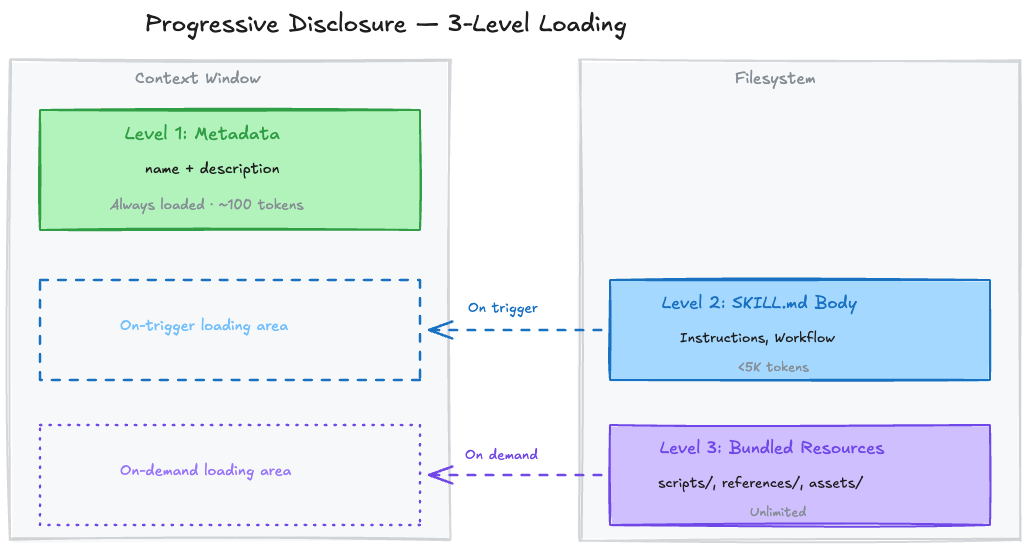
| Level | Loading Timing | Token Cost | Contents |
|---|---|---|---|
| Level 1: Metadata | Always (at session start) | ~100 tokens/skill | name + description |
| Level 2: SKILL.md Body | When skill triggers | Under 5K tokens | Instructions, workflows |
| Level 3: Bundled Resources | On demand only | Virtually unlimited | Scripts, reference docs, assets |
2-1. Directory Structure
1
2
3
4
5
6
7
8
skill-name/
├── SKILL.md           # Required — Main instructions (recommended under 500 lines)
├── references/        # Reference docs loaded on demand
│   ├── finance.md
│   └── sales.md
├── scripts/           # Executed only (code itself doesn't enter context)
│   └── validate.py
└── assets/            # Templates, icons, fonts, etc.
The key is the scripts/ directory. When Claude runs python scripts/validate.py, the script’s code itself doesn’t enter the context window — only the execution output consumes tokens. Even hundreds of lines of validation logic get summarized in a few output lines.
2-2. Loading Flow Example
1
2
3
4
5
1. Session start → "PDF Processing - Extract text and tables..." (metadata only loaded)
2. User: "Extract tables from this PDF"
3. Claude decides → SKILL.md body loaded
4. Only if form filling is needed → FORMS.md additionally loaded
5. Script execution → only results received
Even with many skills installed, only Level 1 (metadata) stays resident, so the context penalty is negligible. The total character budget for skill descriptions dynamically adjusts to 2% of the context window (fallback: 16,000 characters).
3. Complete Frontmatter Guide
The YAML frontmatter at the top of SKILL.md provides fine-grained control over skill behavior. This area was significantly expanded in Skills 2.0.
3-1. Full Field Reference
| Field | Required | Description |
|---|---|---|
name | No | Skill identifier. Lowercase+digits+hyphens only, max 64 chars |
description | Recommended | Core of triggering. What it does + when to use it. Max 1024 chars |
disable-model-invocation | No | true → Claude cannot auto-invoke (user /command only) |
user-invocable | No | false → Hidden from / menu (Claude uses it internally) |
allowed-tools | No | Restrict tools allowed when skill is active (e.g., Read, Grep, Glob) |
model | No | Specify AI model to use when executing the skill |
effort | No | Effort level: low, medium, high, max (only Opus 4.6 supports max) |
context | No | fork → Execute in an independent sub-agent |
agent | No | Agent type for context: fork (Explore, Plan, etc.) |
hooks | No | Skill lifecycle hooks (YAML format) |
argument-hint | No | Autocomplete hint (e.g., [issue-number]) |
3-2. Invocation Control — Who Can Call a Skill
| Setting | User Invocation | Claude Invocation | Context Loading |
|---|---|---|---|
| Default | O | O | description always loaded |
disable-model-invocation: true | O | X | description not loaded |
user-invocable: false | X | O | description always loaded |
Practical Examples:
1
2
3
4
5
6
# Deploy skill — only manual user execution for safety
---
name: deploy
description: Deploy the application to production
disable-model-invocation: true
---
This prevents Claude from autonomously deciding “The code looks ready, let me deploy.”
1
2
3
4
5
6
# Legacy system context — background knowledge Claude references
---
name: legacy-system-context
description: Explains how the old auth system works
user-invocable: false
---
Users won’t run /legacy-system-context directly, but Claude automatically references it when receiving related questions.
3-3. String Substitution Variables
Dynamic values can be inserted in the skill body:
| Variable | Description |
|---|---|
$ARGUMENTS | Full arguments passed when invoking the skill |
$ARGUMENTS[N] or $N | Nth argument (0-based) |
${CLAUDE_SESSION_ID} | Current session ID |
${CLAUDE_SKILL_DIR} | Directory containing the skill’s SKILL.md |
1
2
3
4
5
6
7
---
name: migrate-component
description: Migrate a component from one framework to another
---

Migrate the $0 component from $1 to $2.
Preserve all existing behavior and tests.
/migrate-component SearchBar React Vue → $0=SearchBar, $1=React, $2=Vue
3-4. Sub-agent Execution (context: fork)
Setting context: fork executes the skill in an independent context. It doesn’t access conversation history, and the SKILL.md content becomes the sub-agent’s prompt.
1
2
3
4
5
6
7
8
9
10
11
---
name: deep-research
description: Research a topic thoroughly
context: fork
agent: Explore
---

Research $ARGUMENTS thoroughly:
1. Find relevant files using Glob and Grep
2. Read and analyze the code
3. Summarize findings with specific file references
The agent field specifies the sub-agent type: Explore (read-only exploration), Plan (design), general-purpose (general), or custom agents defined in .claude/agents/.
3-5. Dynamic Context Injection
The !`command` syntax inserts shell command results at the preprocessing stage:
1
2
3
4
5
6
7
8
9
10
11
12
13
---
name: pr-summary
description: Summarize changes in a pull request
context: fork
agent: Explore
---

## Pull Request Context
- PR diff: !`gh pr diff`
- Changed files: !`gh pr diff --name-only`

## Task
Summarize the changes in this PR...
Each !`command` is executed before Claude sees it — Claude only receives the final substituted result.
4. Skill Creator — Skill Development Framework
Skill Creator has evolved from a simple generation tool into a framework for managing the entire skill lifecycle.
4-1. Four Operating Modes
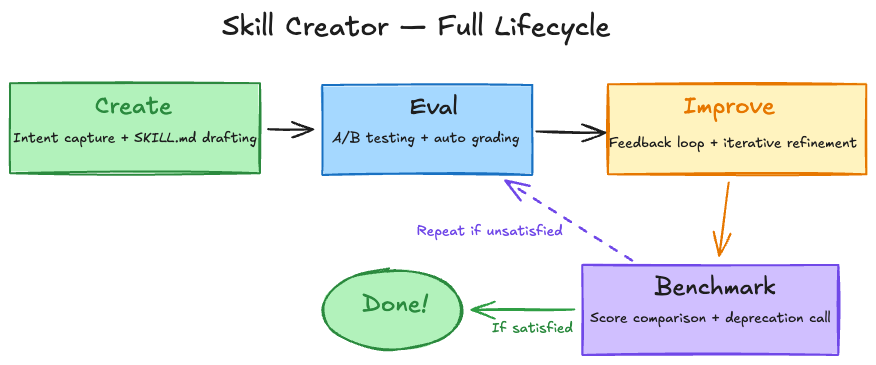
| Mode | Purpose | Key Actions |
|---|---|---|
| Create | New skill generation | Capture intent → Interview → Write SKILL.md → Test cases |
| Eval | Skill evaluation | Execute test prompts → Auto pass/fail grading via assertions |
| Improve | Iterative refinement | Feedback-driven edits → Re-run → Compare → Repeat until satisfied |
| Benchmark | Performance benchmarking | With-skill vs without-skill A/B test → Statistical report |
4-2. Create Mode — Skill Generation Workflow
Step 1: Capture Intent
Skill Creator confirms four things:
- What should this skill make Claude do?
- When should it trigger?
- What’s the expected output format?
- Set up test cases? (Recommended for objectively verifiable skills, optional for subjective ones)
Step 2: Interview and Research
Edge cases, I/O formats, example files, success criteria, and dependencies are identified. If MCP is available, parallel research via sub-agents is also performed.
Step 3: Write SKILL.md
Core principles:
- Make the Description “pushy” — Claude tends to undertrigger skills
- Write in third person — “Processes Excel files and generates reports” (Good) / “I can help you…” (Bad)
- Explain the Why — Explaining reasons is more effective than
ALWAYS/NEVER - Keep it concise — Skip what Claude already knows
1
2
3
4
5
6
7
8
# Bad: Description too short
description: Helps with documents

# Good: Includes both what + when, and is pushy
description: >
  Extract text and tables from PDF files, fill forms, merge documents.
  Use when working with PDF files or when the user mentions PDFs,
  forms, or document extraction.
Step 4: Generate Test Cases
Save 2–3 realistic prompts in evals/evals.json:
1
2
3
4
5
6
7
8
9
10
11
{
  "skill_name": "pdf-processing",
  "evals": [
    {
      "id": 1,
      "prompt": "Extract all text from this PDF and save it to output.txt",
      "expected_output": "Extract text from all pages of the PDF and save to file",
      "files": ["test-files/document.pdf"]
    }
  ]
}
4-3. Eval Mode — Evaluation System in Detail
Multi-Agent Parallel Execution
For each test case, two sub-agents are simultaneously spawned:
1
2
3
Test case 1 → with_skill agent + without_skill agent
Test case 2 → with_skill agent + without_skill agent
Test case 3 → with_skill agent + without_skill agent
Each agent executes in an independent context, ensuring no cross-contamination. Token and timing metrics are collected individually.
Four Specialized Sub-Agents
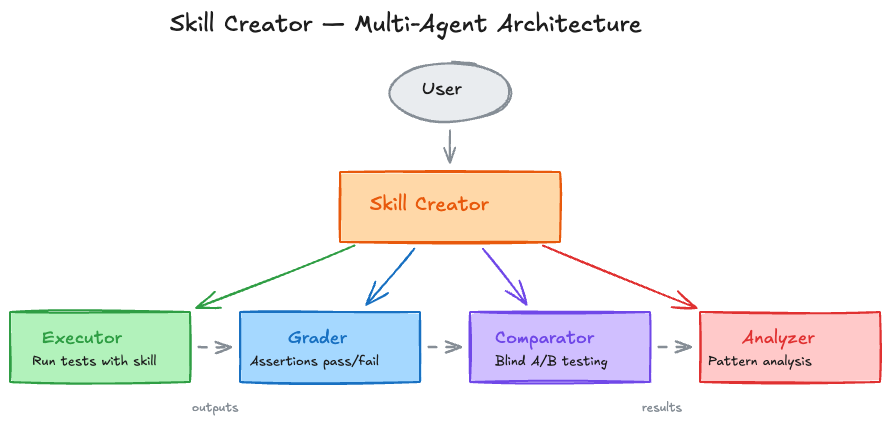
| Agent | Role |
|---|---|
| Executor | Runs test prompts using the skill |
| Grader | Assertion-based pass/fail grading + evidence |
| Comparator | Blind A/B comparison (judges without knowing which side used the skill) |
| Analyzer | Benchmark pattern analysis + improvement insights |
5-Step Evaluation Process
Step 1: Spawn Sub-Agents — Run both with-skill and baseline in the same turn
Step 2: Draft Assertions — Write verification criteria in advance while execution runs (time efficiency)
1
2
3
4
5
6
7
8
9
10
{
  "eval_id": 1,
  "eval_name": "pdf-text-extraction",
  "prompt": "Extract all text from this PDF",
  "assertions": [
    "Successfully read the file using a PDF library",
    "Extracted text from all pages",
    "Saved in a readable format to output.txt"
  ]
}
Step 3: Capture Timing Data Immediately — Save token/time data to timing.json upon sub-agent completion
1
2
3
4
5
{
  "total_tokens": 84852,
  "duration_ms": 23332,
  "total_duration_seconds": 23.3
}
Step 4: Grade → Aggregate → Analyze → Launch Viewer
1
2
3
4
5
6
7
8
9
# Aggregate benchmarks
python -m scripts.aggregate_benchmark workspace/iteration-1 --skill-name pdf

# Launch viewer (view results in browser)
nohup python eval-viewer/generate_review.py \
  workspace/iteration-1 \
  --skill-name "pdf" \
  --benchmark workspace/iteration-1/benchmark.json \
  > /dev/null 2>&1 &
Step 5: Read Feedback — When users submit reviews via the viewer, feedback is received as feedback.json
1
2
3
4
5
6
7
{
  "reviews": [
    {"run_id": "eval-0-with_skill", "feedback": "Chart is missing axis labels"},
    {"run_id": "eval-1-with_skill", "feedback": ""},
    {"run_id": "eval-2-with_skill", "feedback": "Perfect"}
  ]
}
Empty feedback means “satisfied.” Focus improvements on cases with specific complaints.
5. Benchmarking System
5-1. Benchmark Report Structure
When benchmarking completes, detailed statistics are recorded in benchmark.json:
1
2
3
4
5
6
7
8
9
10
11
12
13
14
15
16
17
18
19
{
  "run_summary": {
    "with_skill": {
      "pass_rate": {"mean": 0.85, "stddev": 0.05},
      "time_seconds": {"mean": 45.0, "stddev": 12.0},
      "tokens": {"mean": 3800, "stddev": 400}
    },
    "without_skill": {
      "pass_rate": {"mean": 0.35, "stddev": 0.08},
      "time_seconds": {"mean": 32.0, "stddev": 8.0},
      "tokens": {"mean": 2100, "stddev": 300}
    },
    "delta": {
      "pass_rate": "+0.50",
      "time_seconds": "+13.0",
      "tokens": "+1700"
    }
  }
}
Key Metrics:
- pass_rate — Pass rate with skill vs without skill (mean ± stddev)
- time_seconds — Execution time comparison
- tokens — Token usage comparison
- delta — Difference values
In the example above, the skill improves pass rate by +50% at the cost of +13 seconds execution time and +1700 tokens.
5-2. Skill Retirement Criteria
| Benchmark Win Rate | Interpretation | Action |
|---|---|---|
| 70% or above | Skill is clearly useful | Maintain |
| 50–70% | Room for improvement | Re-evaluate after model update |
| Below 50% | Skill is counterproductive | Delete or completely rewrite |
Regression detection after model upgrades is the key use case for benchmarking. When a new model is released:
- Re-run existing benchmarks
- If the gap between with-skill and without-skill shrinks → The model is absorbing that capability
- If the gap is negligible → Consider retiring the skill
5-3. Blind Comparison
An advanced feature for when more rigorous comparison is needed:
- Deliver both outputs to the Comparator agent anonymized as A and B
- Grade on content, structure, usability without knowing which used the skill
- Analyzer agent examines why the winner won → Extract improvement insights
1
2
3
4
5
6
7
{
  "winner": "A",
  "rubric": {
    "A": {"content_score": 4.7, "structure_score": 4.3, "overall_score": 9.0},
    "B": {"content_score": 2.7, "structure_score": 2.7, "overall_score": 5.4}
  }
}
6. Improve Mode — The Philosophy of Iterative Refinement
6-1. Four Improvement Principles
The improvement philosophy specified in the Skill Creator implementation:
1. Generalize
“We’re building skills that will be used millions of times. Overfitting to 2–3 test cases is pointless.”
Rather than making minor tweaks to pass specific test cases, trying different metaphors or patterns is more effective.
2. Keep Lean
Read transcripts (execution logs) to find where the skill forces the model to do unproductive work, then remove those parts. The key is analyzing the execution process, not just the final output.
3. Explain the Why
1
2
3
4
5
6
7
# Bad — coercive
ALWAYS use pdfplumber. NEVER use other libraries.

# Good — explains the reason
Use pdfplumber for text extraction because it handles
multi-column layouts reliably. Other libraries (pypdf, PyMuPDF)
struggle with complex table structures.
“Today’s LLMs are smart. They have Theory of Mind, so when they understand the reason, they can make correct judgments even in edge cases not covered by instructions.”
4. Bundle Repeated Work
If test execution transcripts show sub-agents independently writing the same helper scripts, bundle that script into scripts/. This prevents the waste of reinventing the wheel each time.
6-2. Iteration Loop
1
2
3
4
5
1. Apply skill improvements
2. Re-run all test cases in new iteration-N+1/ directory (including baseline)
3. Launch viewer comparing with previous iteration via --previous-workspace
4. Wait for user review
5. Read feedback → Improve → Repeat
Termination conditions:
- User is satisfied
- All feedback is blank (= everything OK)
- No meaningful progress
7. Description Optimization — Trigger Tuning
7-1. Why It Matters
Description is the sole mechanism that determines whether a skill auto-triggers. When Claude receives a user message, it scans all skill descriptions and selects relevant ones. It’s like browsing a bookstore and choosing books based only on the cover and jacket blurb.
Currently, Claude has an undertrigger tendency — it often doesn’t use skills that would be helpful. Description optimization directly addresses this problem.
7-2. Optimization Process
Step 1: Generate 20 Trigger Eval Queries
Create 8–10 should-trigger + 8–10 should-not-trigger queries:
1
2
3
4
5
6
7
8
9
10
[
  {
    "query": "My boss sent me a Q4 sales final FINAL v2.xlsx file — column C is revenue and D is costs. Add a profit margin column",
    "should_trigger": true
  },
  {
    "query": "Write a Fibonacci function",
    "should_trigger": false
  }
]
Characteristics of good queries:
- Realistic and specific (file paths, company names, typos, casual tone)
- should-not-trigger focuses on near-misses — obviously unrelated queries like “Fibonacci” have no testing value
- Variety in length, tone, and phrasing
Step 2: User Confirmation via HTML Reviewer
Display the generated query set via HTML interface, let users edit/add/delete, then export.
Step 3: Run Automatic Optimization Loop
1
2
3
4
5
6
python -m scripts.run_loop \
  --eval-set eval_set.json \
  --skill-path ./my-skill \
  --model claude-sonnet-4-6 \
  --max-iterations 5 \
  --verbose
Internal workings:
- Split eval set into 60% training / 40% validation
- Run each query 3 times for reliable trigger rate measurement
- Use Extended Thinking for failure analysis + improvement suggestions
- Up to 5 iterations
- Select best description based on validation set (40%) score (prevents overfitting)
Step 4: Apply Results
Apply the optimized description to the SKILL.md frontmatter and verify before/after scores.
7-3. Limitations of the Trigger Mechanism
Claude doesn’t tend to use skills for simple tasks. For requests like “Read this PDF” that can be solved with basic tools alone, the skill may not trigger even with a perfect description. The probability of skill triggering increases with more complex, multi-step requests.
Therefore, eval queries should be written as sufficiently complex requests to produce meaningful tests.
8. Skill Authoring Best Practices
Key patterns emphasized in official documentation:
8-1. Controlling Degrees of Freedom
| Situation | Freedom | Example |
|---|---|---|
| Multiple approaches are valid | High | “Analyze the code structure, check for potential bugs…” |
| Preferred patterns exist | Medium | Parameterized script templates |
| Task is fragile or order is strict | Low | “Run this exact command: python scripts/migrate.py --verify” |
Anthropic’s analogy: On a narrow bridge between cliffs, precise guardrails are needed, but on a safe, wide open field, just point the direction and trust Claude.
8-2. Feedback Loop Pattern
1
Execute → Verify → Fix on error → Re-verify → Proceed on pass
1
2
3
4
5
6
7
8
9
10
## Document Editing Process

1. Edit `word/document.xml`
2. **Immediate verification**: `python scripts/validate.py unpacked_dir/`
3. If verification fails:
   - Check error message
   - Fix XML
   - Re-verify
4. **Proceed only after verification passes**
5. Rebuild: `python scripts/pack.py unpacked_dir/ output.docx`
8-3. File References — One Level Deep Only
1
2
3
4
5
6
7
# Good — Direct reference from SKILL.md
**Basic Usage**: [explanation here]
**Advanced Features**: See [advanced.md](advanced.md)
**API Reference**: See [reference.md](reference.md)

# Bad — More than 2 levels of nesting
SKILL.md → advanced.md → details.md (Claude may read incompletely)
9. Platform Differences
Skills are available across multiple Claude platforms, but differ by environment:
| Platform | Custom Skills | Pre-built Skills | Sub-agents | Network |
|---|---|---|---|---|
| Claude Code | O (filesystem) | — | O | Full access |
| Claude.ai | O (ZIP upload) | O (PPTX, XLSX, DOCX, PDF) | X | Per settings |
| Claude API | O (API upload) | O | — | X |
| Agent SDK | O (filesystem) | — | — | — |
Limitations on Claude.ai:
- No sub-agents → No parallel evaluation, sequential execution only
- No blind comparison
- No Description optimization (
run_loop.py) — Requiresclaude -pCLI
Limitations on Claude API:
- No network access
- No runtime package installation — Only pre-installed packages
10. Practical Guide — Creating a Skill from Scratch
If you’re creating your first skill, follow this order:
Step 1: Recognize Repetitive Task Patterns
“I keep repeating the same explanation every time I do this task” → Skill candidate
Step 2: Complete the Task Once with Claude
Have Claude do the task directly without a skill. Observe the context, preferences, and procedural knowledge you naturally provide during this process.
Step 3: Create the Skill with Skill Creator
1
2
Tell Claude: "Turn the BigQuery analysis pattern we just did into a skill.
Include the table schema, naming conventions, and test account filtering rules."
Claude fundamentally understands skill format and structure. Even without a special system prompt, saying “make a skill” generates an appropriate SKILL.md.
Step 4: Review for Conciseness
“Does Claude really need this explanation?” → Remove unnecessary descriptions
Step 5: Test and Iterate
Use the skill in a new instance (Claude B) to perform actual work, then feed observations back to the original instance (Claude A):
1
2
"Claude B wrote a regional sales report but missed the test account filtering.
It's mentioned in the skill but apparently not prominent enough."
Step 6: Incorporate Team Feedback
Share the skill with team members and observe usage patterns:
- Does the skill trigger at expected moments?
- Are the instructions clear?
- Is anything missing?
Conclusion
The essence of Skills 2.0 is “Test and manage skills like software.”
| Before | Skills 2.0 |
|---|---|
| Write instructions in SKILL.md | Four modes (Create·Eval·Improve·Benchmark) |
| Judge trigger behavior by gut feeling | Automatic optimization loop + data-driven decisions |
| Subjective evaluation of skill quality | A/B testing + blind comparison + statistical reports |
| Hope for the best on model upgrades | Benchmarking for regression detection + retirement decisions |
| Frontmatter limited to name/description | Fine-grained control with context, model, effort, hooks, agent |
A well-crafted skill guarantees consistent quality across thousands or tens of thousands of repetitive tasks. And now, the process of “crafting it well” itself has been automated.
References: